9:16, 16:9 or 1:1? Pick the Right Frame for Every Faceless Video Before You Make It
Which frame should your faceless videos use? A clear guide to 9:16, 16:9 and 1:1 for Shorts, Reels, TikTok, Facebook and LinkedIn, plus how to set it up.
Roberto Pasqualini
CMO at Faceless Lab
A plain guide to the best faceless video aspect ratio for YouTube Shorts, Reels, TikTok, Facebook and LinkedIn, with a simple rule for choosing.
What is the best aspect ratio for faceless videos? For most short-form posting it is vertical 9:16, which is the native frame for Shorts, Reels, TikTok and Facebook Reels. Landscape 16:9 still wins for longer YouTube videos, and square 1:1 is a safe middle option on a few platforms. We are Stefano and Roberto, we publish faceless videos every day, and choosing the frame before you write the script has saved us more rework than any other habit.
Executive Summary: The best aspect ratio for a faceless video depends on where it will be watched. Use 9:16 (1080 by 1920) for YouTube Shorts, Instagram Reels, TikTok and Facebook Reels, because it fills the phone screen and matches how those feeds are designed. Use 16:9 for standard YouTube videos and for viewers on desktop or TV. Use 1:1 when a platform accepts square video and you want one file that sits comfortably in a feed. Pick the ratio first, because it changes how you write, caption and frame the video. Keep captions and key visuals away from the edges and the bottom, where app buttons and descriptions cover the picture. Faceless Lab lets you create videos in 9:16, 16:9 and 1:1, so you can choose per platform without cropping afterwards. The free trial is €0 and paid plans are €19, €59 and €149 per month.
Table of Contents
- Why the frame decides before the script does
- Which aspect ratio fits which platform
- Keep captions and key visuals in the safe zone
- Set the aspect ratio inside Faceless Lab
- Where Faceless Lab is and isn't the right choice
- When to make a second version
1. Why the frame decides before the script does
Most creators treat aspect ratio as an export setting. It is really a creative decision, and it shows up in three places.
- Writing. A vertical short rewards one idea per line and big, fast text. A landscape video can hold longer sentences and wider scenes.
- Visuals. An image generated for a landscape frame loses its subject when you crop it to vertical. If you know the frame first, the visuals are built for it.
- Captions. Text sized for a phone screen looks tiny on a TV and huge in a square. Caption size and position depend on the frame.
Cropping a finished 16:9 video into 9:16 usually cuts off the part of the picture that mattered, so the cheap fix turns out expensive. Choosing the ratio at the start avoids that.
2. Which aspect ratio fits which platform
Sprout Social's social video spec guide, updated on November 2, 2026, lists current in-app limits for each network. Here is how that translates to faceless videos.
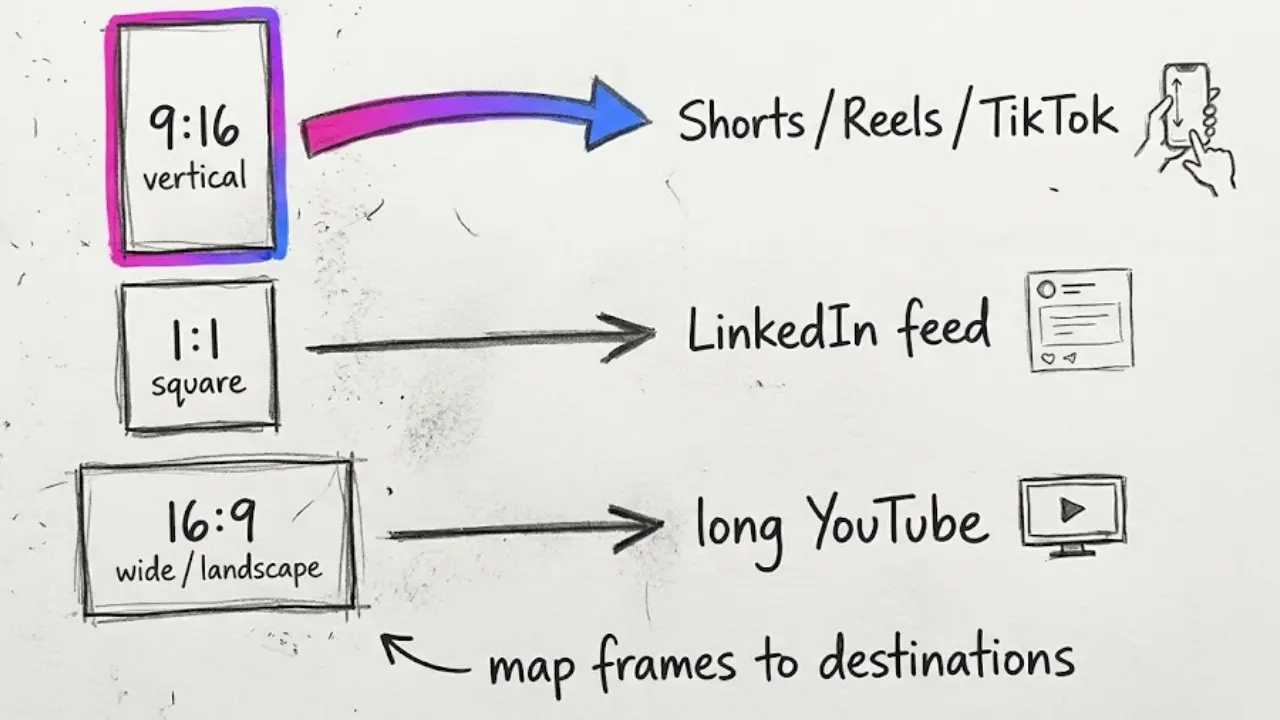
The quick map
- YouTube Shorts. Vertical 9:16 at 1080 by 1920 is the standard. The guide lists 9:16 or 1:1 and a length of up to 3 minutes.
- Instagram Reels. 9:16 at 1080 by 1920. Reels can run longer in the app, with the guide noting 3 minutes as the length for reach to new audiences.
- TikTok. 9:16 at 1080 by 1920.
- Facebook Reels. 9:16 at 1080 by 1920.
- LinkedIn. The feed accepts a wide range of ratios, from tall vertical to wide landscape, so vertical, square and landscape all work. Vertical fills a phone feed best, and square is a safe choice.
- Standard YouTube videos. 16:9 is the normal frame, especially for longer videos that people watch on desktop or TV.
A simple rule
If it is under a few minutes and meant for a phone feed, make it 9:16. If it is a longer YouTube video, make it 16:9. If you want one file that works nearly everywhere in a feed, 1:1 is the compromise, with some empty space on a phone.
3. Keep captions and key visuals in the safe zone
Every app draws buttons, usernames and descriptions over the video. The spec guide notes that thumbnails and covers get cropped differently depending on where they appear, so it advises centering your subject. The same thinking applies to the video itself.
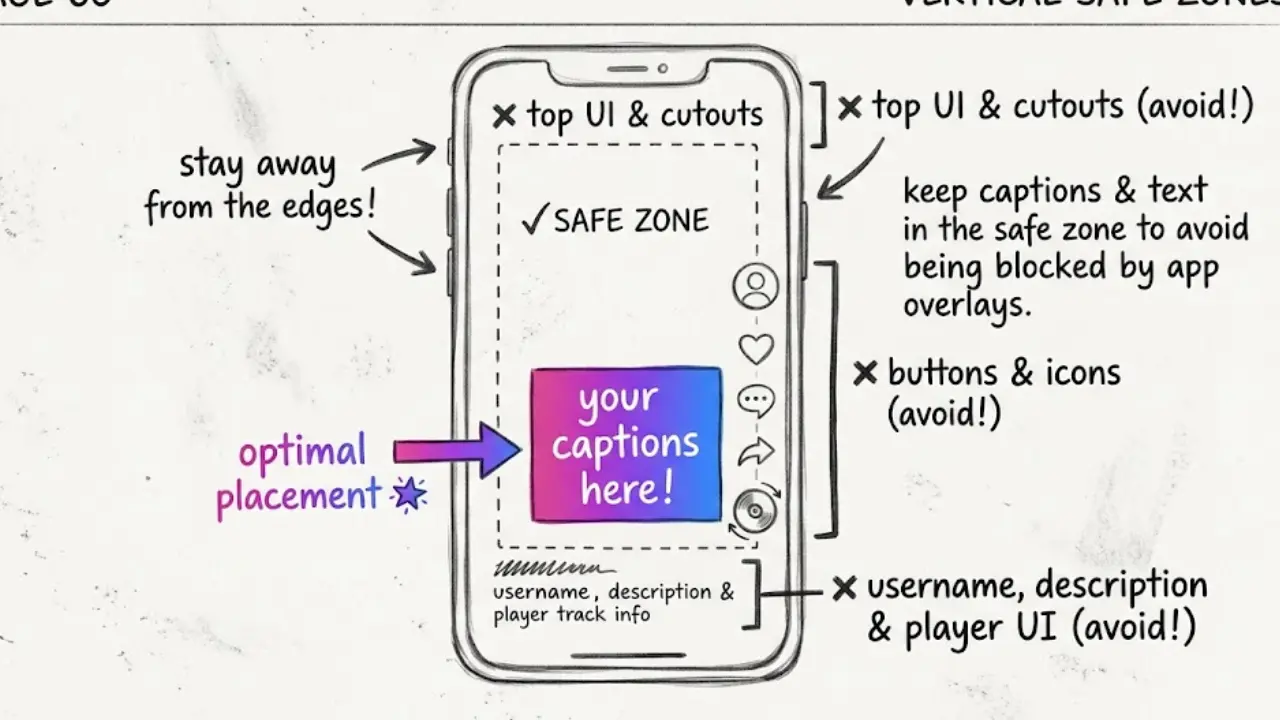
- Keep captions in the middle band. Avoid the very bottom, where the description and buttons sit, and the very top.
- Center the subject of each visual. If an image is later shown in a different crop, the important part survives.
- Leave margins on the sides. Text that touches the edge gets cut on some devices.
- Check one export on a real phone. Open the draft on your phone before you batch ten more.
- Use large, high contrast captions. Faceless videos rely on text, so make it easy to read at a glance.
4. Set the aspect ratio inside Faceless Lab
Here is how a video gets the right frame in Faceless Lab.
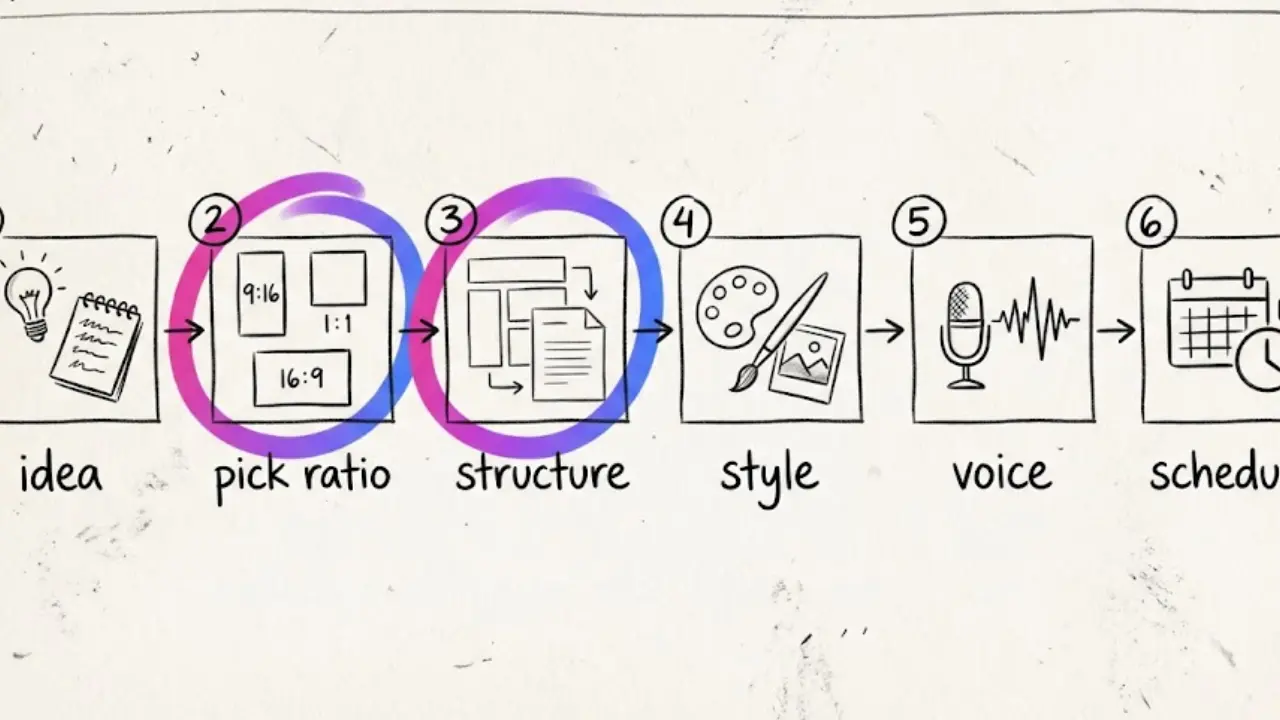
Step by step
- Start from an idea or a script. Type a topic or paste a script you already wrote.
- Choose your platform and aspect ratio. Pick 9:16 for Shorts, Reels, TikTok and Facebook Reels, 16:9 for wide YouTube, or 1:1 where it fits. Faceless Lab supports all three.
- Pick a structure. Choose from the 8 built-in structures. Short vertical videos usually work best with a tight hook and list or story structure.
- Choose a visual style. There are 39 styles, and visuals are generated across multiple models through Replicate for the frame you picked.
- Select a voice. More than 200 ElevenLabs voices are available.
- Review captions and music. Check that captions sit in the safe zone, then adjust text, music or voice before the final video is built.
- Generate. The app assembles voiceover, visuals, music and captions. Most videos are ready in a few minutes.
- Schedule. Queue the video for YouTube, Instagram, Facebook or LinkedIn. TikTok is excluded from fully automatic auto-publish and needs your explicit consent for each post.
💡 Want to see it in action? Try Faceless Lab free and make your first vertical video today.
5. Where Faceless Lab is and isn't the right choice
Where it fits well
- You publish short vertical videos regularly and want the right frame without cropping.
- You want one workflow for script, voiceover, visuals, captions, music and scheduling.
- You want to start free. The trial is €0, and paid plans are Starter at €19, Growth at €59 and Pro at €149 per month.
Where it is not the right tool
- Re-framing a video you already shot or edited elsewhere. Faceless Lab creates videos from a topic or script. It is not a tool for cropping existing footage.
- Frame by frame editing. If you need manual control of every shot and transition, use a traditional editor.
- Unusual formats. If a network needs a ratio outside 9:16, 16:9 and 1:1, you will need another tool for that version.
6. When to make a second version
One idea can live in more than one frame. A short vertical video can become a longer landscape video, and the reverse.
- Start vertical, then expand. A strong Short can grow into a 16:9 explainer with more detail.
- Start wide, then condense. Pull the best 30 seconds of a landscape script into a vertical short.
- Keep the script, change the frame. Paste the same script into a new video and choose a different ratio, so visuals and captions are built for it.
Mistakes that cost views
- Posting a landscape video to a vertical feed. The video shrinks into a thin strip with black bars, and viewers scroll past.
- Mixing ratios on one channel without a reason. A feed full of different shapes looks unplanned. Keep one main frame and use the other on purpose.
- Burying captions at the bottom. The app interface covers them, so the hook goes unread.
- Judging only on a computer screen. Most short-form viewing happens on a phone, so always check there.
The verdict
Choose the frame first, write for it, and keep text in the safe zone. For most faceless creators that means 9:16 for daily posting and 16:9 when a video deserves more depth. You can test every ratio on the free trial before you pay.
If this guide saves you a few reworks, we would love it if you shared your videos organically on your channels and tagged us. And if you run a channel or community and want to partner with us, ask about our affiliate program.
Try Faceless Lab free and make your next video in the right frame: https://facelesslab.video/
Read more
Frequently asked questions
What is the best aspect ratio for faceless videos?
For most faceless videos the best aspect ratio is vertical 9:16, usually 1080 by 1920 pixels. It is the native frame for YouTube Shorts, Instagram Reels, TikTok and Facebook Reels, so it fills the phone screen and avoids black bars. Use 16:9 for longer standard YouTube videos watched on desktop or TV, and 1:1 when you want one square file that works in a feed. Decide before you write the script, because the frame affects visuals, captions and pacing.
Can one faceless video work on every platform?
Often, but with compromises. A 9:16 video works natively on Shorts, Reels, TikTok and Facebook Reels, and it also plays well on LinkedIn, which accepts a wide range of ratios. It will not fill a standard landscape YouTube player. If you post to many networks, make the vertical version your main file and create a landscape version only for videos that deserve a longer YouTube format. Keep captions in the center so crops do less damage.
Is 1:1 square video still worth using?
Sometimes. Square works as a safe middle option on platforms that accept it, such as YouTube Shorts and LinkedIn, and it sits comfortably in many feeds. On a phone it leaves empty space above and below compared with 9:16, so vertical usually gets more screen presence. Use square when you post to feeds where a vertical video would be cropped, or when you want a single file that looks acceptable in several places. Otherwise default to 9:16.
Should my faceless YouTube videos be 16:9 or 9:16?
It depends on the format. Shorts are vertical, so use 9:16 and keep them within the 3 minute limit. Standard long videos are watched on desktop and TV, so 16:9 is the better frame. Many faceless channels run both: daily vertical Shorts for reach, and occasional landscape videos for depth. Write the Short first, then expand the idea into a longer script if viewers respond. Match the frame to where the viewer is, not to what is easiest to make.
Does Faceless Lab support different aspect ratios?
Yes. Faceless Lab supports 9:16, 16:9 and 1:1, and you choose the one that fits your platform when you create the video. Visuals and captions are built around that frame, so you do not crop afterwards. To get another ratio for the same idea, paste the script into a new video and pick a different frame. You can then schedule to YouTube, Instagram, Facebook and LinkedIn. TikTok is excluded from fully automatic auto-publish and needs your explicit consent.
What does Faceless Lab cost?
You can start with the free trial at €0 and see a finished video before paying. Paid plans are Starter at €19 per month, Growth at €59 per month and Pro at €149 per month, so you can match the plan to how many videos you publish. If you only want to test which aspect ratio suits your channel, the free trial is a good place to begin. You can upgrade as your posting volume grows and cancel anytime.
Related articles
Turn Company Stories Into Faceless Business Documentary Videos
Company stories already have a plot. Learn how to research one, script it and turn it into a faceless business documentary video with AI voice and visuals.
Start a Faceless Tech Tips Channel With Shorts That Teach One Trick at a Time
Phone tricks, shortcuts and AI prompts make great short videos, and none of them need your face. Here is how to pick an angle, lock a format and publish tech tips on a schedule.
Earn From TikTok Creator Rewards With a Faceless Account, Step by Step
Creator Rewards pays for original videos over a minute from accounts with 10,000 followers. Here is how a faceless TikTok account can build toward it, with a 30-day plan and honest limits.