Sell Your Digital Product With Faceless Videos, Even If You Never Want to Be on Camera
You built the product, now you have to sell it. Here are the faceless video formats, the workflow and the four-week plan that let you promote a digital product without ever filming yourself.

Roberto Pasqualini
CMO at Faceless Lab
A practical guide to promoting an ebook, template, course or app with short faceless videos, from choosing the angle to scheduling the posts.
How do you promote a digital product with short videos when you refuse to show your face? You let the problem your product solves be the star of the video, put a good voice over it, and post the same format on a schedule until people start clicking your link. Most digital products, from ebooks and Notion templates to presets, courses and small apps, are made by people who would rather build than perform. Faceless video fits that personality very well, and this guide walks through the formats, the workflow and an honest look at what to expect.
Executive Summary: To promote a digital product with faceless videos, write your product's promise in one sentence, turn it into three content pillars (teach, show, nudge), and publish short videos in one repeatable format on a fixed schedule. Each video leads with a problem your buyer already feels, gives one useful answer, and points to your link in the bio or description. Faceless Lab produces the script, AI voiceover from more than 200 ElevenLabs voices, visuals, music and captions from a single idea, so a month of product videos can be batched in an afternoon instead of costing hours per clip. Plans start with a free trial at €0, then Starter €19, Growth €59 and Pro €149. It will not create demand for a weak offer, but it removes the production work that stops most solo founders from marketing at all.
Table of Contents
- Why short faceless video suits a digital product
- Pick the one problem your product solves
- Six faceless video formats that sell without a face
- How to build your product promo series inside Faceless Lab
- Where to post and how to send people to your link
- Where Faceless Lab fits and where it does not
- A simple four-week plan
1. Why short faceless video suits a digital product
A product page only reaches people who already know you exist. Short video reaches strangers who have a problem and happen to scroll past a clip that names it. For a solo creator that is the cheapest top of funnel you can build, because it costs time and no ad budget.
The catch is the time. Our own estimate on the Faceless Lab homepage is that producing one video by hand takes more than 3.5 hours once you add up scripting, voiceover, visuals, captions, music, syncing and export. Nobody who is also building a product, answering support emails and handling payments keeps that up for long. Stefano, my co-founder, lived exactly this. He built apps and digital products, and content creation kept blocking his launches, which is why he built Faceless Lab and now uses it to make videos for his own digital product and to run faceless channels.
Faceless works especially well here for three reasons:
- Your product is the proof. People buy a template because the problem is annoying, and a voice plus clean visuals can show that problem faster than a talking head.
- You can stay anonymous. Plenty of builders sell under a brand name and want to keep it that way.
- It scales with your catalog. A new product means a new series, with the same workflow and the same look.
2. Pick the one problem your product solves
Before you generate anything, write one sentence: "This helps [who] do [what] without [pain]." A budgeting spreadsheet helps freelancers see their real monthly income without guessing. A preset pack helps travel photographers edit a trip in ten minutes. If you cannot finish the sentence, no video format will save the campaign.
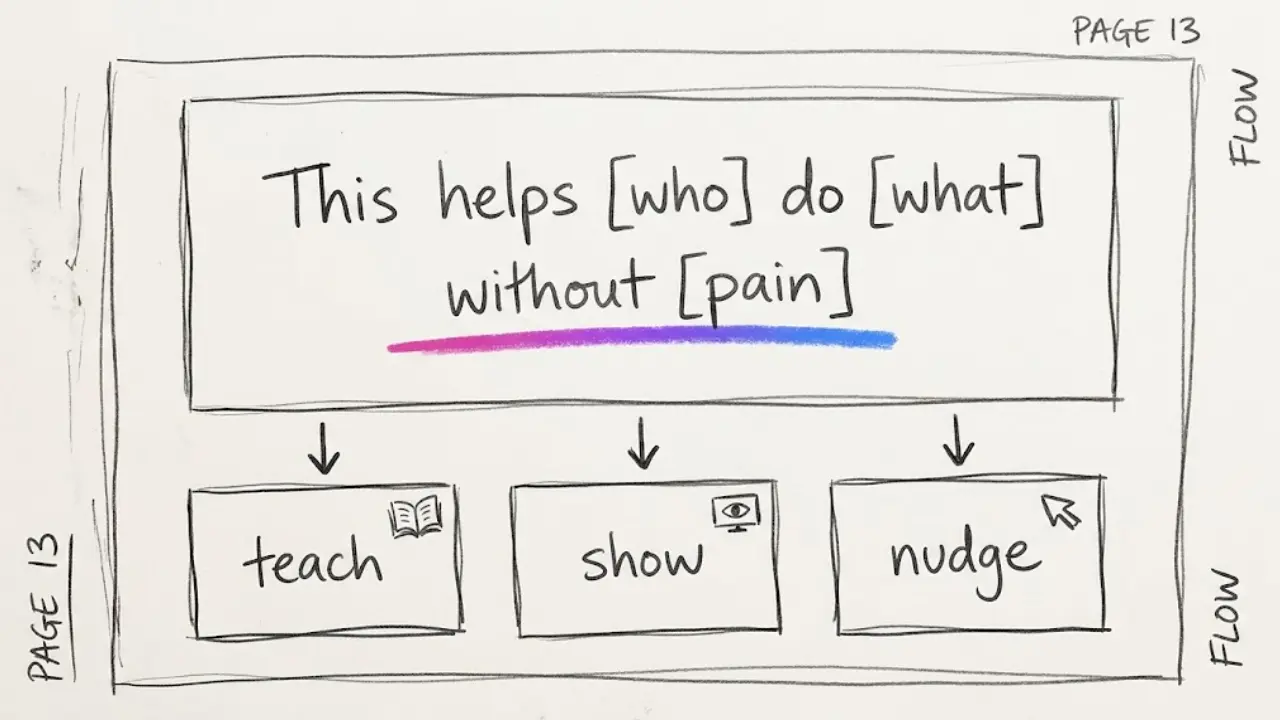
Then split your content into three pillars so the feed does not become one long advert:
- Teach (about 60% of videos): a free tip tied to the problem. This earns follows and trust.
- Show (about 25%): the product solving the problem, narrated over visuals of the result.
- Nudge (about 15%): a direct invitation to get the product, with the price or the free sample.
Those ratios are a starting point from how we run our own channels, not a rule from any platform. Adjust them once you see which videos get saved and which get clicks.
A useful test for any idea is whether a stranger who never buys would still get something from the video. If yes, it belongs in the Teach pillar. If the answer is no, it probably belongs in Nudge, and you should keep those rare.
3. Six faceless video formats that sell without a face
You do not need new formats. You need a few that you repeat. Here are six that fit a product launch, each one easy to turn into a series.
Problem and fix
Open with the pain in one line ("Your invoices keep getting paid late"), give a fix in three beats, and close with a one-line mention of your product. This is the workhorse of the whole plan.
Myth busting
"Everyone says you need X. You do not." Myths get comments, and comments feed the algorithm. Pick myths from your own niche, the ones you hear in support emails.
Numbered tips
"5 mistakes that kill your first newsletter." Lists are easy to script and easy to batch, and they keep viewers until the last item.
Mini lesson from inside the product
Take one page, one template or one chapter and teach it in 30 seconds. It doubles as a free sample and shows buyers the quality they would get.
Before and after story
Narrate a realistic scenario: how messy the situation was, what changed. Keep it believable. Do not invent testimonials or results, since fake proof damages trust faster than no proof.
Build in public
A voiceover about why you made the product, what went wrong in version one and what you changed. These perform well because they sound like a person, even without a face.
4. How to build your product promo series inside Faceless Lab
Here is the workflow I would follow for a first batch. The same steps work for an ebook, a template pack, a course or an app.
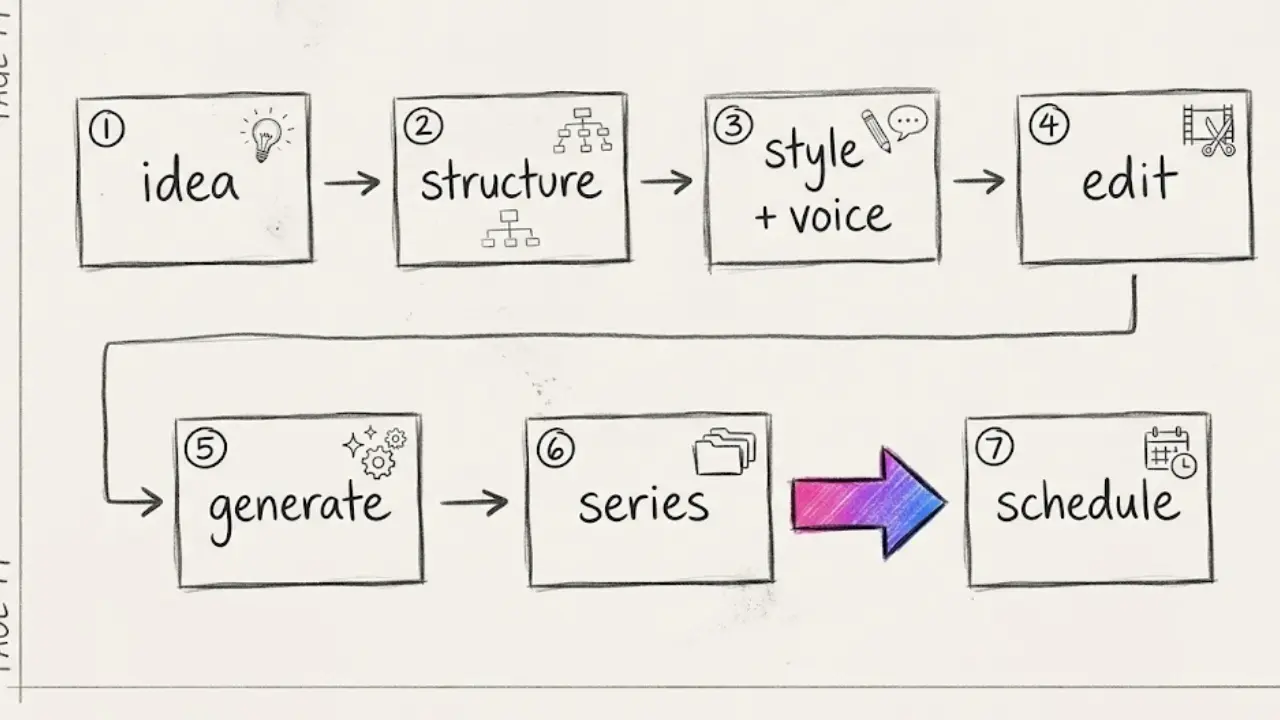
- Start on the free trial. Sign up at the registration page. The trial is €0 and no card is required, so you can judge the output on your own topic first.
- Enter one idea per video. Use your Problem and fix list, for example "why freelancers get paid late". You can also paste a script you wrote yourself.
- Pick a structure. Faceless Lab offers 8 video structures. Choose the one that matches the format from section 3 and keep it for the whole series.
- Choose one visual style and one voice. There are 39 visual styles and more than 200 ElevenLabs voices. Consistency matters more than variety, because viewers should recognize your videos in a feed.
- Edit before you generate. You can change the script, the voice, the captions and the music. This is where you add your product mention and your call to action.
- Generate and check the format. A video usually takes a few minutes to generate, and you can export in 9:16, 16:9 or 1:1 depending on the platform.
- Turn it into a Series and schedule it. Series keeps the format locked so each new episode follows the same rules. Autopilot, which is currently in beta, can keep episodes coming on a rhythm you set.
A good first batch is ten videos: six Teach, two Show and two Nudge. The Faceless Lab homepage describes batching ten videos in a single afternoon as a realistic target, and in our experience the time goes mostly into choosing topics, which is the part only you can do.
5. Where to post and how to send people to your link
Short video does not sell by itself. The link does, so make it easy to find.
Where Faceless Lab can publish for you: YouTube, Instagram, Facebook and LinkedIn can be handled with scheduling and auto-publish. TikTok is excluded from fully automatic auto-publishing because it needs your explicit consent, so plan to post those manually.
How to point people to the product:
- Link in bio: keep one clean link to the product page and say "link in bio" in the Nudge videos only.
- Description or pinned comment: on YouTube Shorts and Facebook, put the link in the description or a pinned comment.
- One call to action per video: "Get the template" or "Grab the free sample", never both.
- A free sample: a short freebie that leads to the paid product tends to convert better than sending cold traffic to a price. Treat that as something to test rather than a promise.
LinkedIn is worth a look if your product serves professionals, because the audience there is already in a work mindset. Our guide on posting faceless videos on LinkedIn covers the format.
6. Where Faceless Lab fits and where it does not
We would rather you pick the right tool than the wrong one, so here is the honest version.
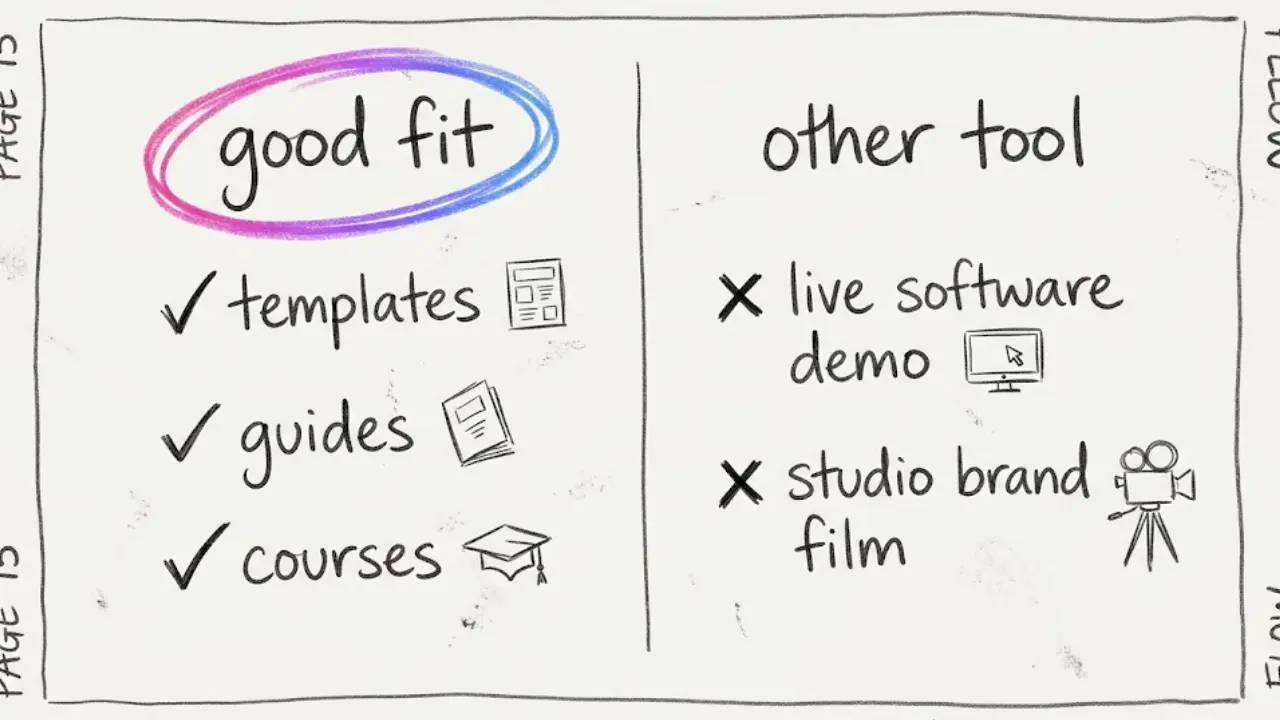
Faceless Lab is a good fit when:
- You want a script, voiceover, visuals, music and captions from one tool, so promotion does not eat your building time.
- You plan to publish on a rhythm, not just once, and want Series and scheduling to carry that.
- Your product can be explained through narration and visuals: templates, guides, courses, tools, printables.
- You want to try everything first, since the free trial is €0.
It is probably the wrong choice when:
- Your product needs a live screen recording to be understood, such as a complex software walkthrough. You would record that separately and could still use faceless videos for the Teach pillar.
- You want a polished brand film with custom motion design for a big launch. That is a studio job.
- You expect the videos to create demand for an offer nobody wants. Video distributes a good offer, and it cannot rescue a vague one.
On cost, the paid plans are Starter at €19, Growth at €59 and Pro at €149 per month. Start with the trial and move up only when your posting volume justifies it.
7. A simple four-week plan
Consistency beats intensity, so this plan is deliberately small.
- Week 1: Foundations. Write your one-sentence promise, list 20 problems your buyers mention, and pick one structure, one style and one voice. Generate your first ten videos.
- Week 2: Publish and listen. Post one video a day on the platforms you chose. Read every comment, because comments are free market research.
- Week 3: Double down. Find the three videos with the most saves or shares and make five more in the same angle. Add your first Nudge videos.
- Week 4: Review. Count clicks to your link and sales that came from it. Keep the formats that worked, drop the rest, and set up the next batch.
If a month goes by with views but no clicks, the usual fix is the hook or the call to action, so test those before changing the product. If you get clicks but no sales, look at the product page. The videos did their job.
Final verdict
Promoting a digital product with faceless videos works when you treat it as a system: one clear promise, a few repeatable formats and a schedule you can actually keep. Faceless Lab covers the production side so you can spend your energy on the product itself. Try it on the free trial, make your first batch and see whether the numbers move.
If this guide helped, share it with another creator who is sitting on a finished product and no audience. We love seeing people repost it organically, and if you want to earn from sharing Faceless Lab, our affiliate program is open to you.
Try Faceless Lab free and make your first product video today
Read more
Frequently asked questions
How do you promote a digital product with faceless videos?
Write your product's promise in one sentence, then make short videos around the problem it solves. Use three pillars: teach with free tips, show the product solving the problem, and nudge people toward your link. Keep one format, one visual style and one voice so viewers recognize you. Post on a schedule and put a single clear link in your bio or description. Faceless Lab can generate the script, voiceover, visuals, music and captions from one idea, so a batch of videos takes an afternoon instead of days.
Can you sell ebooks, templates or courses with faceless videos?
Yes, because buyers care about the problem being solved more than the person who made the product. A voiceover over clean visuals can name a pain, give one useful tip and point to a link. Ebooks, templates, presets, printables and courses all suit this, especially when you use a mini lesson from the product as a free sample. Do not invent testimonials or results. Real, modest proof builds more trust than exaggerated claims, and platforms can penalize misleading content.
How many faceless videos should I post to promote a product?
Start with a first batch of about ten videos and post one a day, then adjust once you see which ones get saves, shares and link clicks. A mix of roughly six teaching videos, two showing the product and two direct invitations works as a starting point. Those numbers come from how we run our own channels, not from a platform rule. Quality and consistency matter more than volume, so choose a pace you can keep for at least a month.
Which platforms are best for promoting digital products?
It depends where your buyers spend time. YouTube Shorts, Instagram Reels and Facebook suit most consumer products, while LinkedIn suits tools and courses for professionals. In Faceless Lab, YouTube, Instagram, Facebook and LinkedIn can be scheduled and auto-published, but TikTok is excluded from fully automatic publishing because it needs your explicit consent, so you post those yourself. Pick two platforms first, learn what works there, and expand later instead of spreading thin.
Do I need to show the product on screen?
Not always. Many products can be explained with narration and visuals that represent the problem and the result, such as templates, guides, printables and courses. If your product is complex software that needs a live walkthrough, record a short screen demo separately and use faceless videos for the teaching content that attracts viewers. Be accurate about what the product does, since buyers who feel misled will ask for refunds and leave bad reviews.
How much does it cost to make promo videos with Faceless Lab?
You can start on a free trial at €0, which lets you test the workflow on your own topic. Paid plans are Starter at €19 per month, Growth at €59 per month and Pro at €149 per month, with higher limits as you move up. Most solo creators try the free trial, confirm the output is good enough to publish, and upgrade only when their posting schedule needs more volume.
Related articles
Keep the Same Character in Every Faceless Video Without Redrawing Anything
AI characters tend to change face, outfit and style from one video to the next. Here is how to keep one recurring character across a whole faceless channel, step by step.
Turn Everyday Life Hacks Into Faceless Videos People Save and Share
Life hacks are short, useful and easy to share. Here is how to build a faceless life hacks channel with AI, from formats and testing to a month of scheduled videos.
Make Faceless Real Estate Videos That Bring in Local Leads
Agents, brokers and investors can grow a local audience with market updates, buyer tips and neighborhood guides, all made as faceless videos with AI and scheduled ahead of time.