Keep the Same Character in Every Faceless Video Without Redrawing Anything
AI characters tend to change face, outfit and style from one video to the next. Here is how to keep one recurring character across a whole faceless channel, step by step.

Roberto Pasqualini
CMO at Faceless Lab
A practical guide to keeping one recurring AI character across a whole faceless channel, covering why characters drift, how to brief them and how to set it up in Faceless Lab.
How do you keep the same character in every AI video? Anyone who has generated a few scenes knows the problem: the hero has brown hair in scene one, a different jaw in scene two and a new jacket by scene five. For a faceless channel that is a real cost, because a recognizable character is often the only "face" the audience has. We run faceless channels ourselves, and fixing character drift was one of the first things we built into the app. This guide explains why it happens and how to keep one consistent character from video to video.
A consistent character in a faceless video is a recurring figure, such as a mascot, narrator avatar or story hero, that keeps the same face, outfit and art style across every scene and every upload. AI image models draw each scene separately, so characters drift unless you control the inputs. The fix is a short written character brief, one fixed visual style, a character consistency option turned on at creation time and a series structure that reuses the same setup. In Faceless Lab you set those once and every new video starts from them. You still review each result, because no model is perfect.
Table of Contents
- Why a recurring character helps a faceless channel
- Why characters drift from video to video
- How to keep a character consistent inside Faceless Lab
- Write a character brief that survives 50 videos
- Build a series around your character
- Where Faceless Lab fits, and where it doesn't
1. Why a recurring character helps a faceless channel
A faceless channel has no host to recognize. Viewers scrolling at speed need something else to latch onto, and a character does that job well. When the same little astronaut, detective or cartoon fox shows up in every video, the channel starts to feel like a show, and people come back for the character as much as the topic.
Three practical benefits:
- Recognition. A stable look makes your videos easy to spot in a feed, even before the title registers.
- Trust. A channel that looks the same every time reads as a real project.
- Speed. Once the character is defined, you stop reinventing the look for each video. That is a big time saver when you publish often.
This works best in story, history, kids, fable, mythology and mascot-style channels. Not every niche needs a character. A news channel or a quote channel can do well with abstract visuals. If you are still choosing a niche, our guide to faceless video niches helps you compare options, and the 2D stickman channel is a good example of a character-led format.
2. Why characters drift from video to video
Most AI image and video models generate each scene on its own. They do not remember the last frame unless you give them something to hold on to. The result is small changes that add up: a new hairstyle, a different outfit color, a face that gets older or younger, a style that slides from flat cartoon to semi-realistic.
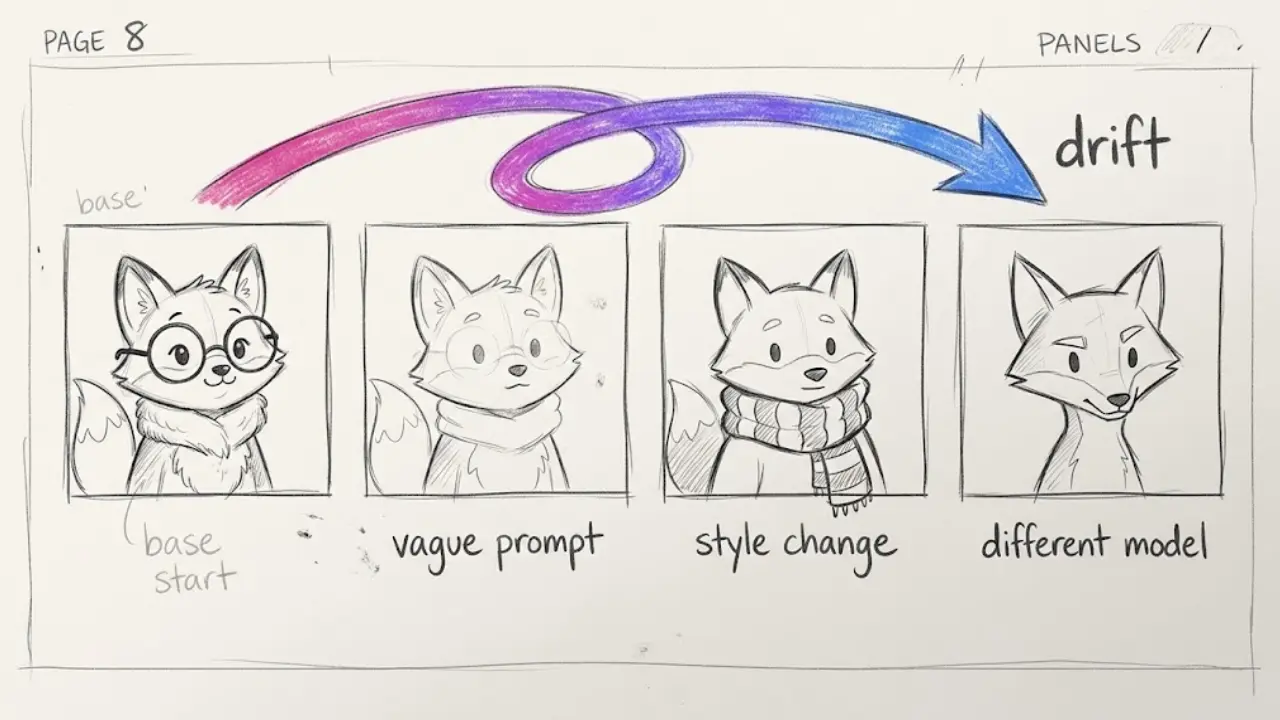
The usual causes are easy to spot once you know them:
- Vague prompts. "A man in a suit" can become a thousand different men. The less you specify, the more the model fills in on its own.
- Style changes. Switching styles between scenes or between videos changes how faces and bodies are drawn, even with the same description.
- Different models. Each model has its own default look. Mixing them without a plan makes the character feel like different people.
- Prompt drift. When you rewrite the description each time, you rarely rewrite it the same way.
None of this means consistency is out of reach. It means you control the inputs instead of hoping the model guesses right.
3. How to keep a character consistent inside Faceless Lab
Here is the flow we use for any channel with a recurring character.
- Start from a topic or a script. Type an idea such as "a fox explains one historical event a day" or paste a script you already wrote. If you paste a script, the app splits it into scenes without changing your words.
- Choose AI images or clips as your visual type. Faceless Lab can also use stock images and stock video from Pexels, or your own content, but a recurring character comes from generated visuals.
- Pick one style and keep it. The app has 39 visual styles, such as 3D cartoon and realistic. Choose one for the whole channel. Changing style is the fastest way to change a character's face.
- Turn on character consistency. This option is part of the video settings. Switch it on so the app works to keep your character recognizable across the scenes of the video.
- Choose a structure. Pick one of the 8 narrative structures, or leave it on Auto. A story structure suits a character who carries a plot, and a list structure suits a mascot who counts down facts.
- Add the voice. Faceless Lab offers 200+ ElevenLabs voices. Videos use an external narrator who reads your script in the third person, so the voice belongs to the narrator while the character stays a visual presence. Pick a voice that fits the tone and keep it for the whole series.
- Generate, then review. The app builds the voiceover, visuals, music and captions into one video in 9:16, 16:9 or 1:1. Watch it through and check the character in each scene before you publish.
If you want to go further on a single shot, the single-clip and single-image tools let you work from a reference image, using Flux for images and Wan for clips, including reference-to-video. That is handy for a hero shot or a thumbnail.
For more on how style choices affect a channel's identity, read why one visual style beats a new look every video. If scenes still miss the mark, getting AI visuals that match your script covers the prompt side.
4. Write a character brief that survives 50 videos
Consistency starts on paper. A short character brief, written once and reused word for word, does more than any clever setting. Keep it to a few lines and avoid vague adjectives.
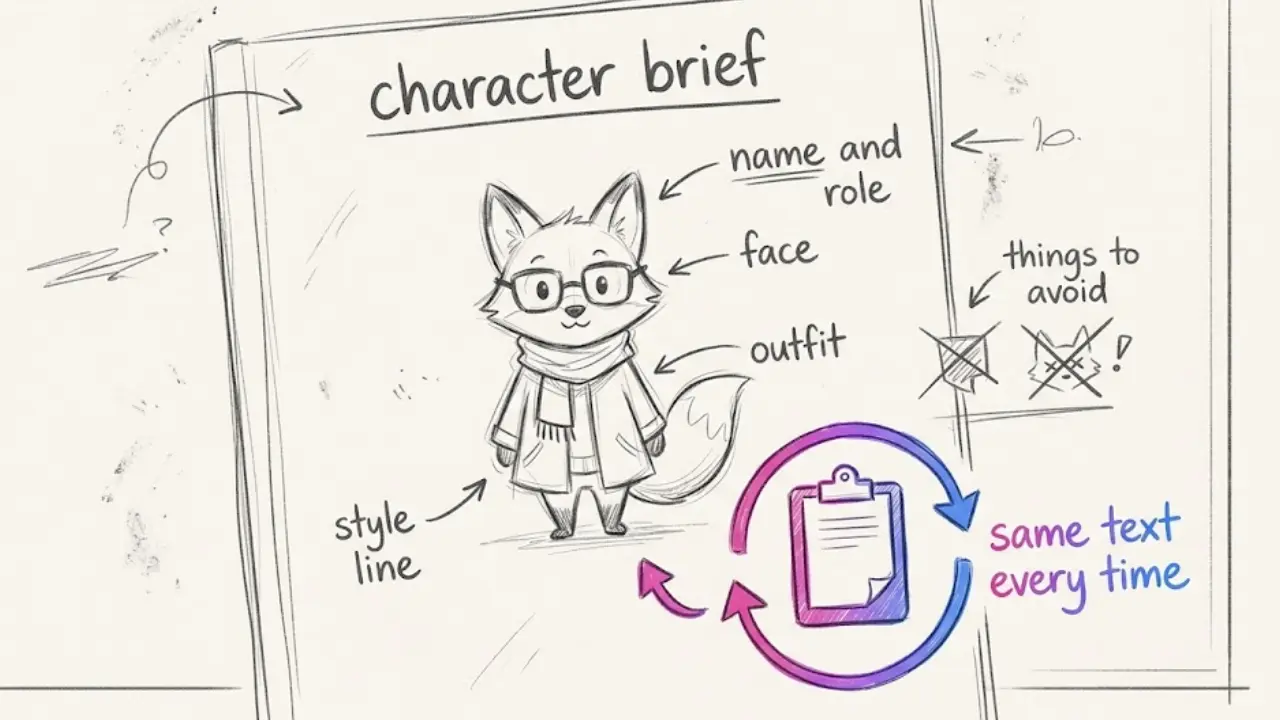
What to put in the brief:
- Name and role. For example, "Milo, a friendly red fox who explains history."
- Face and body. Fixed details: eye color, fur or hair color and length, one distinctive feature such as round glasses or a small scar.
- Outfit. One main outfit with specific colors. Decide now whether the character ever changes clothes, and under what rule.
- Style line. One sentence naming the art style you chose, so the brief and the style setting agree.
- Things to avoid. Anything the model tends to add that you do not want, such as extra accessories or a different species.
Two habits that help:
- Copy and paste, never retype. Keep the brief in a note and paste the same text each time. Small wording changes lead to small visual changes.
- Save a reference. Keep the best frame of your character as an image reference for thumbnails, covers and single-shot work.
Treat the brief as part of your brand. If you change it, change it on purpose, and ideally at the start of a new season of videos rather than in the middle of one.
5. Build a series around your character
A character pays off over time, so it makes sense to plan for repetition. In Faceless Lab, the Series feature lets you define your channel context once: the business or channel idea, the target audience, the goal, and the tone and style. From there the app generates ideas, scripts and social captions in batches of up to 6, and you can turn them into videos one by one or in a batch. Our guide to turning one idea into a series that runs on autopilot walks through it.
Why a series helps with consistency:
- One setup, many videos. The channel context and style carry over, so each new video starts close to the last.
- Logo or watermark. You can add one to every video, which gives the channel a second constant next to the character.
- Predictable structure. Reusing a structure means the character appears in the same kind of scenes every time, which makes drift easier to catch.
Autopilot, still in beta, can run the process from idea to publishing on connected platforms. TikTok is the exception, because it is excluded from fully automatic publishing and needs your explicit consent. Since this is a beta, check what it produces, especially in the first weeks. If you prefer to work by hand, batching a month of faceless videos in one afternoon is a good routine, and it fits a character channel well because you review all the character shots in one sitting.
6. Where Faceless Lab fits, and where it doesn't
We would rather you pick the right tool than be disappointed, so here is the honest view.
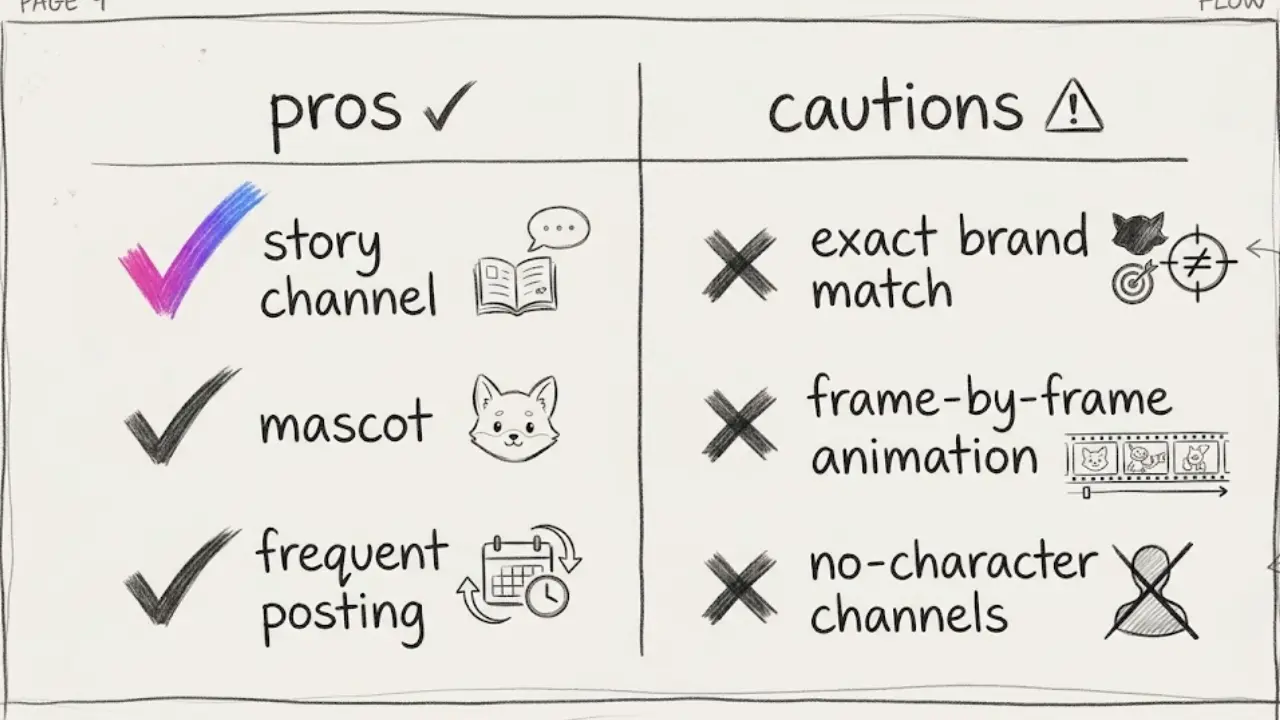
It fits well when:
- You run a story, history, kids, fable or mascot-style channel and want the same look across many videos.
- You publish often and want the character defined once instead of rebuilt for every upload.
- You want generation, voiceover, captions, scheduling and publishing in one place.
It is a weaker fit when:
- You need a single exact face that matches a specific real person or an existing brand character to the pixel. AI generation gets close, but it does not guarantee a perfect match in every frame.
- You want hand-animated, frame-by-frame animation with full control over every pose. That is a job for a dedicated animation tool.
- Your channel does not need a character at all. A quote or news channel may be better served by abstract visuals.
A realistic expectation: consistency is much better when you control style, description and model, but it is not perfect. Occasionally a scene will drift. Catch it in review, regenerate that scene and move on. Do not publish a video where the character changes in a way viewers will notice. If you want to understand how model choice plays in, read why one AI model can't make every faceless video look right.
Also keep platform rules in mind. Where a platform asks for an AI label on synthetic content, use it, and avoid characters that copy a protected brand, studio or celebrity. An original character is both safer and easier to build a channel around.
Conclusion
A recurring character gives a faceless channel something real to remember, and consistency is mostly a matter of controlling the inputs: one style, one written brief, the character consistency option and a series that reuses the same setup. Expect good results with a quick review pass, and keep your expectations realistic. If you want to see how it feels on your own idea, the free trial costs €0 and lets you test it before you spend anything. Paid plans start at €19 on Starter, with Growth at €59 and Pro at €149 when you want to publish more.
If this guide helped, we would love it if you shared it with a creator friend or posted your own take on it, since organic reposts help small projects like ours more than anything. And if you have an audience of your own, ask us about our affiliate program.
Ready to give your channel a character that stays the same? Try Faceless Lab free
Read more
Frequently asked questions
How do you keep the same character in every AI video?
Control the inputs instead of leaving them to the model. Write a short character brief with fixed details such as hair, eye color and outfit, reuse it word for word, and keep one visual style for the whole channel. Then turn on the character consistency option when you create the video. In Faceless Lab this is part of the video settings. Finally, review the result before publishing, because AI can still drift in a scene or two. Regenerate those scenes and the video stays consistent.
Why does my AI character look different in every scene?
Most AI models generate each scene on its own, with no memory of the previous frame. If your prompt is vague, the model fills in the missing details differently each time. Changing styles, switching models or rewording the description between scenes makes it worse. The fix is a precise, reusable description, one fixed style and a tool with a character consistency option that you switch on for the whole video.
Can I use the same character across many videos on one channel?
Yes. Keep the same written brief, the same visual style and the same settings every time, and the character will look very close from video to video. Using a series setup helps, because the channel context and style carry over to each new video. It will not be pixel-perfect, so check each video before it goes out. Many creators also save a reference image of their character to reuse for thumbnails and single shots.
Do I need a character for a faceless channel?
No. Plenty of faceless channels work well with abstract visuals, stock footage, text or b-roll, such as news, quotes and finance. A character helps most in story, history, kids, fable and mascot-style channels, where viewers follow a figure over time. If your topic is information-first and your visuals change with every item, you can skip the character and focus on a consistent style, voice and caption design instead.
Which tool keeps characters consistent in AI videos?
Several tools offer some form of character or reference control, and the quality varies by model and use case. In Faceless Lab, you can turn on a character consistency option when you create a video, pick from 39 visual styles, and reuse the same setup across a series. For single shots, you can also work from a reference image with the image and clip tools. Test a few tools on the same character brief and compare, because results depend on your style and subject.
Can I make a character that looks like a famous cartoon or celebrity?
We advise against it. Copying a protected cartoon character, studio mascot or real person can cause copyright, trademark or likeness problems, and platforms may remove or restrict the videos. An original character is safer and also easier to grow, since it is yours. Describe your own figure with a distinctive look and a clear role, then keep it consistent. If a platform asks you to label AI-generated content, apply the label.
Related articles
Turn Everyday Life Hacks Into Faceless Videos People Save and Share
Life hacks are short, useful and easy to share. Here is how to build a faceless life hacks channel with AI, from formats and testing to a month of scheduled videos.
Make Faceless Real Estate Videos That Bring in Local Leads
Agents, brokers and investors can grow a local audience with market updates, buyer tips and neighborhood guides, all made as faceless videos with AI and scheduled ahead of time.
Write Faceless Video Titles, Captions and Hashtags That Get Found
A good faceless video still stalls with a vague title. Here is a simple routine for titles, captions and hashtags that helps the right viewers and platforms find your videos.