Turn Houseplant and Garden Tips Into a Faceless Channel That Grows All Winter
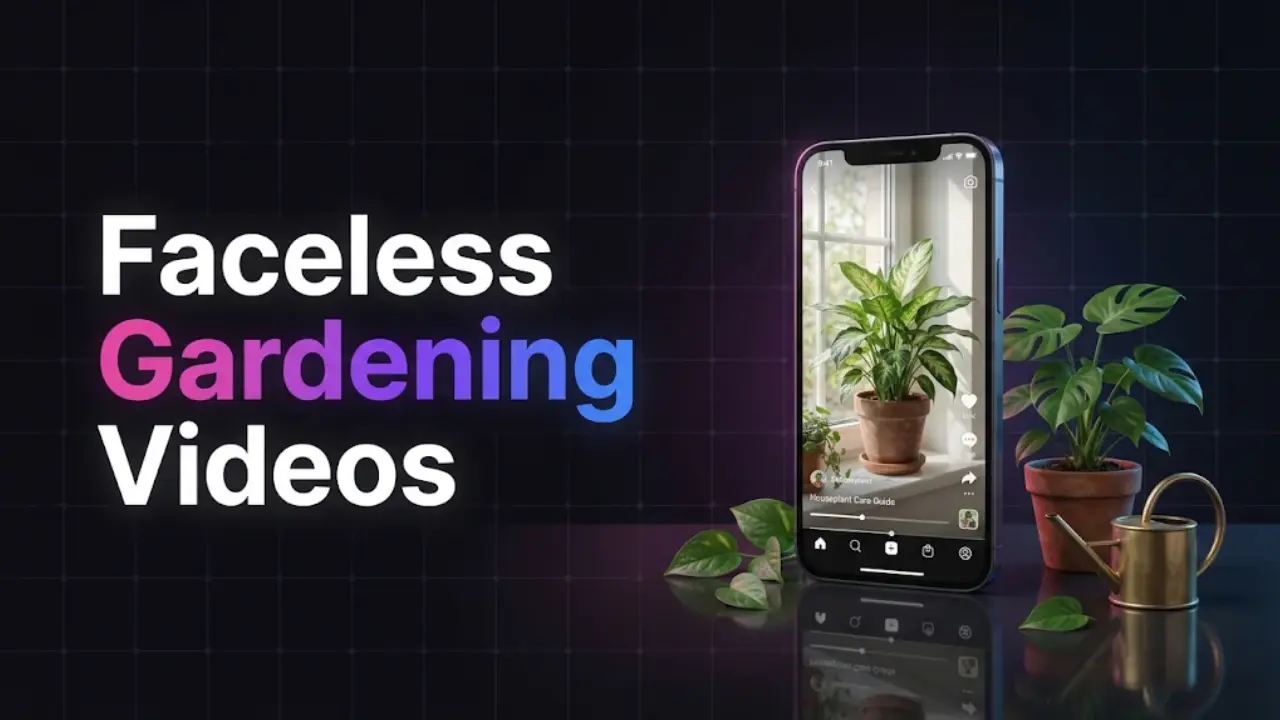
Houseplant and garden tips are easy to turn into short videos with no one on screen. Here is how to plan, make and schedule a faceless gardening channel that keeps growing through winter and beyond.

Stefano Ventrudo
CTO at Faceless Lab
How to plan, make and schedule a faceless gardening channel, from picking one plant angle to the video formats that work, plus what to do when the season changes.
Can you start a faceless gardening channel without showing your garden, your hands or your face? Yes. Plant tips are some of the easiest advice to turn into short videos, because one question and one clear answer already make a complete clip. We (Stefano and Roberto) run faceless channels every day, and winter is a good moment to start a plant channel: people move their plants indoors, houseplants need new care, and the questions never stop. This guide shows you how to build one, step by step.
Executive Summary. A faceless gardening channel publishes short videos where an AI voiceover, captions, music and generated visuals share one plant or garden tip, so the creator never appears on screen. It works because plant questions are specific, repeatable and easy to save: "why are my leaves turning yellow?" is a full video. The simplest way to start is to choose one angle, such as houseplant care, one visual style and one voice, then post on a steady schedule for 30 days. Faceless Lab turns an idea or script into a finished vertical video and schedules it to YouTube, Instagram, Facebook and LinkedIn, while TikTok posts need your explicit consent. The free trial costs €0, and paid plans are Starter €19, Growth €59 and Pro €149.
Table of Contents
- Why gardening and plant tips suit a channel with no face
- Pick one plant angle you can repeat all winter
- Seven video formats that work without showing a garden
- How to make a plant tip video inside Faceless Lab
- Keep plant advice accurate and safe
- What to do when winter ends
- Where Faceless Lab fits and where it does not
1. Why gardening and plant tips suit a channel with no face
Most plant advice is about the plant, so the person giving it does not need to be in the frame. A viewer wants to see the leaf, the pot or the soil, and hear a short, clear answer. That is exactly what a faceless workflow produces.
Here is why the topic fits short-form video:
- One question per video. "How often should I water a snake plant in winter?" is a complete clip.
- The visuals do the explaining. A drooping leaf, a root-bound pot or a sunny windowsill is clear in a second, so the picture carries the idea.
- It repeats naturally. There are thousands of plants and every one comes with its own questions, so ideas do not run out.
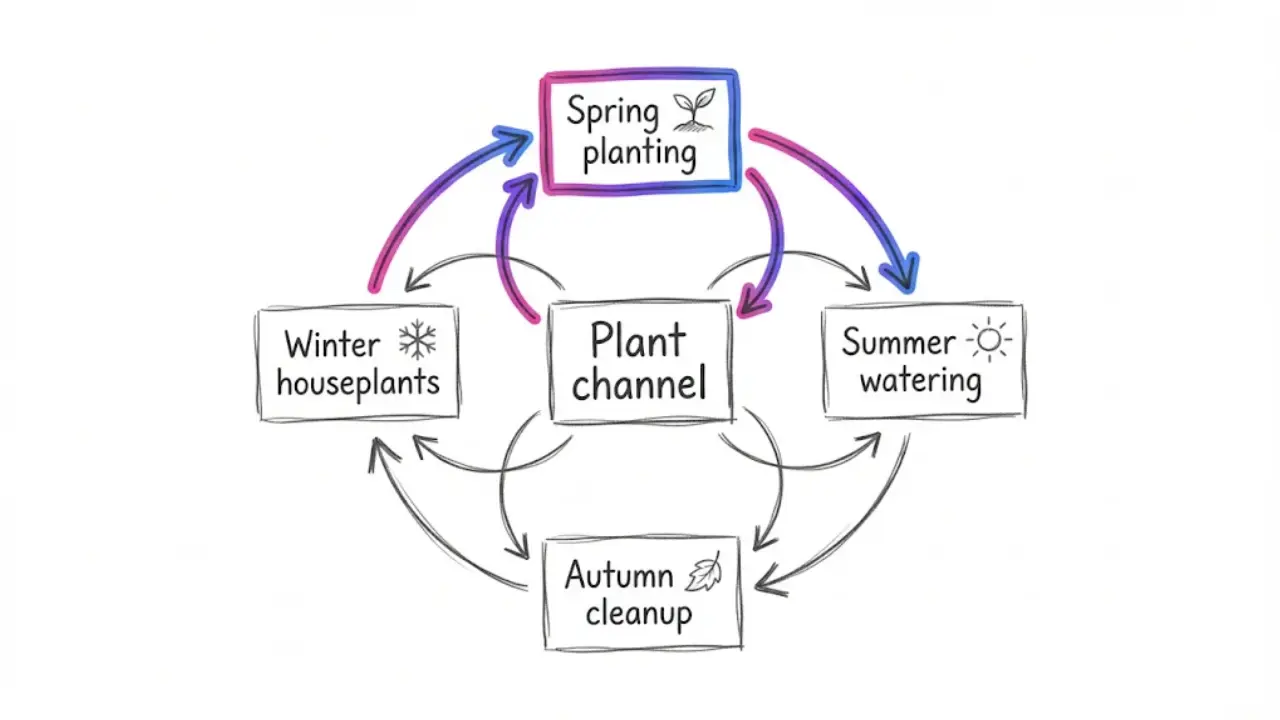
- It follows the calendar. Winter care, spring planting, summer watering and autumn cleanup give you a built-in content plan for the whole year.
- It needs no garden. You do not need a greenhouse or a camera, and you do not need to own the plants you talk about.
Plant content is also easy to save. People bookmark a care tip and come back to it when the plant starts to struggle, which is a good signal for any channel.
2. Pick one plant angle you can repeat all winter
"Gardening" is a big category, and a channel that covers everything has no clear audience. Pick one angle first and let every video support it.
- The houseplant care channel. Watering, light, humidity and common problems for popular indoor plants. This is the natural winter choice.
- The beginner plant channel. Easy plants, first mistakes and simple routines for people who have killed a plant before.
- The small-space garden channel. Balcony, windowsill and container ideas for people without a yard.
- The plant troubleshooting channel. One symptom per video, such as brown tips or drooping, with the usual causes.
- The seasonal garden planner. What to do this month in the garden, in short weekly videos.
Choose the angle you could keep up for 30 days without running out of ideas. A narrow topic with a clear viewer, like "houseplant care for beginners," beats a broad one because people know right away whether the channel is for them.
💡 Not sure plants are the right niche for you? Test it before you commit a month of posting. The Faceless Niche Method is our guide with a scorecard, a gap-finder and a 30-day validation plan. The page shows a launch price of $2.79 (regular price $49), so check it for the current offer.
3. Seven video formats that work without showing a garden
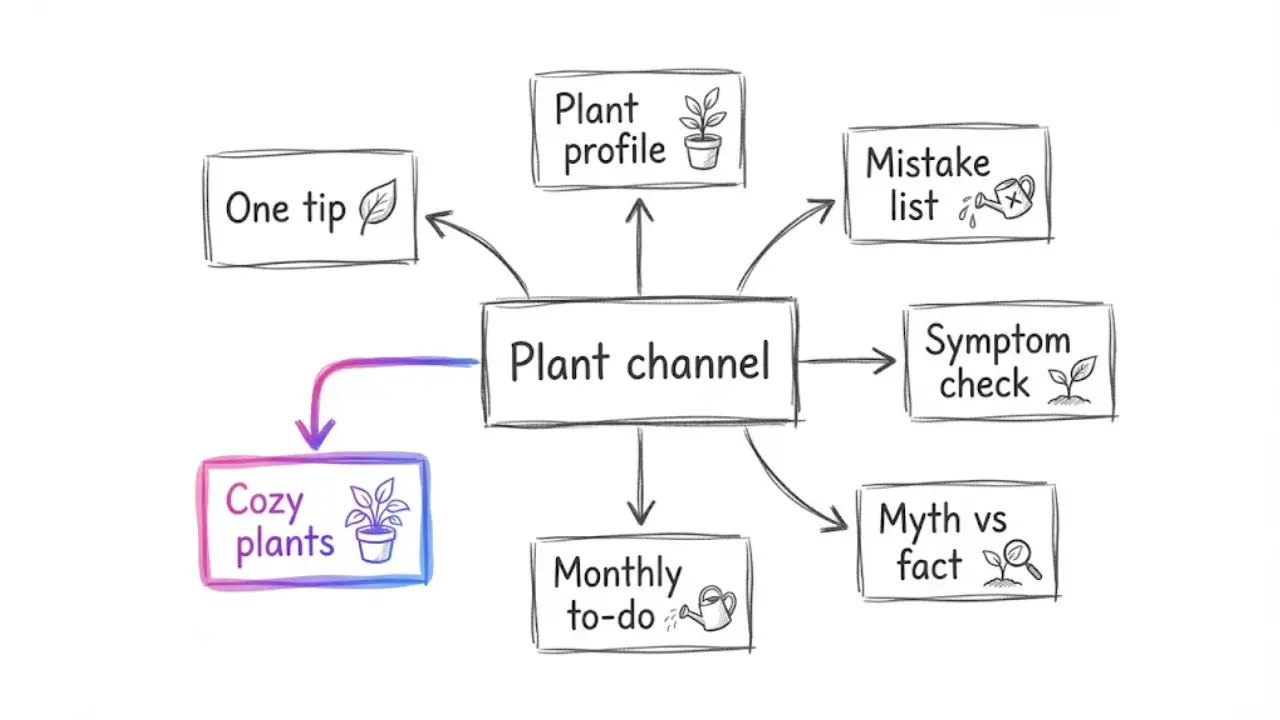
Faceless Lab has 8 structures built into the app, and several suit plant content well. Here are seven formats to start with.
- The one-tip short. One care tip, shown with a clear visual, in 20 to 30 seconds.
- The plant profile. One plant per video: light, water, difficulty and one quirk.
- The mistake list. "Three mistakes that are killing your pothos," counted down to the most common.
- The symptom check. Yellow leaves, brown tips or drooping, with the likely causes in order.
- The myth versus fact. A common plant belief, then what the evidence says.
- The monthly to-do. A quick list of garden jobs for the month, great for a weekly series.
- The cozy ambience video. A calm scene of plants with soft narration, in a calm sleep and relaxation style.
Mix two or three of these and repeat them. A channel that posts the same shape every day is easier to follow than one that changes style with every upload.
4. How to make a plant tip video inside Faceless Lab
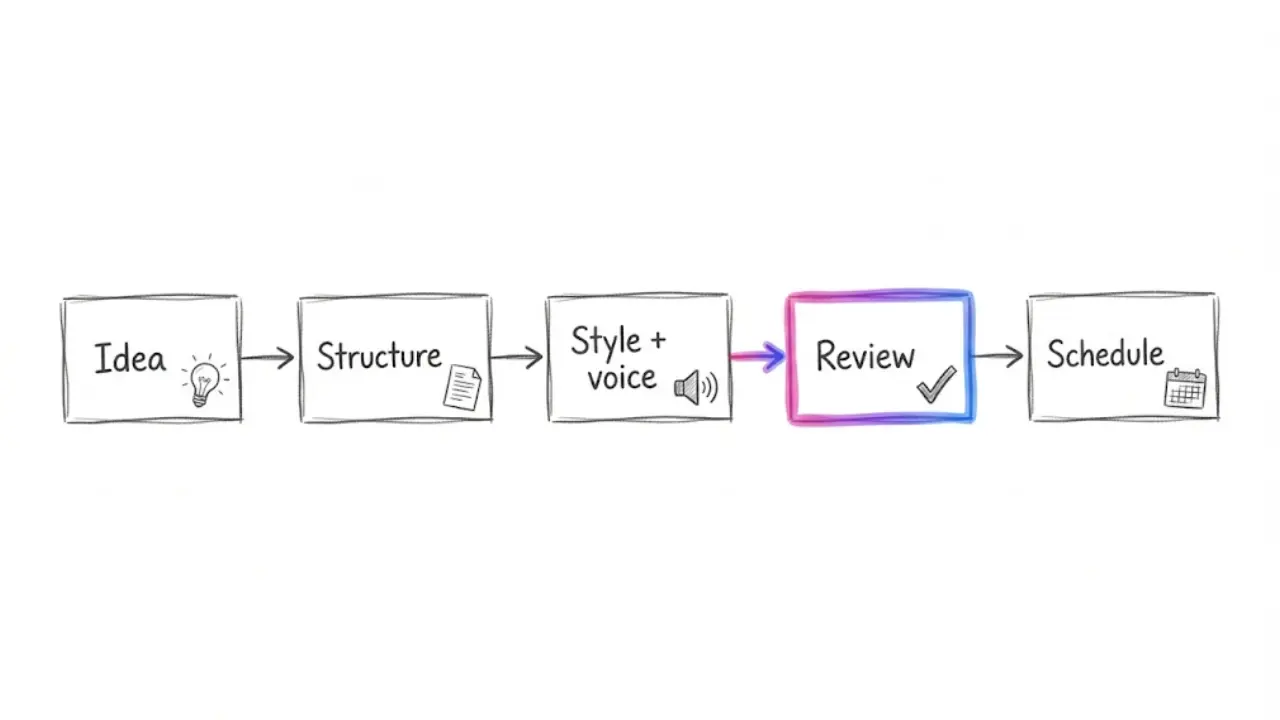
Here is the path from idea to scheduled video. Once your style is set, each video takes a few minutes.
- Open the dashboard. Start on the free trial. No credit card is needed.
- Type the idea or paste your script. Something like "three winter watering mistakes that kill houseplants" is enough to begin. If you already wrote the script, paste it and the app will not rewrite your words.
- Choose a structure. Pick the one that matches your format, such as a countdown or a myth versus fact.
- Pick one visual style and one voice. Choose from 39 visual styles and more than 200 ElevenLabs voices, then keep both for the whole run so the channel looks and sounds consistent.
- Choose the aspect ratio. Use 9:16 for Shorts, Reels and TikTok. 16:9 and 1:1 are available too.
- Generate and review. The app writes the script in scenes, records the voiceover, builds the visuals and adds captions and music. Read it once and fix any line that is vague, especially anything about plant safety.
- Schedule it. Connect your accounts, set the days and times, and let approved videos go out on schedule.
Faceless Lab uses multiple AI models through Replicate for visuals, so you can choose the look that suits plants, from a realistic style to a soft illustrated one. If you plan a daily or weekly format, Series generates ideas, scripts and captions in batches of up to 6, and Autopilot (beta) can carry the work through to publishing.
💡 Ready to build your first one? Create a free account and open the dashboard, then make your first plant tip today.
5. Keep plant advice accurate and safe
Plant advice looks harmless, but a few details matter, and getting them right protects your viewers and your channel.
- Check every care claim. Light, water and soil needs vary by plant and by home. Verify each tip with a reliable source such as a botanical garden or an extension service, and keep your wording general.
- Mention pet and child safety carefully. Some common houseplants are toxic to cats, dogs or children. If a video features one, say so and point viewers to a trusted toxicity list.
- Do not promise results. "This will save your plant" is a promise you cannot keep. "This is the most common cause" is honest and still useful.
- Add your own angle. Platforms favor original content. A recognizable voice, your own scripts and a consistent look make the channel yours instead of a copy of the next one.
- Label AI content where required. Some platforms ask you to mark AI-generated or altered content, and AI plant images can look unrealistic, so do not present them as photos of real plants you grew.
Rules change and this is not legal advice, so check the current policies of each platform you post on.
6. What to do when winter ends
A seasonal channel only works if it can follow the seasons, and plants make that easy because the next season always brings new questions.
Here is how to keep it going:
- Follow the calendar. Move from winter houseplant care to spring planting, then summer watering and autumn cleanup. Each season restarts the search interest.
- Keep the angle, change the topic. A houseplant channel can grow into a small-space garden channel without losing the audience you built.
- Lean into the series. A weekly format with a recognizable name outlasts any single trend. Series and the scheduler help you keep that rhythm.
- Use your own numbers. After two weeks, look at which videos held attention and make more of those.
If plants stop being fun for you, the same system works for other practical niches. Our guide to faceless DIY videos shows how to carry the same approach to home projects.
7. Where Faceless Lab fits and where it does not
We would rather you pick the right tool than any tool, so here is our honest read.
Faceless Lab is a strong fit when:
- You want to post on a steady schedule. Script, voiceover, visuals, music, captions and scheduling live in one place.
- You want one consistent look. One style and one voice across the channel make it recognizable.
- You want to start cheap. The free trial is €0, and the paid plans are Starter €19, Growth €59 and Pro €149.
It is a weaker fit when:
- You need real footage of your own garden. The app builds videos from AI visuals, stock options and your own content, but if your whole brand is the look of your real garden, you will want to film it yourself.
- You want fully hands-off TikTok. TikTok needs your explicit consent, so those posts stay manual.
- You need expert-reviewed plant advice. Faceless Lab generates the script and visuals, but it does not fact-check horticulture claims, so that review is on you.
The verdict. Plant and garden tips are a practical, repeatable way to build a faceless channel, and winter is a good time to begin. Pick one angle, keep one style and one voice, check your facts, and post three to five times a week for the next 30 days. You can run all of it on the free trial and decide on a plan later.
If you are still deciding what your channel should be about, The Faceless Niche Method can help you test the choice before you commit to a month of posting.
If this helped, repost it to a friend who loves plants, and if you want to earn while you share, our affiliate program pays you for the people you send our way.
Start your plant channel today and try Faceless Lab free.
Read more
Frequently asked questions
Can I run a gardening channel without showing my garden or my face?
Yes. A faceless gardening channel uses an AI voiceover, generated or stock visuals, captions and music, so nothing needs to be filmed. Plant tips work well this way because the visual is usually the plant, the pot or the problem, not the creator. Faceless Lab turns a script or idea into a finished vertical video with all of those parts, so you can publish care tips, plant profiles and seasonal checklists without a camera. If your brand depends on the look of your own real garden, you would still want to film that yourself.
What kind of plant videos get watched on Shorts and Reels?
Short, specific videos tend to work best: one care tip, one plant profile, one common mistake or one symptom with its likely causes. A clear question in the first second, a direct answer and a simple visual keep people watching. Formats such as "three mistakes killing your houseplant" or "what yellow leaves usually mean" are easy to repeat and easy to save. Mix two or three formats and post them on a steady schedule, then check which ones hold attention and make more of those.
How often should I post plant and garden videos?
Pick a rhythm you can keep for at least 30 days, such as three to five videos a week. Consistency matters more than volume, and a channel that posts the same format on a regular schedule is easier for viewers to follow. Faceless Lab lets you schedule approved videos in advance, and Series can generate ideas, scripts and captions in batches of up to 6, so a week of plant tips can be prepared in one sitting.
Is AI-generated plant content allowed on YouTube, Instagram and TikTok?
Platforms generally allow AI-generated videos, but several ask you to label AI-generated or altered content, and they favor original work over copied or mass-produced clips. Policies change, so read the current rules for each platform before you publish. Add your own scripts, voice and angle, and avoid presenting AI images as photos of real plants you grew. This is general information and not legal advice, so check each platform's latest guidelines.
How much does it cost to start a faceless plant channel with Faceless Lab?
You can start on the free trial at €0, with no credit card needed to begin. Paid plans are Starter at €19, Growth at €59 and Pro at €149. Start with the free trial to make your first plant tip videos, see how the style and voice fit your channel, and choose a paid plan later if you need more volume. Check the site for the current plan limits before you upgrade.
Can Faceless Lab post my plant videos for me automatically?
Yes, with some limits. You can schedule approved videos to YouTube, Instagram, Facebook and LinkedIn, and Autopilot (beta) can carry a Series from idea to publishing. TikTok is the exception: fully automatic posting is not available there and it needs your explicit consent, so those posts stay manual. Review each script before it goes out, especially anything about plant safety or pets, because the app does not fact-check horticulture claims for you.
Related articles
Turn Company Stories Into Faceless Business Documentary Videos
Company stories already have a plot. Learn how to research one, script it and turn it into a faceless business documentary video with AI voice and visuals.
Start a Faceless Tech Tips Channel With Shorts That Teach One Trick at a Time
Phone tricks, shortcuts and AI prompts make great short videos, and none of them need your face. Here is how to pick an angle, lock a format and publish tech tips on a schedule.
Earn From TikTok Creator Rewards With a Faceless Account, Step by Step
Creator Rewards pays for original videos over a minute from accounts with 10,000 followers. Here is how a faceless TikTok account can build toward it, with a 30-day plan and honest limits.