Style a Dream Room Every Day With Faceless Interior Design Videos
Start a faceless interior design channel with AI rooms, a calm voiceover and captions. Batch a week of home decor videos in one afternoon and schedule them to post themselves.

Stefano Ventrudo
CTO at Faceless Lab
A practical guide to starting a faceless interior design channel with AI, from the room formats people save to batching and scheduling a whole season of home decor videos.
Wondering how to make faceless interior design videos without a camera, a showroom or your own home on display? Home decor is one of the few niches where viewers watch a room, save it for later and come back for the next one, and none of that requires your face. As the evenings get darker and people start thinking about cozy autumn corners and holiday refreshes, this is a good moment to start. We run faceless channels ourselves, and interior design is one of the niches we point new creators to when they want something calm, visual and easy to repeat.
A faceless interior design channel works because the room is the star and the creator can stay out of frame. You write a short script about one space, generate the visuals with AI, add a calm voiceover and captions, and publish a vertical video in minutes. The formats that get saved are room makeovers, style breakdowns, "how to decorate" tips, budget swaps and mood-board tours, and every one of them works without filming a thing. Batch a week of rooms in one sitting, keep one visual style and one voice, schedule the run, and the channel keeps posting while you plan the next season.
Table of Contents
- Why interior design is a natural fit for faceless video
- The faceless interior design formats people actually save
- How to make a faceless interior design video inside Faceless Lab
- Keep every room in one recognizable look
- Batch a season of rooms and schedule the lot
- Where a faceless interior design channel is and isn't the right choice
- Stay honest and copyright-safe with AI rooms
1. Why interior design is a natural fit for faceless video
Most niches ask you to explain something. Interior design asks you to show something, and that is exactly what a faceless video does well. Nobody scrolling past a warm Scandinavian living room is waiting to see who is talking. They are looking at the sofa, the light and the rug.
Three things make the niche easy to run:
- The visuals do the selling. A good room image holds attention before the voiceover says a word, which helps in the first three seconds where most Shorts and Reels are won or lost.
- Topics repeat endlessly. Every style, every room type and every budget is a new video. Japandi bedroom, small kitchen, renter-friendly entryway: you will not run out.
- Seasons feed you ideas. Autumn corners, holiday tables, spring resets and new-year declutters give you a built-in calendar.
Interior design also pairs well with monetization angles that do not need a face, such as affiliate links to furniture and decor, which we cover in our guide to monetizing a faceless YouTube channel.
2. The faceless interior design formats people actually save
Saves and shares are the signal that matters in this niche, because people bookmark rooms they want to recreate. These are the formats we would test first.
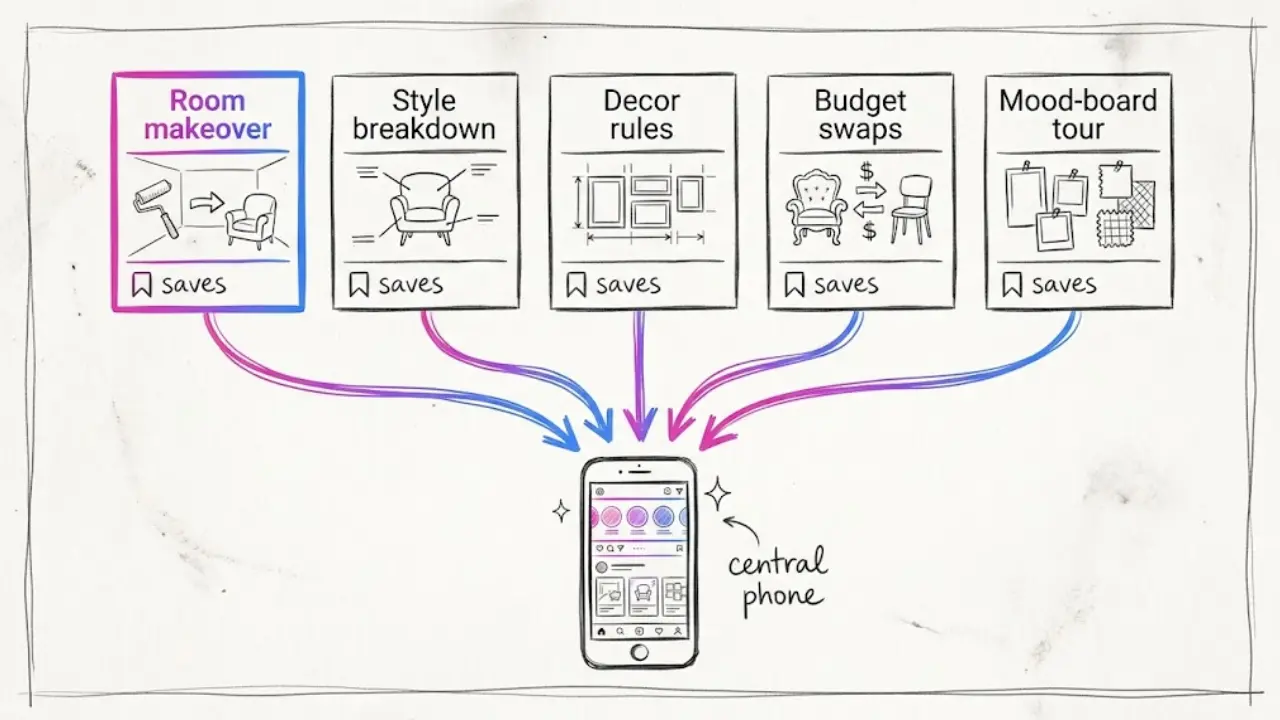
Room makeovers
Take one space and describe the change in 30 to 45 seconds. "A dark, cramped hallway turned into a warm entryway." The structure is simple: the problem, the idea, the result. AI visuals let you show the reimagined room without owning it.
Style breakdowns
Explain a style in one short video. "Japandi in four moves." "What makes a room feel mid-century." Style breakdowns are searched constantly and stay useful for months, so they are a good evergreen backbone.
Decorating rules and tips
Short rules travel well. "The one-third rule for styling a shelf." "Where to hang a mirror so the room feels bigger." Each tip is its own video, and each one can be written in a minute.
Budget swaps and renter-friendly ideas
"Three upgrades under a small budget." "Make a rental feel like yours without touching the walls." These speak to a huge audience that cannot renovate, and they pull comments with people sharing their own tricks.
Mood-board tours
A slow, calm walk through a palette, a texture and a mood with a soft voiceover. These work well for relaxing, save-for-later viewing, and they are the easiest to batch.
3. How to make a faceless interior design video inside Faceless Lab
This is the loop we use on our own channels, from a one-line idea to a scheduled post.
- Start from an idea or a script. Type a topic like "three ways to make a small living room feel bigger" or paste a script you already wrote. Faceless Lab turns it into a short with scenes, and you can choose from 8 video structures, so a tips list is laid out differently from a makeover story.
- Choose a visual style. There are 39 styles, powered by multiple models through Replicate. For interior design, pick a clean, realistic or softly stylized look and keep it for the whole channel.
- Pick a voice. You get 200+ ElevenLabs voices. A warm, unhurried voice suits home decor, and using the same one every time makes the channel sound like one channel.
- Let it build the video. Faceless Lab generates the voiceover, matches visuals to your script, adds captions and drops in background music. You get a publish-ready vertical video in minutes.
- Review and adjust. Swap a room image, fix a caption, tighten a line. You decide what ships.
- Schedule and publish. Connect your accounts and Faceless Lab can publish to YouTube, Instagram, Facebook and LinkedIn for you. TikTok needs your explicit consent, so it is left out of fully automatic publishing.
That takes a room idea to a scheduled post without opening a separate script tool, voice tool, stock library and editor.
💡 Ready to try it on your first room? Create your first video free.
4. Keep every room in one recognizable look
Interior design viewers follow taste. If your channel looks warm and minimal one day and neon the next, nobody knows what they are subscribing to. A consistent look is how a faceless channel builds an identity without a face.
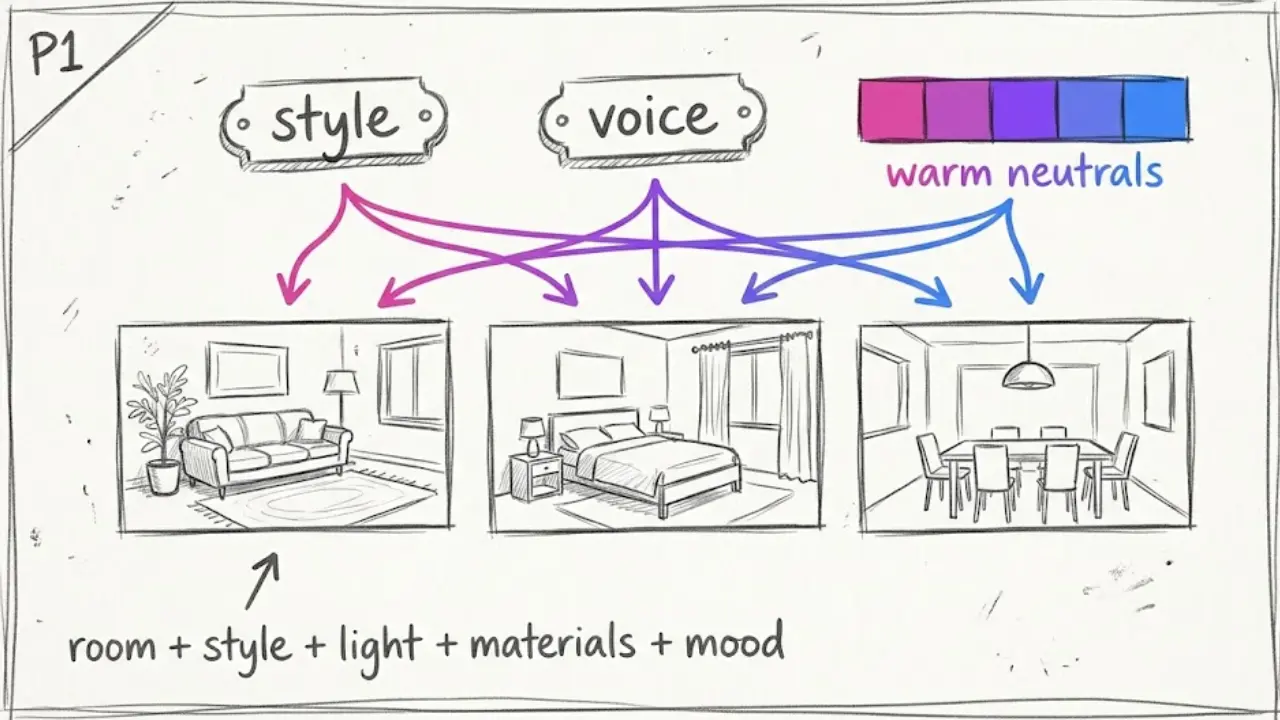
Lock one visual style. Choose a style in Faceless Lab and use it across every video. Rooms in different styles can still share one overall feel through lighting and color.
Lock one voice. The same ElevenLabs voice in every video becomes part of your brand within a week.
Choose a palette per series. "Warm neutrals," "moody greens," "coastal light." A recurring palette makes each video feel like part of a collection.
Write prompts like a designer. Name the room, the style, the light, the materials and the mood. "A small Japandi bedroom, soft morning light, oak furniture, linen bedding" gives far better images than "nice bedroom." Our guide to getting AI visuals that match your script goes deeper on this.
5. Batch a season of rooms and schedule the lot
Posting a room a day by hand is how people burn out in week three. Batching fixes it.
Make a week in one sitting. Block an afternoon, pick five room ideas and produce five videos back to back. With your style and voice locked, each new video is mostly a new topic and script.
Plan around the calendar. Cozy autumn corners now, holiday tables and gift-friendly decor as winter approaches, fresh-start declutters in January. If you batch ahead, you publish into each moment instead of chasing it.
Turn one format into a Series. Series lets you set up a repeatable format once, for example "one room, one style, one tip," and keep it running. That is the difference between making videos and running a channel.
Let Autopilot carry some of the load. Autopilot is in beta and built to keep a channel posting on a rhythm without starting from zero each day. You still choose the rooms and the ideas.
6. Where a faceless interior design channel is and isn't the right choice
Here is the honest read from the two of us.
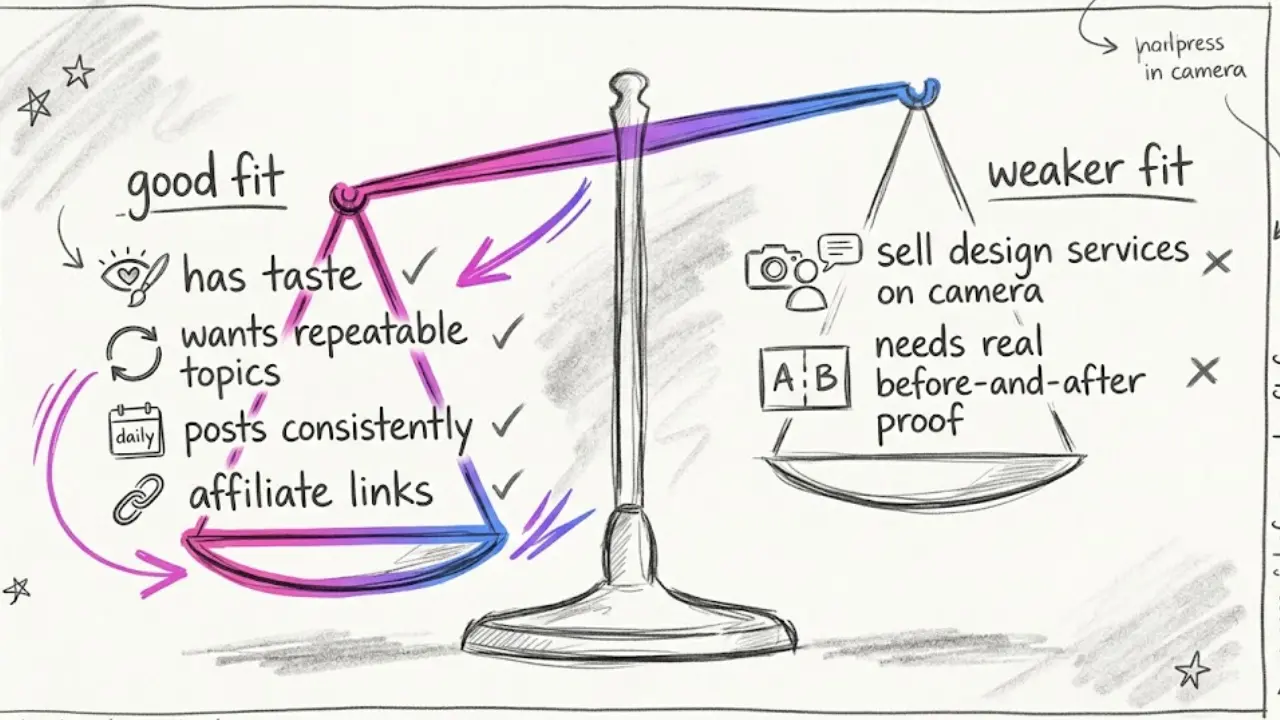
It is a strong choice if you enjoy design and have taste, you want a calm and visual niche with endless repeatable topics, and you can post consistently. It also suits you if you want to monetize through affiliate links, since people watching a room often want the lamp or the rug.
It is a weaker choice if you want to sell your own design services on camera, since people hire designers they see and trust. It also fits badly if you need real before-and-after proof of actual projects. AI rooms are great for ideas and inspiration, and they are not a record of work you did.
Faceless Lab has limits too. Automatic publishing covers YouTube, Instagram, Facebook and LinkedIn, and TikTok needs your explicit consent. Autopilot is still in beta, so treat it as a strong assistant rather than a machine you can forget about. AI images of rooms can occasionally produce odd details such as a warped chair leg or an impossible window, so give each video a quick look before it goes out.
7. Stay honest and copyright-safe with AI rooms
This section keeps your channel trustworthy and monetizable, so it is worth a careful read.
Do not pass AI rooms off as real projects. If a video shows an AI-generated room, present it as inspiration or a concept. Viewers feel misled when they find out a "finished home" never existed, and platforms increasingly ask creators to label realistic AI content.
Never reuse other people's photos. Images from design magazines, brand catalogs and other creators are protected. Generate your own visuals or use material you have the right to use.
Be careful with brands. Naming a furniture brand in a script is fine. Reproducing its product photos is not. Generic, well-styled AI pieces avoid the issue entirely.
Add your own point of view. A tip, a rule, an opinion or a clear story is what makes a video yours, and it is also what platforms tend to reward over a slideshow of pretty rooms.
Interior design rewards people who show up with taste and consistency, and a faceless setup lets you do that every day. Batch your first week of rooms, lock your look and schedule the run. If one of your videos takes off, repost it on your other accounts and tag it so people can find you, and if you like the tool, our affiliate program pays you to send other creators our way.
Pick your first room, start free and let the channel style itself: https://facelesslab.video/
Read more
Frequently asked questions
What is a faceless interior design channel?
A faceless interior design channel is a home decor channel where you never appear on camera. You post short videos about rooms, styles, decorating rules and budget ideas, using a script, an AI voiceover and AI-generated room visuals instead of footage of your own home. The room is what people watch, so the format suits the niche well. A tool like Faceless Lab produces the voiceover, visuals, captions and music from one idea, and you review the result before it publishes. It is a calm, visual niche with plenty of repeatable topics.
Can I make interior design videos with AI and no camera?
Yes. You write or generate a short script about a room or a style, then an AI tool creates matching room visuals, a voiceover, captions and background music. In Faceless Lab you can pick one of 39 visual styles and one of 200+ ElevenLabs voices, then review the finished vertical video before publishing. AI rooms work best as inspiration and concept content. Present them as ideas rather than as real finished projects, and give each video a quick look for odd details like warped furniture before it goes live.
What types of faceless home decor videos get saved the most?
Videos people want to recreate tend to get bookmarked. Room makeover concepts, style breakdowns such as Japandi or mid-century, short decorating rules, budget swaps, renter-friendly ideas and calm mood-board tours are the formats we would test first. They are short, visual and useful, which is what drives saves and shares. Pick two or three, run them on repeat with different rooms and styles, and watch which ones your audience bookmarks before you commit to a single direction for the channel.
How often should I post faceless interior design videos?
A steady rhythm matters more than volume. One short per day is a strong target if you batch, and a few per week is a fine start if you are testing the niche. Block an afternoon, make five rooms back to back with your style and voice locked, and schedule them. With Series and Autopilot (currently in beta) in Faceless Lab you can set up a repeatable format once and keep the channel posting without rebuilding every video from scratch.
How much does it cost to start a faceless interior design channel with Faceless Lab?
You can start on the free trial at €0, which is the right way to test the niche and the workflow before spending anything. The paid plans are Starter at €19, Growth at €59 and Pro at €149, so you move up only when the channel is working and you want more output or automation. You also avoid paying for a separate script tool, voice tool, stock library and editor, because Faceless Lab bundles script, voiceover, visuals, captions, music, scheduling and publishing in one workflow.
Do I need to label AI-generated rooms in my videos?
It is a good habit, and platforms increasingly ask creators to disclose realistic AI content, so check the current rules on each platform you post to. The safest approach is to frame AI rooms as concepts or inspiration and never present them as real projects or finished client work. Avoid reusing photos from magazines, brands or other creators, since those are protected, and generate your own visuals instead. Honest framing protects your channel's trust and keeps your monetization options open.
Related articles
A Daily Horoscope Channel Is the Easiest Faceless Series to Keep Alive
Horoscopes come with a built-in content calendar. Here is how to pick a lane, build one repeatable format and post daily or weekly astrology readings without ever showing your face.
You Can Build a Fitness Channel Without Filming a Single Workout
Start a faceless fitness channel with AI visuals, a clear voiceover and captions. Batch a month of workout Shorts now, schedule them, and be ready before January hits.
One AI Model Can't Make Every Faceless Video Look Right
Most faceless video tools render every scene through one AI model, which is why so many channels start to look alike. Here's how Faceless Lab does it differently, and why it matters for your visuals.