Teach a Language on Shorts and Reels Without Ever Showing Your Face
Language lessons are short, repeatable and built for replays and saves, which makes them a great fit for a faceless channel. Here are the formats, the script rules and a step by step build.
Roberto Pasqualini
CMO at Faceless Lab
A practical guide to starting a faceless language learning channel: the lesson formats that work, how to write a lesson in under a minute, and how to produce and schedule them in Faceless Lab.
How do you start a faceless language learning channel? You pick one language pair, turn it into tiny single-idea lessons, and let a consistent voice and visual style do the teaching instead of your face. Language content is one of the few niches where viewers actively want to rewatch, save and come back tomorrow, which is exactly what short-form platforms reward. If you have ever thought "I would teach this, but I do not want to be on camera", this is the guide for you.
We are Stefano and Roberto, the two people behind Faceless Lab. We run faceless channels every day, and educational formats are some of the ones we trust most for steady, repeatable growth.
Executive Summary: A faceless language learning channel works because each lesson is small, self-contained and built for replays and saves. Choose one language pair and one lesson format (phrase of the day, quick vocabulary set, common mistakes, mini dialogues or a pronunciation drill), keep each video between 20 and 45 seconds, and teach exactly one idea per video. Use a native-sounding voice for the target language, show the written phrase on screen with matching captions, and repeat the same structure daily so learners know what to expect. Faceless Lab turns a lesson idea into a finished video with script, voiceover in 200+ voices, visuals, music and captions, then schedules or auto-publishes it, so the channel keeps posting while you plan the next batch.
Table of Contents
- Why language learning is a natural fit for faceless video
- Pick one lesson format and repeat it
- Write lessons that teach one thing in under a minute
- How to make a language learning video inside Faceless Lab
- Turn one lesson into a daily series
- Where Faceless Lab is and isn't the right choice
- How to keep learners coming back
1. Why language learning is a natural fit for faceless video
Most niches ask the viewer to watch once and move on. Language learning asks them to watch, repeat out loud, save the video and return for the next one. That behavior is gold for a short-form channel, because saves, replays and follows are strong signals that a video was useful.
It also fits the faceless format better than almost anything else. A learner does not need to see your mouth to learn "where is the train station". They need to see the phrase, hear it said clearly, and read the meaning. A good voice, clean text and a simple visual do all of that.
Three reasons it works so well without a face:
- The lesson is the content. The phrase on screen and the voice reading it are the product. Your face adds nothing.
- The topic list never runs out. Greetings, travel, food, work, dating, small talk, common mistakes. You can plan months of lessons in one sitting.
- Learners are loyal. Someone who learns a phrase from your channel today has a reason to open tomorrow's video.
A fair warning from experience: the channels that last teach one clear thing per video and teach it well. Fancy edits matter far less than clarity.
2. Pick one lesson format and repeat it
You do not need a clever new idea every day. You need a format that viewers recognize in the first second. Here are the ones that work well for language channels.
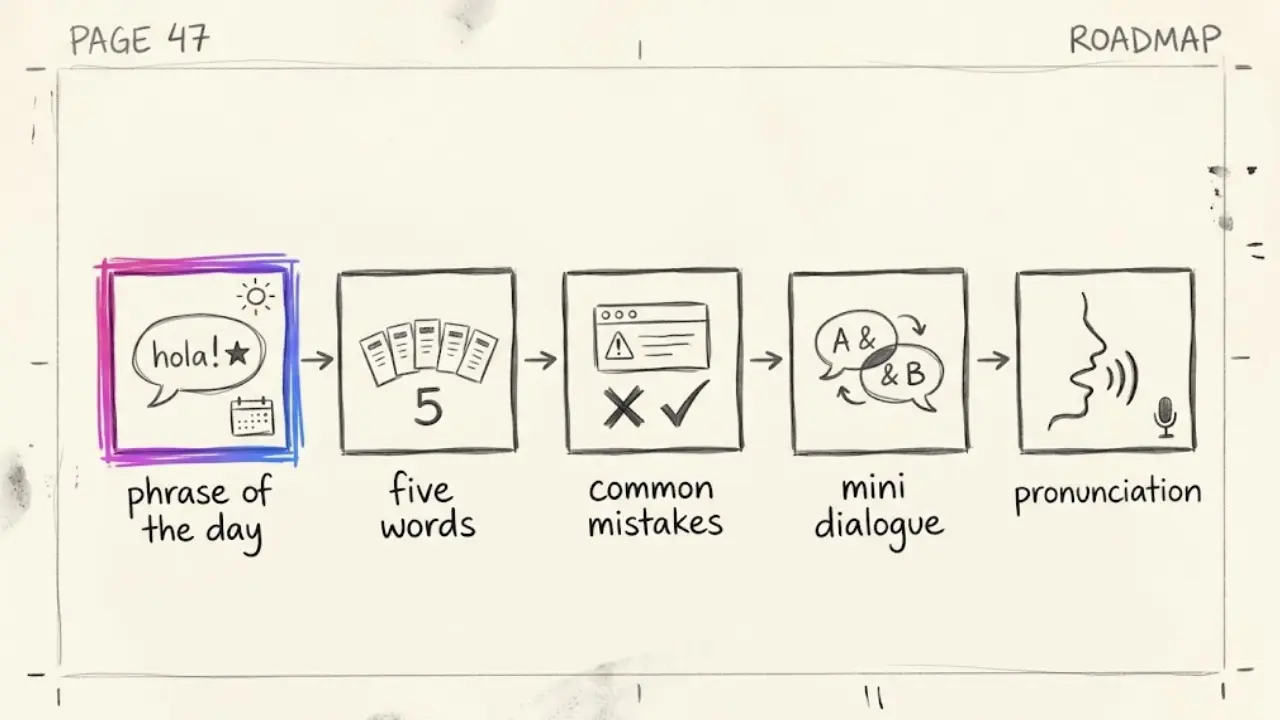
Phrase of the day
One useful phrase, its meaning, and a slow then normal speed reading. Simple, repeatable, and perfect for a daily habit.
Five words in one theme
Five words about food, travel or the office, shown with a visual for each. The visuals do the memorizing, and the countdown to the fifth word keeps people watching.
Common mistakes
"Stop saying this in Spanish" style videos. Learners love corrections, and they tend to comment with their own mistakes.
Mini dialogues
A short exchange such as ordering a coffee, read by two different voices with the translation on screen. It teaches phrases in context.
Pronunciation drills
A tricky sound repeated slowly, then at natural speed. Short, replayable and very save-friendly.
Choose one, run it for at least two weeks, and only then add a second. Channels that mix five formats in their first month confuse both viewers and the algorithm.
3. Write lessons that teach one thing in under a minute
A lesson short is a tiny script with a very specific shape. This is the structure we use.
The hook (first 3 seconds). Promise a payoff. "Three ways to say thank you in Italian that locals actually use." The viewer should know what they will leave with.
The teaching beat. Say the phrase in the target language, then give the meaning. Show the written version on screen so reading and listening reinforce each other.
The repeat. Say it again, slower. Repetition is the whole point of language learning, and it also gives you a natural place for a small pause.
The example. One short sentence that uses the phrase in real life. Context makes it stick.
The close. Ask for something specific. "Say it out loud and comment how it felt" or "Save this for your trip." A concrete action beats a general "follow for more".
On length, 20 to 45 seconds is a comfortable range. Long enough for a complete lesson, short enough that learners watch to the end and replay it.
4. How to make a language learning video inside Faceless Lab
Here is the workflow we would follow, from a blank page to a scheduled lesson.
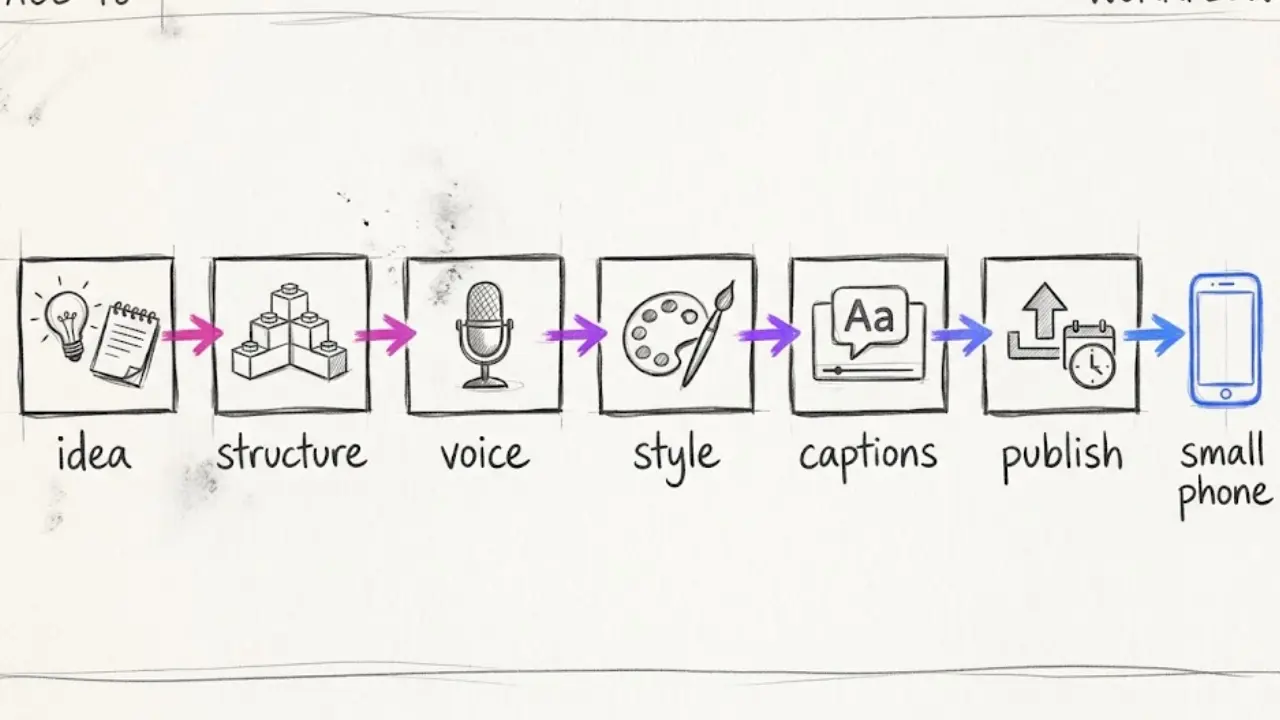
Step 1: Start from the lesson idea. Type something like "five ways to order food in Spanish" or paste your own script. You can let the AI draft the lesson and then edit every line.
Step 2: Choose a structure. Faceless Lab has 8 video structures. Pick the one that matches your format, for example a list structure for five words or a step structure for a short dialogue.
Step 3: Pick a native-sounding voice. With 200+ ElevenLabs voices, you can choose a voice that matches the language you teach. For a language channel this is the most important choice you make, so listen to a few samples before locking one in.
Step 4: Lock a visual style. Choose from 39 styles and multiple image models through Replicate, then keep it the same on every video. A clear, consistent look helps learners recognize your lessons at a glance.
Step 5: Check captions and music. The on-screen text should match the audio exactly, because learners read along. Add a light background track that does not compete with the voice.
Step 6: Generate, review and publish. Read the script once more for accuracy, then publish or schedule. Auto-publish covers YouTube, Instagram, Facebook and LinkedIn. TikTok is excluded from fully automatic publishing because it needs your explicit consent, so you confirm those posts yourself.
💡 Ready to turn your first lesson into a video? Start free and make your first faceless language lesson.
5. Turn one lesson into a daily series
Language learning rewards consistency more than almost any other niche, because learners follow a channel the way they follow a course. They want the next lesson, in the same style, at the same time.
With Series in Faceless Lab, you define the theme once and keep producing episodes with the same voice, style and structure. Plan a themed week, for example restaurant Spanish from Monday to Friday, batch the videos in one afternoon and put them on the schedule.
Autopilot can take this further. It is currently in beta, so we suggest watching your first runs closely, but the idea is to keep generating and queuing episodes with minimal input so posting does not stall when life gets busy.
6. Where Faceless Lab is and isn't the right choice
We would rather you choose the right tool than churn after a month, so here is the honest version.
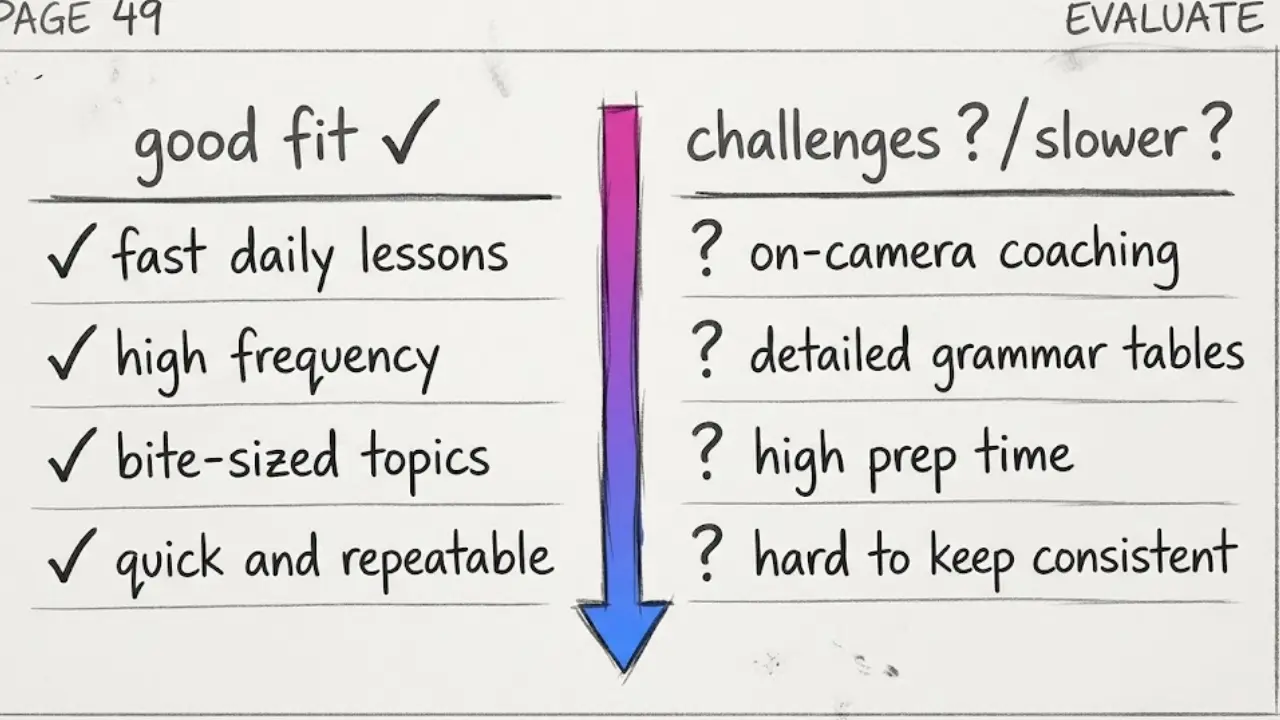
Faceless Lab is a strong fit if you want to publish short lessons daily, you like one workflow for script, voice, visuals, captions and scheduling, and you value a consistent look and a natural voice across every episode.
It is a weaker fit if you need to be the teacher on camera, for example live pronunciation coaching where learners watch your mouth, or long lessons with detailed grammar tables you want to design by hand. Faceless Lab is built for speed and volume in short vertical video.
One more honest note. AI scripts and voices are good, but you are responsible for accuracy. If you teach a language you do not speak well, have a native speaker check the first few lessons before you publish. Mistakes in a language channel cost trust quickly.
7. How to keep learners coming back
Small habits make a big difference once the channel is live.
- Keep a fixed series name. "Spanish in 30 seconds" tells a new viewer exactly what they are getting.
- End with a concrete prompt. "Comment the phrase you want next" gives you your next ten lessons for free.
- Reuse the same intro line. A familiar first sentence signals a lesson learners already like.
- Show the text clearly. Large, high-contrast captions help learners read and listen at the same time, even on mute.
- Post at a steady rhythm. Learners want a routine. A predictable daily lesson builds that habit.
The takeaway is simple. A faceless language channel needs one language pair, one lesson format, and the patience to publish consistently. The face was never the teaching tool. The lesson is.
If you want to see how quickly one lesson comes together, try Faceless Lab free. The trial is €0, no credit card needed, and paid plans start at Starter €19, then Growth €59 and Pro €149 when you are ready to scale. If a lesson does well, repost it organically on your other platforms too, and if you end up loving the tool, our affiliate program is open so you can earn by sharing it.
Try it and make your first faceless language lesson today: facelesslab.video
Read more
Frequently asked questions
How do I start a faceless language learning channel?
Pick one language pair, one lesson format and one visual style, then publish short single-idea lessons on a steady rhythm. In Faceless Lab you type a lesson idea such as "five ways to order food in Spanish", approve or edit the script, choose a native-sounding voice from 200+ options, lock a visual style and generate the video with captions and music. You then publish or schedule it. Nobody needs to appear on camera, because the phrase on screen and the voice carry the lesson.
Can I teach a language I do not speak fluently?
You can, but you carry the responsibility for accuracy. AI scripts and voices are strong, yet small errors in grammar or pronunciation damage trust quickly on a language channel. A sensible approach is to start with phrases you are confident about, and have a native speaker review your first lessons before publishing. Once you have a checked set of formats and phrasing you trust, you can reuse that structure confidently and only review new vocabulary each week.
How long should a language learning short be?
Between 20 and 45 seconds is a comfortable range for most lesson formats. That is long enough to give the hook, say the phrase, repeat it slowly and show one example, yet short enough that learners watch to the end and replay it. Keep the rule of one idea per video. If a topic needs more, split it into a short series, such as a themed week of lessons, instead of stretching a single video.
Which lesson formats work best for faceless language channels?
The formats that perform reliably are phrase of the day, five words in one theme, common mistakes, mini dialogues and pronunciation drills. Each is short, repeatable and easy to save, which are the behaviors short-form platforms reward. Pick one and run it for at least two weeks before adding another. A recognizable repeated format helps new viewers understand your channel in the first second and gives returning learners a routine to follow.
Can I publish language lessons automatically?
Yes, with one exception. Faceless Lab can auto-publish to YouTube, Instagram, Facebook and LinkedIn, and you can schedule lessons ahead so the channel keeps posting on a rhythm. TikTok is excluded from fully automatic publishing because it needs your explicit consent, so you confirm those posts manually. Autopilot is in beta and aims to keep generating and queuing episodes with minimal input, so watch your first runs closely before relying on it fully.
Is there a free way to try this?
Yes. Faceless Lab has a free trial at €0 with no credit card required, so you can make a real lesson and see the full workflow before paying. When you want to publish daily, paid plans start at Starter €19, with Growth at €59 and Pro at €149, scaling with how many videos you produce each month. A single phrase of the day video is a quick first test of whether the format suits you.
Related articles
Faceless Shorts Can Have Thumbnails Now. Make Yours Earn the Click
YouTube just gave Partner Program creators custom thumbnails on Shorts. Here is how faceless creators, with no face to feature, build a frame that earns the click and lifts views.
Make Faceless Quiz Videos That Get People Answering in the Comments
Quiz and trivia shorts are some of the easiest faceless videos to grow with. Here is how the format works, the structures that hold attention, and how to make one in minutes.
Make Faceless Horror Story Videos That People Watch Until the End
Horror is one of the highest-retention faceless niches, and you do not need a camera or a scary voice of your own. Here is how to build a scary-story channel that posts on its own.