Faceless Shorts Can Have Thumbnails Now. Make Yours Earn the Click
YouTube just gave Partner Program creators custom thumbnails on Shorts. Here is how faceless creators, with no face to feature, build a frame that earns the click and lifts views.

Stefano Ventrudo
CTO at Faceless Lab
A practical guide to YouTube Shorts thumbnails for faceless videos: what changed in 2026, what a good faceless thumbnail needs to do, and how to make one when nobody is on camera.
Can you even add a custom thumbnail to a faceless Short? For years the answer was no, and faceless creators just accepted that the algorithm grabbed whatever frame it liked. That changed this summer. YouTube now lets creators pick and upload the still that represents a Short, which means the youtube shorts thumbnails for faceless videos question finally has a real answer. If you run a channel with no face, no studio and no on-camera host, this is one of the few free levers you have to lift your click-through without touching the video itself.
Executive Summary: On July 24, 2026 YouTube started rolling out custom thumbnails for Shorts to Partner Program creators, a top-requested feature that is expanding to more creators over time. For faceless channels this is a genuine opening, because a thumbnail is the one part of a Short a viewer judges before a single second plays. A strong faceless Shorts thumbnail does three jobs at once: it reads in under a second on a small phone screen, it promises exactly what the video delivers, and it works without a human face by leaning on one bold visual and three or four words of text. Faceless Lab already generates the scripted visuals, captions and scenes your Short is built from, so the raw material for a clean, on-brand thumbnail is sitting in every project you export. This guide covers the new rules, the specs, and a repeatable way to ship a thumbnail with every video instead of leaving it to chance.
Table of Contents
- Why Shorts thumbnails suddenly matter for faceless creators
- What a faceless Shorts thumbnail needs to do
- Where your thumbnail comes from when no one is on camera
- Make a faceless Shorts thumbnail inside Faceless Lab
- Five thumbnail mistakes that sink faceless Shorts
- Where Faceless Lab fits, and where it does not
- Build a thumbnail habit your channel can keep
1. Why Shorts thumbnails suddenly matter for faceless creators
For most of Shorts history, the thumbnail was an afterthought. YouTube auto-selected a frame, and that frame followed your Short around the Subscriptions feed, your channel grid and search results. If the auto-pick landed on a blurry transition or a half-rendered scene, that was your storefront whether you liked it or not.
What actually changed in 2026. On July 24, 2026, YouTube announced that Partner Program creators can start uploading custom thumbnails for Shorts. In its own words the company called it a top-requested feature that gives creators "more control over how your Shorts look." YouTube also added the ability to choose from three suggested thumbnail frames on desktop, matching how long-form videos already worked, and said the upload feature would expand to more creators over time.
Why this lands harder for faceless channels. A creator who films their face already had a strong thumbnail asset baked into every video. Faceless channels never did. Your storefront was a random frame of a stock clip or an AI-generated scene. Now the still that appears in search, on your channel page and in the "more like this" rail is a decision you get to make, and for a niche where every viewer is deciding based on the visual alone, that decision carries real weight.
2. What a faceless Shorts thumbnail needs to do
A Shorts thumbnail is not a mini movie poster. It shows up small, often stacked next to a dozen others, and a viewer scrolls past it in a fraction of a second. The bar is simple. It has to be legible, honest and distinct.
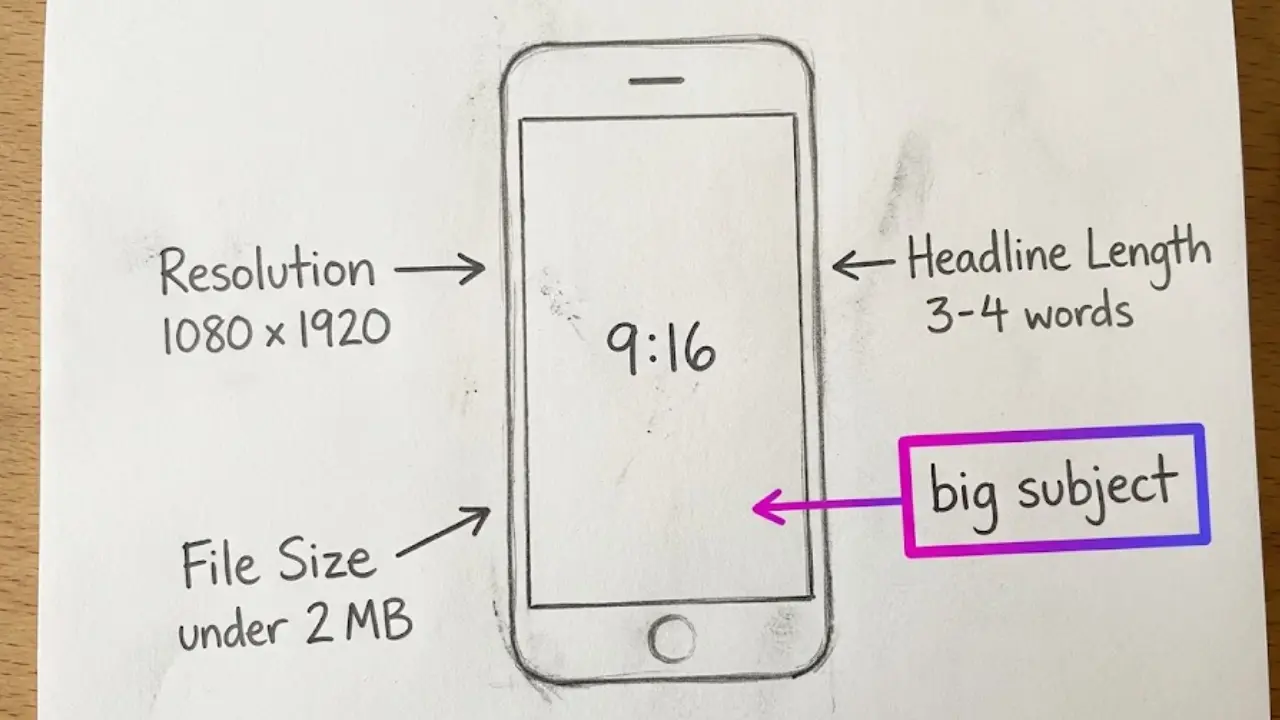
Legible on a phone, not a monitor. Most people meet your thumbnail on a screen smaller than a credit card. If the text needs squinting or the subject is lost in a busy background, you have already lost. Big subject, high contrast, three to four words maximum.
Honest about the payoff. The fastest way to train YouTube to stop showing your Shorts is to promise something the video does not deliver. Clickbait that misleads gets a quick tap and an even quicker swipe away, and that short watch time tells the system your video is weak. Match the thumbnail to the actual hook of the Short.
Distinct from the crowd. Your thumbnail sits beside competitors covering the same topic. A consistent color, a recurring layout and a repeated text style make your channel recognizable before anyone reads a word.
Here are the technical specs worth knowing for a Shorts thumbnail in 2026:
- Aspect ratio: 9:16 vertical, the full portrait frame of the Short.
- Resolution: 1080 by 1920 pixels is the safe target.
- File size: keep it under 2 MB.
- Format: JPG, PNG, GIF or BMP are accepted.
💡 Thumbnails work best when the video underneath actually holds attention. Pair this with our guide on writing faceless scripts that hook in the first three seconds.
3. Where your thumbnail comes from when no one is on camera
This is the real faceless problem. Creators who show their face pick an expressive frame and they are done. You have no face, so your thumbnail has to be built from other parts. Three sources cover almost every case.
A strong frame from the video itself
The simplest option is a still pulled straight from your Short. On desktop YouTube now offers three suggested frames, and on mobile you can scrub to any frame you want. Look for the single most striking visual in your video, usually the moment the AI-generated scene is at its clearest and most on-topic, and use that as the base.
One bold visual as the subject
When no frame is quite strong enough on its own, lead with one clean visual that says the topic instantly. A single object, a clear symbol, a bold scene. A finance Short might show a stack of coins with a green arrow. A history Short might show one dramatic illustrated figure. The rule is one subject, not a collage.
Text that does the selling
Because there is no facial expression to carry emotion, your words carry it instead. Three or four punchy words that tease the payoff, in a heavy readable font, high contrast against the background. Think "This one cost him millions" over a coin image, not a full sentence. The text should repeat the promise of your hook, not restate the title word for word.
Keep it consistent. Faceless channels grow on recognition. Pick one accent color, one font and one text position, and reuse them. When a viewer has seen three of your Shorts, the fourth thumbnail should be recognizable as yours before they read it.
4. Make a faceless Shorts thumbnail inside Faceless Lab
Faceless Lab is where your Short gets built: script, voiceover, visuals, music and captions in one workflow. That same workflow gives you everything you need for the thumbnail, because the strongest images in your thumbnail are the ones the app already generated for the video. Here is the step by step we use on our own channels.
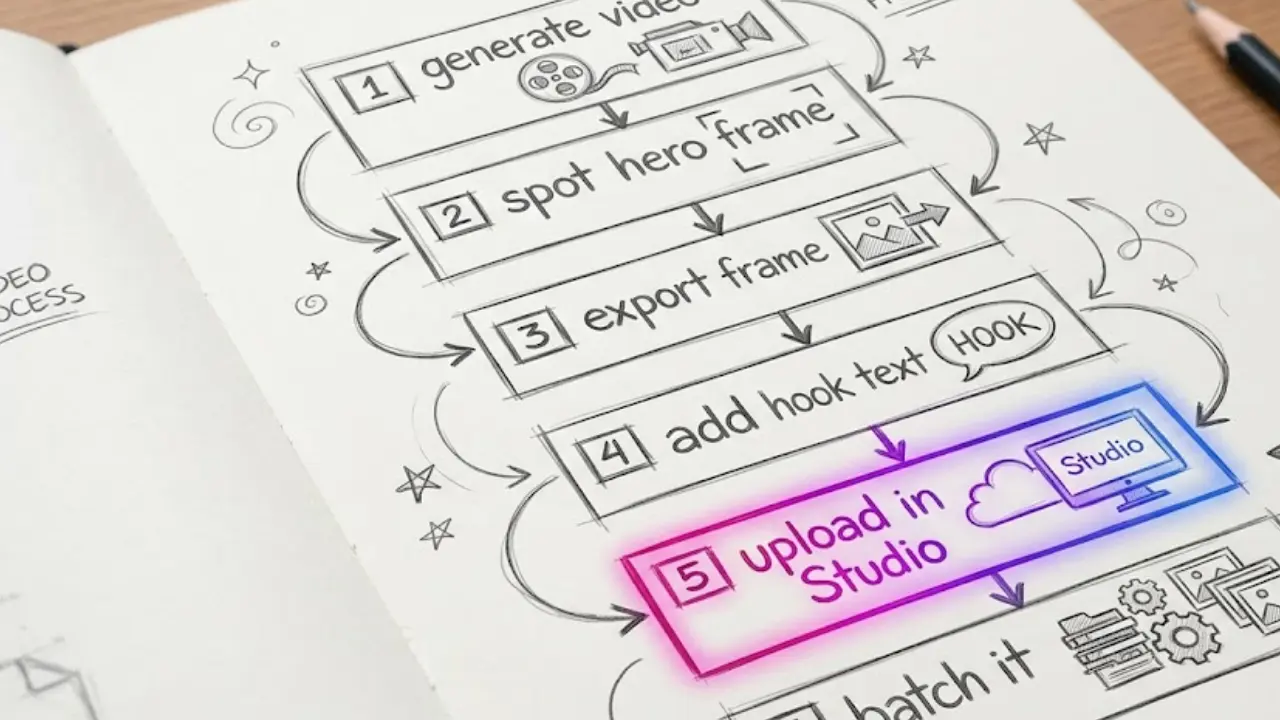
- Generate the video first. Type your topic, pick one of the 8 video structures and one of the 39 visual styles, and let Faceless Lab produce the script, the voiceover from the 200-plus ElevenLabs voices, the visuals through its multi-model Replicate setup, the music and the captions. Your thumbnail candidates are born here.
- Spot your hero frame while you review. As you watch the draft, note the single scene where the visual is clearest and most on-topic. That is your thumbnail base. Because the visuals are generated to match your script, the strongest scene usually also matches your hook.
- Export the video and grab that frame. Publish or download the finished Short, then capture the hero frame at full 1080 by 1920 resolution. On desktop you can also let YouTube suggest three frames and check whether one of them is already close.
- Add three or four words of hook text. In any image editor, drop your short hook onto the frame in your channel font and accent color. Keep it high contrast and readable at thumbnail size. Reuse the same layout every time so the channel stays recognizable.
- Upload it as your custom thumbnail. In YouTube Studio, open the Short, choose the custom thumbnail option and upload your 9:16 image under 2 MB. Save, and that still now represents your Short everywhere it appears.
- Batch it. If you produce a week of videos in one sitting, do the thumbnails in the same sitting. Same font, same color, same corner. Ten videos, ten thumbnails, one afternoon.
💡 Ready to try it on your next upload? Start free inside Faceless Lab and build the video your thumbnail will come from.
5. Five thumbnail mistakes that sink faceless Shorts
We have made most of these ourselves. Avoiding them is often worth more than any clever design trick.
- Cramming a full sentence in. If it does not read in one glance on a phone, it does not read at all. Cut to three or four words.
- Letting the background fight the text. Busy AI scenes plus thin light text equals a mud puddle. Add a dark overlay or a solid shape behind the words.
- Reusing the exact same image for every video. Consistency of style is good. Identical thumbnails train viewers to scroll past because they think they already saw it.
- Overpromising. A thumbnail that oversells gets the tap and loses the watch time, and Shorts lives and dies on watch time. Promise only what the first five seconds pay off.
- Ignoring the thumbnail entirely. The most common mistake is still doing nothing and letting the auto-frame decide. Now that you can choose, not choosing is a wasted lever.
6. Where Faceless Lab fits, and where it does not
We would rather you trust the honest version. Faceless Lab is built to take an idea to a publish-ready faceless video, and to schedule and auto-publish it to your platforms. It is genuinely strong at the video: the script, the voiceover, the visuals, the captions and the music, plus Autopilot in beta and Series for running a topic on a repeating schedule.
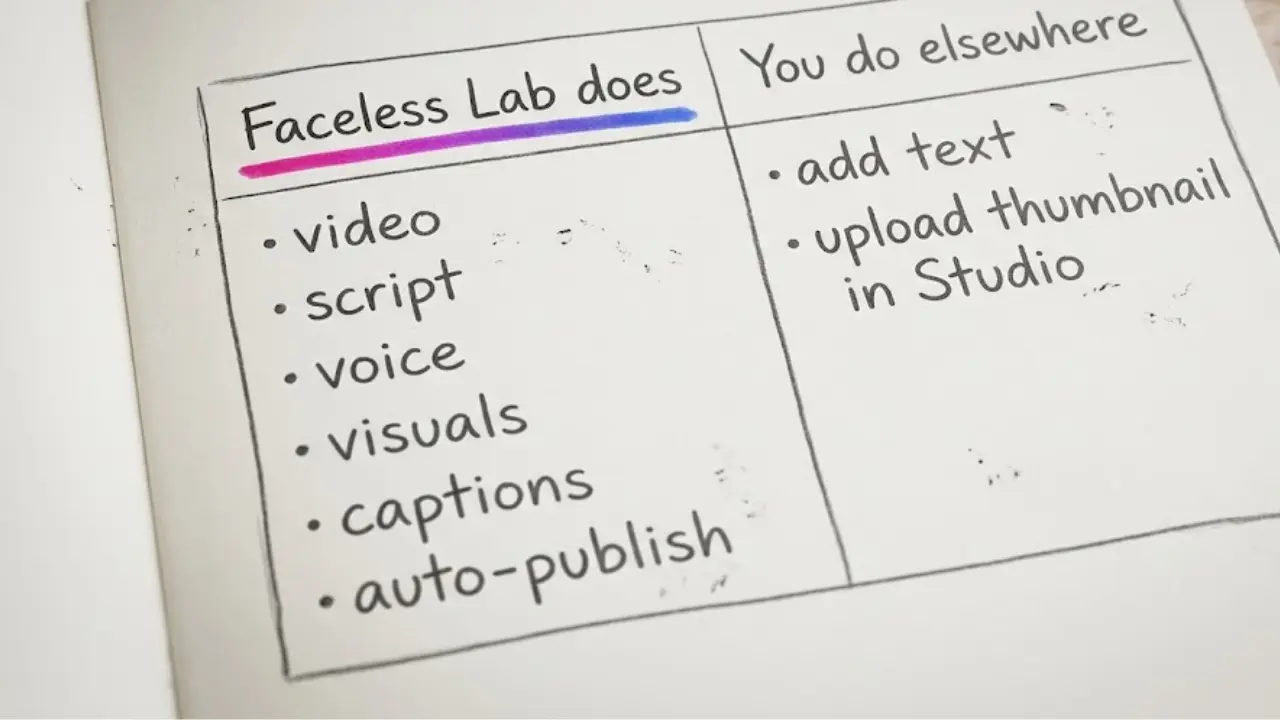
Where it fits the thumbnail job. The app produces the visuals your thumbnail is made from and the scenes you pull your hero frame from. If your channel style is clean and visual-led, the raw material for a great thumbnail is already in every export.
Where it does not. Faceless Lab is not a dedicated thumbnail editor. Adding your hook text, uploading the custom thumbnail and choosing the frame all happen in an image tool and in YouTube Studio, not inside the app. The custom Shorts thumbnail upload itself is a YouTube feature, currently available to Partner Program creators and rolling out more widely, so if your channel is not yet in the Partner Program you may only have the frame-selection option for now. And one platform note that has nothing to do with thumbnails: TikTok is excluded from our fully automatic auto-publish and needs your explicit consent, because of TikTok's own rules.
If you need a heavy custom thumbnail studio with templates and brand kits, pair Faceless Lab for the video with a dedicated design tool for the still. For most faceless creators, a strong frame plus a few words of text is all it takes, and that costs nothing extra.
7. Build a thumbnail habit your channel can keep
The creators who win with this change will not be the ones who make one perfect thumbnail. They will be the ones who make a decent thumbnail every single time without it slowing them down.
Set your template once. Decide your accent color, your font and your text position today. Save a blank template at 1080 by 1920. Every future thumbnail is now a five-minute job of dropping in the frame and the words.
Attach it to your publishing rhythm. If you post daily, the thumbnail is part of the daily job. If you batch weekly, the thumbnails get batched too. The plans scale with that rhythm: the Free trial at €0 to test it, Starter at €19, Growth at €59 and Pro at €149 as your output grows. Pick the volume you can actually sustain and make the thumbnail a fixed step in it.
Review what gets clicked. After two weeks, look at which thumbnails pulled the best click-through in YouTube Studio and copy what worked. Faceless channels compound on small, repeatable wins, and the thumbnail is now one of them.
The takeaway is simple. Custom thumbnails on Shorts are a rare free lever, and faceless creators finally get to pull it. Make the video strong, pull the best frame, add a few honest words, and ship it every time. Try it free on your next upload, and if a thumbnail idea works for you, repost your best Short organically and tell another creator, because our affiliate program pays you when they join. Build your next faceless video, and its thumbnail, at facelesslab.video.
Read more
Frequently asked questions
Can you add a custom thumbnail to a YouTube Short in 2026?
Yes. On July 24, 2026, YouTube began letting Partner Program creators upload custom thumbnails for Shorts, a long-requested feature that gives you control over the still viewers see before they tap. The company said it would expand access to more creators over time. On desktop you can also pick from three suggested frames, and on mobile you can scrub to any frame in the video. If your channel is not yet in the Partner Program, you may only have frame selection for now, but custom upload is rolling out steadily and is worth preparing for today.
What is the right size for a faceless Shorts thumbnail?
A Shorts thumbnail is vertical, matching the 9:16 portrait frame of the video. Aim for 1080 by 1920 pixels so it stays sharp on every screen, keep the file under 2 MB, and save it as JPG, PNG, GIF or BMP. Because it displays small, design for legibility first: one bold subject, high contrast, and no more than three or four words of text. A file that looks great on your monitor but turns to mush on a phone will lose the click, so always preview it at thumbnail size before you upload.
How do you make a thumbnail for a faceless video with no face?
Build it from three parts. First, a strong visual, usually the clearest scene from your own video or one bold object that signals the topic instantly. Second, three or four words of hook text, since you have no facial expression to carry emotion. Third, a consistent style, one accent color, one font and one text position that you reuse on every upload so your channel becomes recognizable. With Faceless Lab, the video already generates the visuals, so your best thumbnail frame is usually sitting inside the export you just made.
Does Faceless Lab create thumbnails automatically?
Faceless Lab creates the full video: script, voiceover, visuals, music and captions, then schedules and auto-publishes it. It is not a dedicated thumbnail editor, so adding hook text and uploading the custom thumbnail happen in an image tool and in YouTube Studio. What Faceless Lab gives you is the raw material, the on-topic visuals and scenes your thumbnail is pulled from. For most faceless creators that is enough: grab the strongest generated frame, add a few words, and upload. If you want templates and brand kits, pair the app with a design tool for the still.
Will a custom thumbnail actually get my Short more views?
It can, indirectly. The thumbnail does not change the algorithm, but it changes whether a viewer taps in the first place, and it appears in search, on your channel page and in suggested rails. A clearer, more honest thumbnail lifts click-through, and a strong first few seconds then holds the watch time that Shorts rewards. The trap is overpromising: a misleading thumbnail earns the tap but loses the viewer fast, which signals a weak video. Match the thumbnail to your actual hook and it works with the algorithm rather than against it.
Do I need to be in the YouTube Partner Program to upload Shorts thumbnails?
For the custom upload feature, yes, at least for now. YouTube launched custom Shorts thumbnails for Partner Program creators on July 24, 2026, and said it would expand to more creators over time. If you are not yet in the Partner Program, you can still choose from three suggested frames on desktop or scrub to any frame on mobile, which is already better than leaving it to the auto-pick. It is worth setting up your thumbnail template now so that the day full upload reaches your channel, you can use it immediately.
Related articles
Teach a Language on Shorts and Reels Without Ever Showing Your Face
Language lessons are short, repeatable and built for replays and saves, which makes them a great fit for a faceless channel. Here are the formats, the script rules and a step by step build.
Make Faceless Quiz Videos That Get People Answering in the Comments
Quiz and trivia shorts are some of the easiest faceless videos to grow with. Here is how the format works, the structures that hold attention, and how to make one in minutes.
Make Faceless Horror Story Videos That People Watch Until the End
Horror is one of the highest-retention faceless niches, and you do not need a camera or a scary voice of your own. Here is how to build a scary-story channel that posts on its own.