Turn What You Know Into Faceless Educational Videos People Actually Finish
Want to teach on YouTube without a camera? Here is how to make faceless educational videos with AI, from choosing a topic people search for to letting a whole series publish itself on a schedule.

Stefano Ventrudo
CTO at Faceless Lab
A practical guide to making educational videos with AI, from picking a topic people search for to letting a whole series publish itself.
Can you make educational videos on YouTube without ever showing your face? Yes, and it might be the cleanest way to start. Faceless educational videos let you teach something you already understand using a script, a voice and a set of visuals, so the lesson does the work instead of your on-camera presence. We run faceless channels every day, and teaching content is some of the most durable we have. It ages well, it earns trust quickly, and it keeps getting found long after a trend has moved on.
The catch used to be the production. Scripting, recording a clean voiceover, sourcing visuals, syncing captions and finding music could turn one short lesson into a half-day of work. That is the part we set out to fix, and it is why this guide is as much about workflow as it is about ideas.
Executive Summary: Faceless educational videos let you teach a topic you already know using a script, an AI voiceover, matching visuals, captions and music, with no camera and no editing suite. They work because teaching earns trust fast, holds attention longer than most formats (educational how-to content sees around a 4.62% median engagement rate versus roughly 3.06% across YouTube), and several education sub-niches like personal finance, AI tools and SaaS carry some of the highest ad rates on the platform. Inside Faceless Lab you turn one idea into a finished short in minutes, then batch a whole series and let it publish on a schedule while you focus on what to teach next.
Table of Contents
- Why faceless educational videos are working right now
- What to teach when you cannot show your face
- The anatomy of an educational short people finish
- How to make a faceless educational video inside Faceless Lab
- Turn one lesson into a series that posts itself
- Where Faceless Lab is and isn't the right choice
- Publishing and growing your educational channel
1. Why faceless educational videos are working right now
Teaching is one of the few formats where you do not need a face for people to trust you. If the explanation is clear and the payoff is real, viewers stay. That shows up in the numbers.
People actually watch to the end
Educational how-to content tends to hold attention better than the platform average. Industry data for 2026 puts the median engagement rate on educational content around 4.62%, against roughly 3.06% across YouTube as a whole. Retention is the metric the algorithm cares about most, so a format that naturally holds people is a format that gets pushed.
The ad rates can be strong
Not every education topic pays the same, and this is where niche choice matters. Recent 2026 CPM data puts personal finance in the region of 18 to 45 dollars, legal and tax around 15 to 40, business and SaaS around 14 to 35, and AI and technology tutorials roughly 8 to 20. Broad kids and general education sit lower, closer to 3 to 8. You are teaching either way, so it is worth aiming at a topic where the audience is also a buyer.
It fits how search and AI answers work
People type questions when they want to learn. That means an educational video can keep getting found for months, and it can surface inside the AI answers that now sit on top of search. Clear, self-contained explanations are exactly what those systems quote, so a well-structured lesson does double duty.
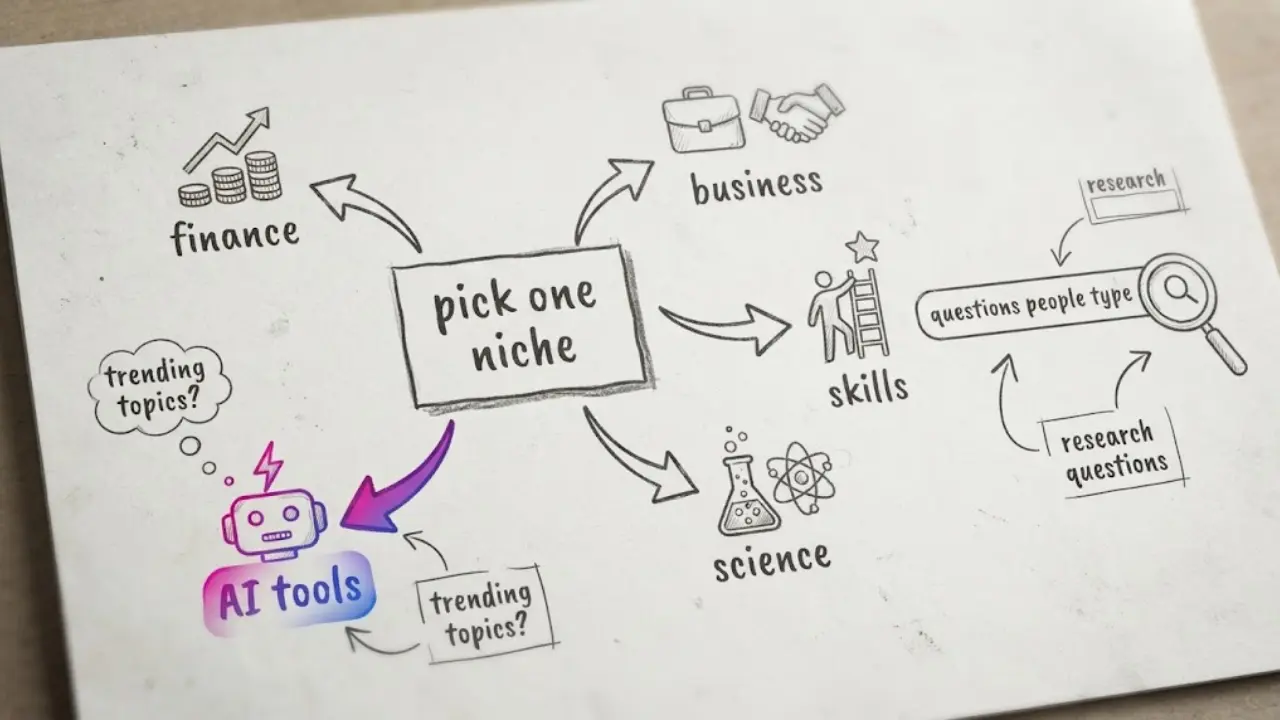
2. What to teach when you cannot show your face
The best faceless educational channel is built on something you can explain without notes, or something you are willing to research properly. You do not need to be the world expert. You need to be one useful step ahead of your viewer.
Start from questions people already type
The fastest way to find topics is to listen for real questions. "How does X work", "X explained", "beginner guide to X", "common mistakes with X". Each of those is a single video. If you can answer it in sixty seconds and the viewer leaves smarter, you have a piece of content.
Pick a sub-niche, then go deep
A channel that teaches "everything" is hard to follow. A channel that teaches one thing is easy to subscribe to. Some strong educational lanes:
- Personal finance and money basics. High demand, high ad rates, endless beginner questions.
- AI tools and software workflows. Fast-moving, and the audience is often evaluating products to buy.
- Business, marketing and case studies. Great for storytelling and clear takeaways.
- Health, science and "how things work". Evergreen curiosity, easy to make visual.
- Language, history and skills. Series-friendly, because each lesson leads to the next.
Keep it brand-safe
Educational content is naturally advertiser-friendly, which is part of why it monetizes well. Stick to accurate claims, avoid medical or financial promises you cannot back up, and treat your viewer's time with respect. That reputation compounds.
3. The anatomy of an educational short people finish
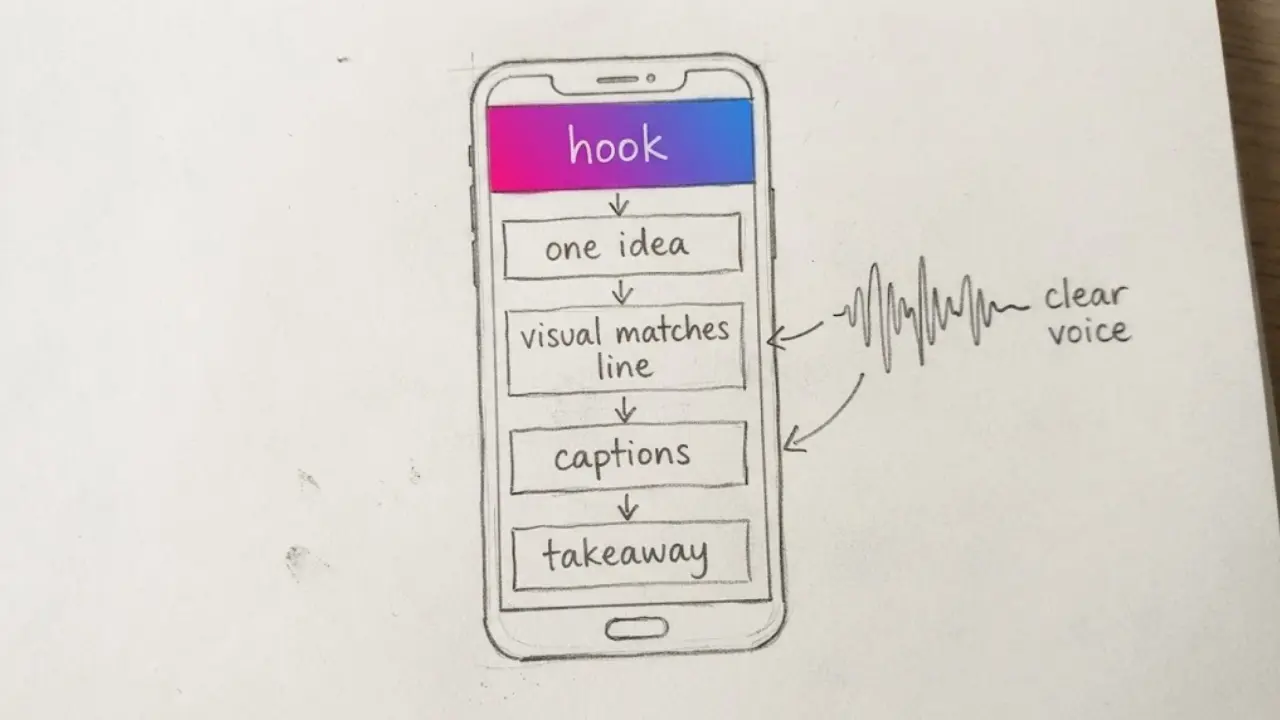
A good lesson is not a lecture squeezed into a minute. It is one idea, delivered cleanly. Here is the shape we come back to.
The parts that matter
- A hook that promises the payoff. The first line should tell the viewer what they will know by the end. "Here is why your savings lose value even when the number goes up."
- One idea per video. If you are explaining two things, that is two videos. Focus is what keeps retention high.
- A clear structure. A setup, the explanation, and a takeaway they can repeat. Faceless Lab ships with 8 built-in structures, so you can start from a proven shape instead of a blank page.
- A voice that sounds like a calm teacher. Clarity beats drama for education. Faceless Lab includes 200+ ElevenLabs voices, so you can pick one that sounds informed and easy to listen to.
- Visuals that match each line. When the narration says "compound interest", the screen should show it. Faceless Lab generates visuals through multiple Replicate models and offers 39 styles, so the look stays consistent across a whole series.
- Captions, always. A large share of people watch on mute, so on-screen captions are not optional for teaching. They also help viewers follow terms they have never heard spoken.
How long should it be
For most teaching, a 30 to 60 second short answers one question and does well on Shorts, Reels and TikTok. When a topic genuinely needs room, Faceless Lab supports longer videos up to five minutes, which suits step-by-step explainers and deeper breakdowns.
4. How to make a faceless educational video inside Faceless Lab
This is the part that used to eat your afternoon. Here is the full path from a topic to a scheduled video, done in one place.
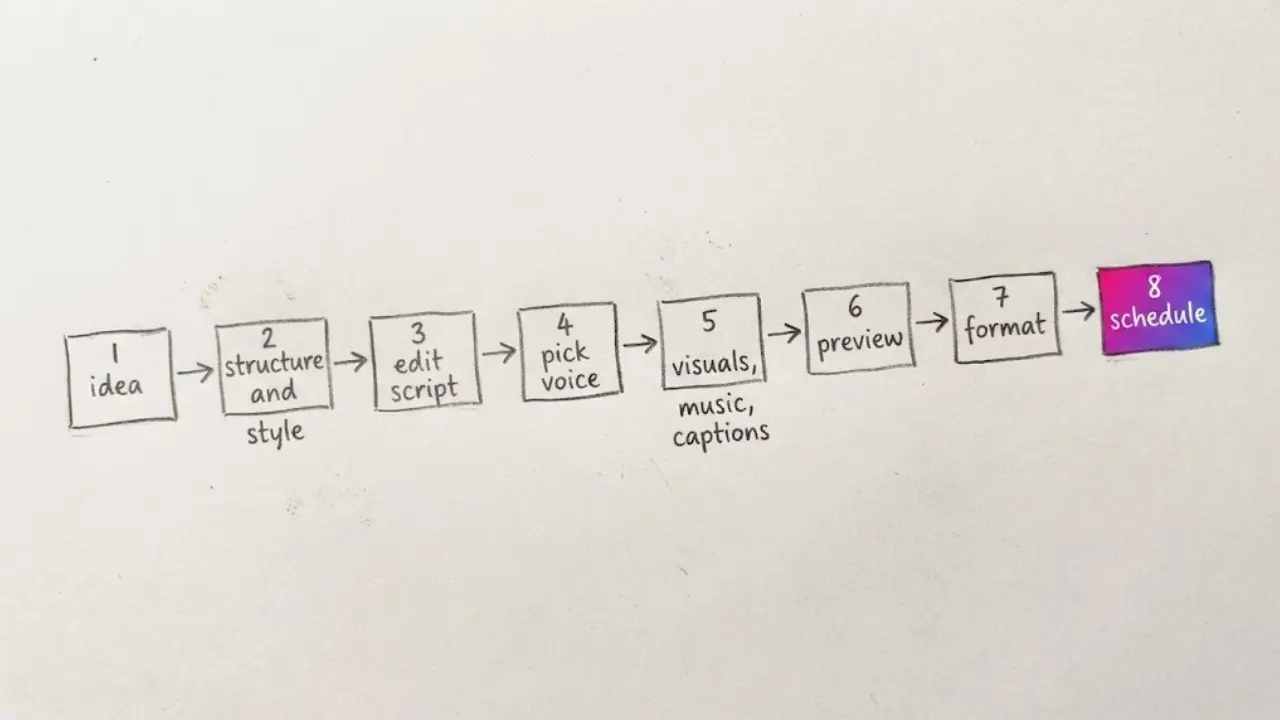
- Start from your idea. Type the topic or the question you want to answer. If you only have a rough theme, the app helps you shape it into a script.
- Choose a structure and a style. Pick one of the 8 structures to frame the lesson, then one of the 39 visual styles so the video matches your channel.
- Review and edit the script. The AI drafts it, you tighten it. This is where your knowledge goes in. Fix a claim, sharpen the hook, cut a sentence that drags.
- Pick a voice. Browse the 200+ ElevenLabs voices and choose one that sounds like a clear, trustworthy narrator for your subject.
- Let visuals, music and captions generate. The app sources matching visuals, adds background music and builds synced captions around your script.
- Preview and tweak before the final render. Swap a visual, adjust the captions, change the music. Nothing is locked until you are happy.
- Set the format and platform. Choose 9:16 for Shorts, Reels and TikTok, 16:9 for standard YouTube, or 1:1, then get a publish-ready file.
- Schedule or auto-publish. Queue the video for the days you want to post. Faceless Lab can publish for you to YouTube, Instagram, Facebook and LinkedIn. TikTok is kept out of fully automatic publishing and needs your explicit consent each time, and Autopilot is currently in beta, so keep an eye on the first runs.
💡 Ready to make your first lesson? Start free and build one now.
5. Turn one lesson into a series that posts itself
One video is a test. A series is a channel. The reason educational channels grow is that each lesson sets up the next, and viewers come back for the pattern.
Batch, do not grind
Pick a theme, for example "money basics explained", and write ten questions in one sitting. Generate all ten in an afternoon. That is a fortnight of daily posting produced in the time it used to take to make a single video by hand.
Let Series and Autopilot carry the rhythm
Faceless Lab's Series feature turns one idea into a recurring format, so the look, voice and structure stay consistent without you rebuilding them each time. Autopilot, which is in beta, can generate and schedule videos so the channel keeps posting while you plan the next batch. You choose the topics and the schedule, the app handles the production and the posting.
6. Where Faceless Lab is and isn't the right choice
We would rather you start with clear expectations, so here is the honest version.
Faceless Lab is a strong fit when you want to turn what you know into short, clear lessons at a consistent pace, batch a series without touching an editing timeline, and publish across several platforms from one place. For idea-to-video teaching content, this is exactly what it was built for.
It is less of a fit when your format depends on recording your own screen, for example live software tutorials where the viewer needs to watch you click through a real interface. In that case you would capture the screen elsewhere and use Faceless Lab for the parts around it. It is also not the tool for highly technical diagrams that must be precise to the pixel, since AI visuals are illustrative rather than textbook-exact. And the deep research behind a genuinely authoritative lesson is still your job. The app makes the video, you make sure the teaching is right.
One more honest note: Autopilot is in beta and TikTok stays outside fully automatic publishing by design, so treat the first automated runs as something to check rather than set and forget.
7. Publishing and growing your educational channel
Making the video is half of it. The other half is showing up in a way the algorithm and your audience can rely on.
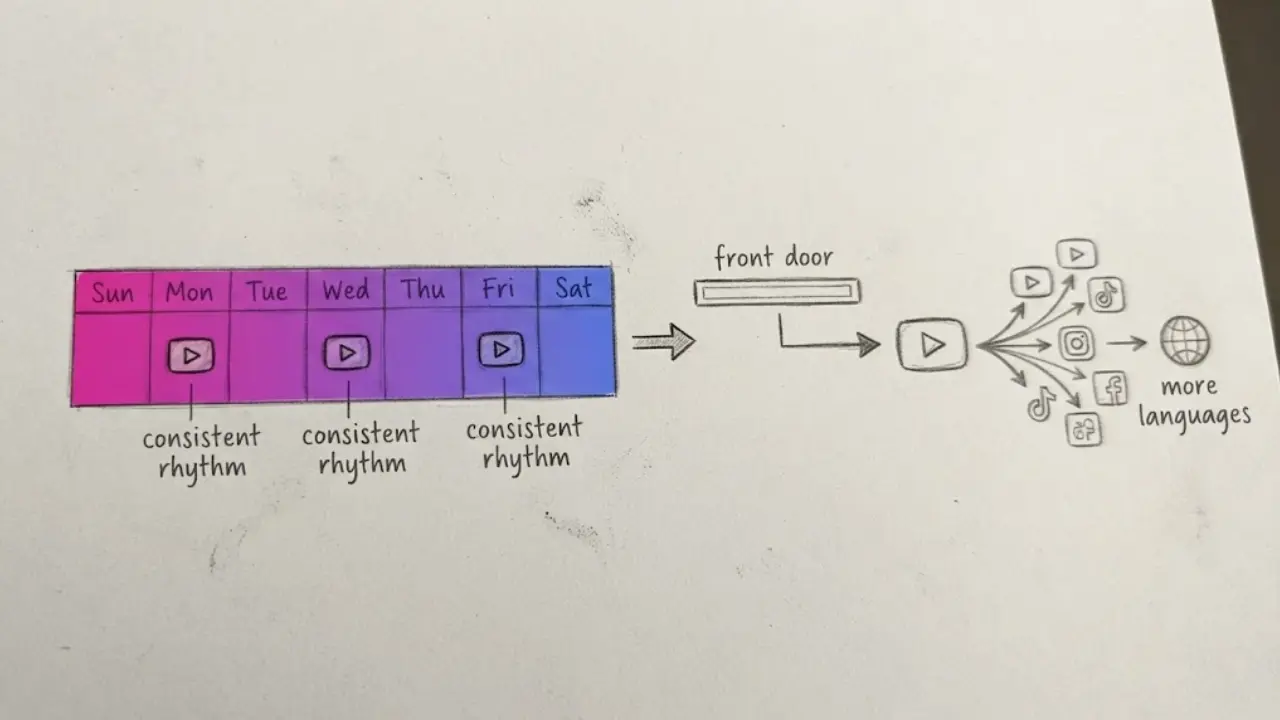
Post on a rhythm you can actually keep
Consistency beats intensity. Three genuinely useful videos a week, every week, will out-grow ten videos in one burst followed by silence. Batching is what makes that rhythm survivable.
Treat the title as the front door
For educational content, the title and thumbnail are the search query the viewer typed, answered. Match the language people use. "Explained", "beginner guide", "why", "how" all signal a clear payoff.
Reuse what works
One lesson can become a Short, a longer explainer and posts on several platforms. If your topic travels, you can also produce the same lesson in more than one language and reach an audience that most creators ignore. Then watch retention on your best videos and make more of what holds people.
If you have a topic you could explain to a friend, you already have your first video. Try it free and make one today: https://facelesslab.video/
Read more
Frequently asked questions
Do faceless educational videos actually make money?
Yes, and often more than entertainment formats, because the ad rates on education can be high. In 2026, personal finance content commonly sits around 18 to 45 dollars CPM, legal and tax around 15 to 40, and business or SaaS around 14 to 35, while broad general education sits lower. Earnings depend on views, watch time and your niche, so a smaller channel in a high-value topic can out-earn a larger one in a low-value topic. The realistic path is to pick a monetizable sub-niche, publish consistently, and let a back catalogue of searchable lessons build up over months.
What should I teach if I am not an expert?
You do not need to be the top expert, only a clear step ahead of your viewer. Teach something you understand well enough to explain without notes, or a topic you are willing to research carefully and cite. Start from the questions people already type, such as "how does X work" or "beginner guide to X", and answer one per video. Accuracy matters more than credentials here, so double-check facts, avoid promises you cannot back up, and focus on clarity. Confidence comes from preparation, not from a job title.
How do I make educational videos without showing my face?
Use a script, a voice and visuals instead of a camera. Write or generate a clear script, add an AI voiceover that sounds like a calm narrator, pair each line with a matching visual, add captions and light background music, then export in the right aspect ratio. Inside Faceless Lab this happens in one workflow: you type a topic, pick a structure and style, edit the script, choose a voice, and the app builds the visuals, music and captions around it. You review, tweak and publish, all without ever appearing on screen.
How long should a faceless educational video be?
Match the length to the question. For a single idea, 30 to 60 seconds works well on YouTube Shorts, Instagram Reels and TikTok, and short lessons tend to hold retention because there is no room to drift. When a topic genuinely needs steps, a two to five minute explainer gives you space to build up an idea without padding. Faceless Lab supports both, up to five minutes. The rule of thumb is simple: say one useful thing, say it clearly, and stop when the payoff has landed rather than filling time.
Which educational niche is best for a faceless channel?
The best niche is one you can sustain and that an advertiser values. High-value lanes in 2026 include personal finance, AI tools and software, business and SaaS, and legal or tax explainers, all of which combine steady search demand with strong ad rates. Health, science and "how things work" are excellent for evergreen curiosity, while language, history and skills are naturally series-friendly. Pick one lane rather than teaching everything, because a focused channel is far easier to subscribe to and the algorithm learns who to show it to faster.
Can Faceless Lab publish my educational videos automatically?
Yes, with one deliberate exception. Faceless Lab can schedule and auto-publish your videos to YouTube, Instagram, Facebook and LinkedIn, so a batch you make on Monday can go out across the week on its own. TikTok is kept out of fully automatic publishing and requires your explicit consent each time. Autopilot, which generates and schedules content for you, is currently in beta, so it is worth checking the first automated runs before you trust it fully. You always choose the topics and the schedule, and the app handles the production and the posting around them.
Related articles
Dog and Cat Tips Make a Faceless Channel That Owners Come Back To
Pet owners search for tips every day, and each answer fits one short. Learn how to pick an audience, write safe tips, and publish a faceless dog and cat channel without ever filming.
Faceless What If Videos Are the Easiest Way to Turn Curiosity Into Views
Curiosity sells, and you never have to show your face. Here is how to make faceless what if videos with AI, which formats hold attention, and how to turn one idea into a daily series.
Keep the Same Character in Every Faceless Video Without Redrawing Anything
AI characters tend to change face, outfit and style from one video to the next. Here is how to keep one recurring character across a whole faceless channel, step by step.