Ride the Movie Season With a Faceless Movie Facts Channel
Big premieres land on November 20 and December 18. Here is how to start a faceless movie facts channel with AI, what formats work with no footage, and how to stay safe on copyright.

Stefano Ventrudo
CTO at Faceless Lab
How to start a faceless movie facts channel with AI, which formats work without any footage, a posting plan that runs through the big December premieres and the copyright habits that keep your videos safe.
Can you run a movie channel without showing your face or using a single clip from the film? Yes, and the next two months are a good time to start. The Hunger Games: Sunrise on the Reaping opens on November 20, 2026, and both Avengers: Doomsday and Dune: Part Three open on December 18. Every one of those dates brings a wave of searches for facts, timelines, trivia and predictions, which is exactly the kind of content a faceless movie video can cover. We run faceless channels ourselves, and this is how we would build a movie facts channel with AI doing the script, voiceover, visuals, music and captions.
Executive Summary
A faceless movie channel publishes short vertical videos about films, such as trivia, timelines, release countdowns, character backstories and "what to know before you watch" explainers, narrated over original AI visuals with no presenter and no footage from the movies. The release calendar gives you fixed dates to plan around: November 20 for The Hunger Games: Sunrise on the Reaping and December 18 for Avengers: Doomsday and Dune: Part Three. The safe way to do it is to talk about the films with your own script and your own visuals, and to skip studio clips, posters and trailers. Faceless Lab handles the script, voiceover, visuals, music and captions, and schedules the finished videos to your connected platforms.
Table of Contents
- Why movie season works for a faceless channel
- Faceless movie video formats that need no footage
- How to make a faceless movie video inside Faceless Lab
- A posting plan from now to December 18
- Stay on the right side of copyright and spoilers
- Where Faceless Lab fits and where it does not
- What to post when the premieres are over
1. Why movie season works for a faceless channel
Movies come with a built-in calendar. Studios announce dates months ahead, fans start counting down, and search interest climbs in the weeks before opening day. For a creator, that means you can plan content around dates that will not move on you at the last minute.
Why movie topics suit faceless videos:
- The audience wants information. People search for cast lists, reading order, background lore, runtimes and "do I need to watch the first one" answers. A clear voice and good visuals deliver that without a presenter.
- Fans like to rewatch and share. A trivia video or a timeline gets sent to a friend with the message "did you know this", which is the kind of sharing a new channel needs.
- Several premieres stack up. With one film on November 20 and two on December 18, you can run three overlapping waves of content from a single channel.
- The format is flexible. The same channel can cover big franchises today and any other film next month, so it does not depend on one title.
The honest catch is competition. Movie content is crowded, and big entertainment accounts post fast. You win by being specific, accurate and consistent, and by choosing a clear angle such as one franchise, one genre or one type of video.
2. Faceless movie video formats that need no footage
You do not need a single frame from a film to make a good movie video. These are the formats we would put in a first batch.
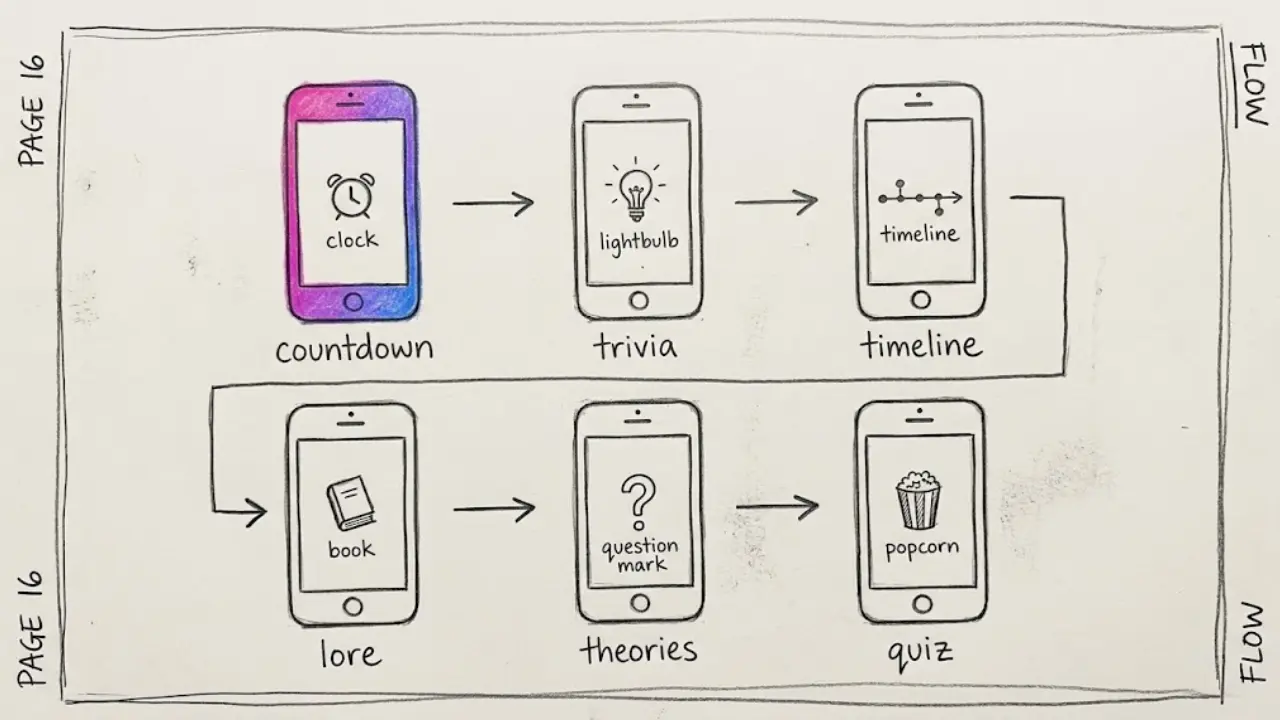
Countdown and release explainers
"Everything to know before Sunrise on the Reaping opens" or "Three things to remember before Dune: Part Three". These are timely, easy to script from public information and good for the first week of a wave.
Trivia and behind the scenes facts
Short lists of facts about a franchise, its source material or its production. Keep each fact verifiable and write down where you found it.
Timelines and recaps of the story so far
A calm, spoken timeline of the events before the new film. This helps casual viewers catch up, and it needs only original illustrated visuals.
Character and lore explainers
One character or one piece of lore per video, told like a story. These do well as a series because viewers come back for the next one.
Prediction and theory videos
"What might happen next" content gets comments because viewers argue with you. Label it clearly as opinion so nobody confuses it with fact.
Quiz and "guess the movie" videos
A quiz keeps people watching to the answer. It works without footage when you describe the scene with words and original visuals.
Each one maps onto a video shape from our structures guide, usually the list, the explainer or the question format.
3. How to make a faceless movie video inside Faceless Lab
This is the workflow we use for a topical video, from the first idea to a file that is ready to schedule.
- Start from a topic or a script. Type the idea, for example "five facts to know before The Hunger Games: Sunrise on the Reaping", or paste a script you wrote. If you want control, edit the generated script before anything else is built.
- Pick a structure. Faceless Lab has 8 video structures. The list fits trivia, the explainer fits timelines and lore, and the question format fits quizzes and theories.
- Choose a voice. There are 200+ ElevenLabs voices. For a dramatic franchise, a deeper and slower voice usually works better than a bright one.
- Set the visual style. Pick from 39 styles, and use the multi-model setup through Replicate to match the look to the scene. A dark cinematic style suits a thriller, and a bold illustrated style suits a superhero countdown.
- Let it assemble. The app builds the voiceover, visuals, background music and captions into a finished vertical video, usually in two to five minutes.
- Review and fix. Read the captions, check every fact against a reliable source, swap any visual that looks too close to a real poster and send the video to your schedule.
You choose the idea, the angle and the tone. The production work is what goes away.
💡 Ready to try it with your first idea? Create a free account and make your first movie video.
4. A posting plan from now to December 18
A topical channel works best when the content ramps up toward each date. This plan starts this week and runs through the last premiere.
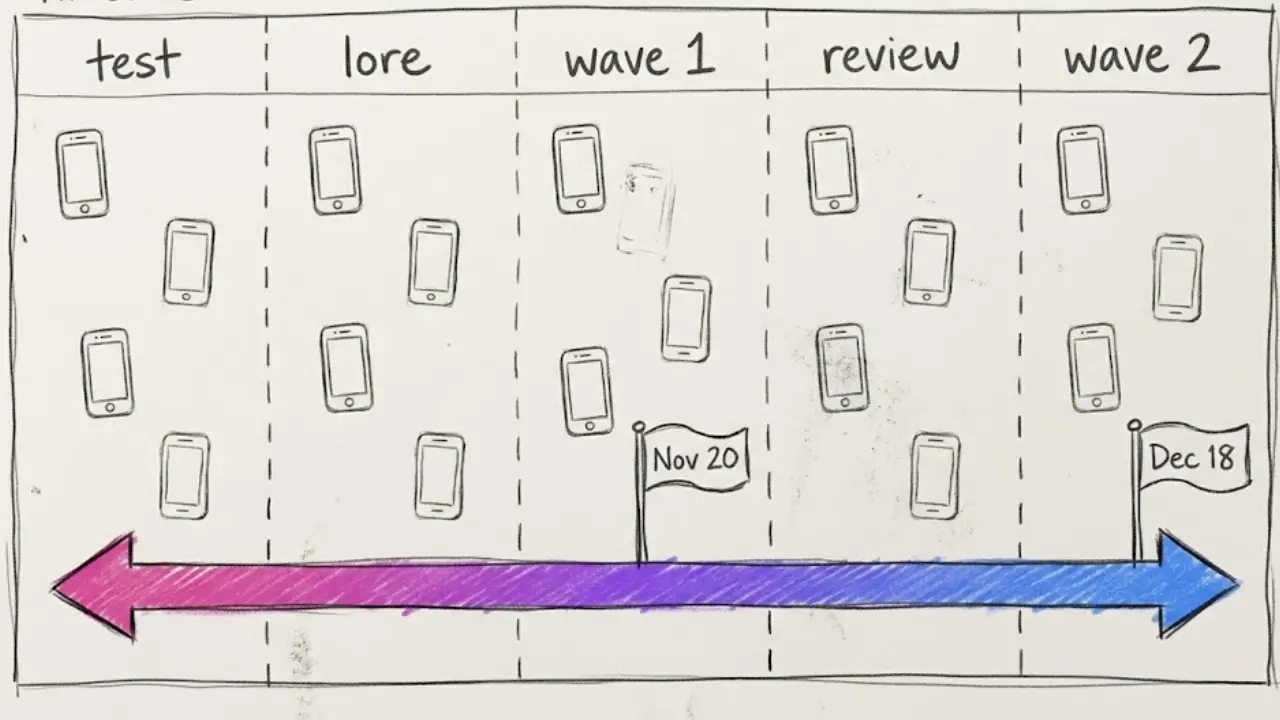
- Week of October 19: build and test. Make a batch of eight to ten videos in one sitting, mixing trivia, a timeline and a quiz. Post two or three and see which format holds attention.
- Week of October 26 to November 9: lore and recaps. Post the story-so-far and character videos while interest is still building.
- Week of November 9 to November 20: Hunger Games wave. Post countdowns, trivia and "what to know" videos, with the heaviest posting in the final week.
- Week of November 23 to December 7: pause and look at your numbers. Keep two videos a week going, and use the data to pick your best format for December.
- Week of December 7 to December 18: Avengers and Dune wave. Publish countdowns and recaps for both films, since the two premieres share a date and a very large audience.
The easiest way to keep this alive is batching. Write all your ideas in one sitting, generate the videos in one afternoon and schedule them across the weeks. Faceless Lab publishes to your connected platforms on schedule, so the plan runs while you do other things.
💡 How to batch a month of faceless videos in one afternoon
5. Stay on the right side of copyright and spoilers
Entertainment is the niche where this matters most, so we want to be clear about it. We are not lawyers, and this is general guidance rather than legal advice.
Do not use studio footage. No clips from the films, no trailer cuts and no screenshots. Original AI visuals and your own voiceover keep the video yours.
Do not copy posters or logos. Make illustrated scenes that evoke a mood. If a generated image looks too close to a known poster or a recognizable character design, regenerate it.
Do not pose as the studio. Make it clear that your channel is an independent fan channel. Do not use official names in your channel name or imply any partnership.
Respect spoilers. Put a spoiler warning at the start of any video that reveals plot points, and keep pre-release videos spoiler free. Viewers trust channels that warn them.
Keep facts sourced. Release dates, cast names and production details change. Check them on the day you record, and describe rumors as rumors.
Be open about AI. Platforms have their own labeling and originality rules. Add your own research, ideas and commentary so every video has a clear human contribution.
6. Where Faceless Lab fits and where it does not
We would rather you start with clear expectations.
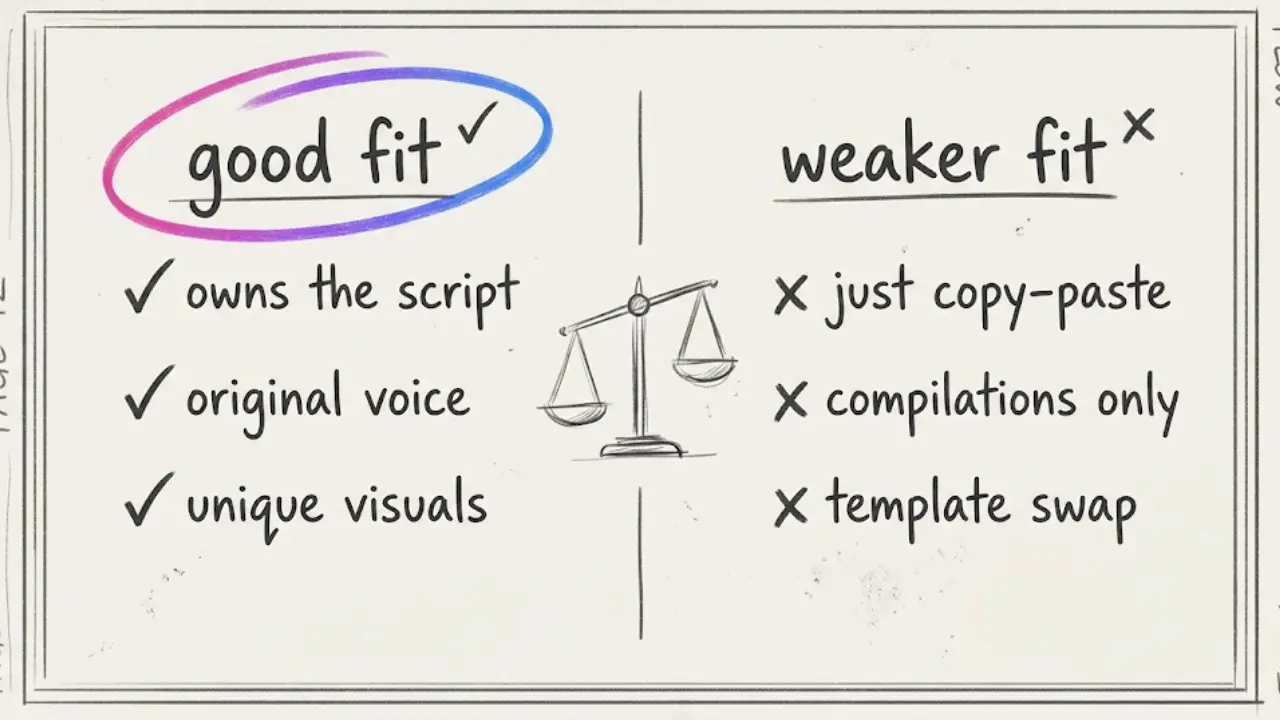
Faceless Lab is a good fit when:
- You want a batch of topical videos live within a couple of weeks and do not want to edit each one by hand.
- You like planning angles and checking facts more than dragging clips on a timeline.
- You want to schedule weeks of posts in advance and let them go out on their own.
It is the wrong fit when:
- You want to show real footage, trailers or reaction clips. We do not offer that, and it would be a copyright risk anyway.
- You expect the app to verify facts or break news. It builds the video, and accuracy remains your job.
- You need guaranteed views. A good idea and good timing help, and nothing replaces testing and consistency.
On platforms, one honest note: TikTok is excluded from fully automatic auto-publish and needs your explicit consent, so plan a quick manual step there. You can try everything on the free trial at €0 first, and the paid monthly plans are Starter at €19, Growth at €59 and Pro at €149.
7. What to post when the premieres are over
A topical channel has a second job, which is to stay alive when the hype fades. Movies keep coming, and your audience stays interested in the same type of video.
- Reuse what worked. Check which formats held attention and make more of them for the next release.
- Move to older films. Anniversary trivia and "movies you forgot about" videos have a long shelf life and need no release date.
- Turn it into a series. The Series feature keeps the look, voice and structure consistent across episodes, so a weekly "movie fact of the week" becomes a recurring show.
- Try Autopilot. It is still in beta, and it pushes the process further toward hands-off, so review its output before you rely on it.
- Plan the year end. Lists and recaps of the year's films are a natural next step as December closes.
A faceless movie channel rewards early planning, original visuals and accurate facts, and Faceless Lab covers the production so you can focus on those. Pick one film from this guide, make the first video this week and see how your audience responds. If a video does well, repost it on your other platforms and share the app with a friend who is stuck on editing. And if you like Faceless Lab, our affiliate program is an easy way to earn while you share it.
Try Faceless Lab free and make your first movie video today.
Read more
Frequently asked questions
What is a faceless movie channel?
A faceless movie channel publishes short videos about films with a narrator voice and original visuals instead of a presenter on camera. Typical topics include trivia, timelines, release countdowns, character and lore explainers, theories and quizzes. The channel talks about the movies without using footage from them. With a tool like Faceless Lab you write or generate the script, pick a voice and a visual style, and get a finished vertical video with music and captions in a few minutes.
Can I use movie clips or trailers in a faceless video?
We recommend against it. Clips, trailer cuts, posters and screenshots belong to the studios, and using them can lead to copyright claims, demonetization or strikes. A safer approach is to write your own script, record or generate your own voiceover and use original AI visuals. Keep your channel clearly independent, and do not imply any partnership with a studio. This is general guidance and not legal advice, so check the rules of each platform you post on.
When are the next big movie releases in 2026?
At the time of writing, The Hunger Games: Sunrise on the Reaping is set to open on November 20, 2026, and both Avengers: Doomsday and Dune: Part Three are set for December 18, 2026, with some international dates a few days earlier. Release dates can move, so check an official source on the day you record. Planning around these dates lets you build one wave of content for each premiere.
How do I make a movie trivia video with AI?
Type your idea or paste a script into Faceless Lab, such as "five facts to know before a new franchise film". Pick a structure like the list, choose a voice from 200+ ElevenLabs voices and set a visual style from 39 options. The app builds the voiceover, visuals, music and captions into a vertical video. Then read the captions, verify each fact against a reliable source, swap any visual that looks too close to a real poster and schedule the video.
How do I handle spoilers in faceless movie videos?
Keep videos made before a release spoiler free, and put a clear spoiler warning at the start of any video that reveals plot points after it. Use the caption or the first line of the voiceover for the warning. Viewers trust channels that respect their experience, and platforms often surface spoiler complaints in comments. Label theories and predictions as opinion so they are not mistaken for confirmed facts.
Can I schedule movie videos automatically?
Yes. Faceless Lab can schedule and publish finished videos to your connected platforms, so a batch made in one afternoon can go live across the weeks before each premiere. One exception applies: TikTok is excluded from fully automatic auto-publish and needs your explicit consent, so plan a short manual step there. Series keeps the look and structure consistent across episodes, and Autopilot, which is still in beta, goes further toward hands-off, so review its output first.
Related articles
Get Your Faceless Thanksgiving Videos Ready Before the Holiday Week Fills Up
Thanksgiving is on November 26, and the window to prepare is open now. Here is how to make faceless Thanksgiving videos with AI, with ideas beyond recipes and a five week posting plan.
YouTube Is Cutting Reach for Re-Uploaded Shorts. A Faceless Channel Can Stay Original
On October 1, YouTube said it will reduce the reach of re-uploaded Shorts. Here is what counts as original, what to avoid, and how to run a faceless channel built on your own scripts.
Make Faceless Diwali Videos for the Festival of Lights, Starting This Week
Diwali peaks on November 8. Here is how to make respectful faceless Diwali videos with AI, which formats get watched, and how to schedule all five days without ever filming.