Write Faceless Video Titles, Captions and Hashtags That Get Found
A good faceless video still stalls with a vague title. Here is a simple routine for titles, captions and hashtags that helps the right viewers and platforms find your videos.
Roberto Pasqualini
CMO at Faceless Lab
How to write faceless video titles, captions and hashtags: a simple routine for the words around your video, so the right viewers can find it on YouTube, Instagram, Facebook, LinkedIn and TikTok.
How do you write titles and hashtags for faceless videos so they actually get found? Most faceless creators spend an hour on the video and ten seconds on the words around it, then wonder why a good short stalls at 200 views. Faceless video titles and hashtags are the first thing a person (and a search engine) reads, and you do not have a face or a thumbnail personality to lean on. We are Stefano and Roberto, we run faceless channels every day, and this is the packaging routine we use.
Executive Summary: Faceless video titles, captions and hashtags tell viewers and platforms what a video is about before anyone presses play. A good title puts the main keyword near the front, promises one clear result and stays well inside the platform limit (YouTube titles cap at 100 characters). A good description or caption repeats the topic in plain language, adds one line of context and ends with a single call to action. Hashtags work best as a short, relevant set of about three to five, placed in the description or caption, instead of a long block copied from another post. Write the words once per platform, keep a reusable template for each, and review them before every post goes live. Faceless Lab builds the script, voiceover, visuals, captions and music, then schedules and publishes to your channels, so you can spend your saved time on this final layer. The free trial costs €0 and paid plans are €19, €59 and €149 per month.
Table of Contents
- Why the words around your video matter as much as the video
- Write titles that say what the video delivers
- Write descriptions and captions people and search can use
- Pick hashtags without overdoing it
- How to set up titles and captions inside Faceless Lab
- Where Faceless Lab is and isn't the right choice
- Build a repeatable packaging routine
1. Why the words around your video matter as much as the video
A faceless video has no presenter to introduce it. The title, the first line of the caption and the hashtags do that job, and they also feed the systems that decide who sees the video.
Search and suggestions read text. Platforms understand your video partly through the script and captions, and partly through the title, description and hashtags you write. If those words are vague, the video has fewer ways to reach the right person.
The title is your hook before the hook. A viewer scrolling past decides in a moment whether the video is for them. A clear title does that work for you, and the first three seconds of the video then have to keep the promise.
Faceless channels need clarity more than personality. On a channel without a face, the topic is the brand. A viewer who understands what a video is about, and what the channel posts every week, is more likely to follow.
Small fixes add up. Rewriting a weak title takes a minute. Across thirty videos a month, that minute is the cheapest improvement you can make.
2. Write titles that say what the video delivers
A strong title answers one question: what will the viewer get if they watch this?
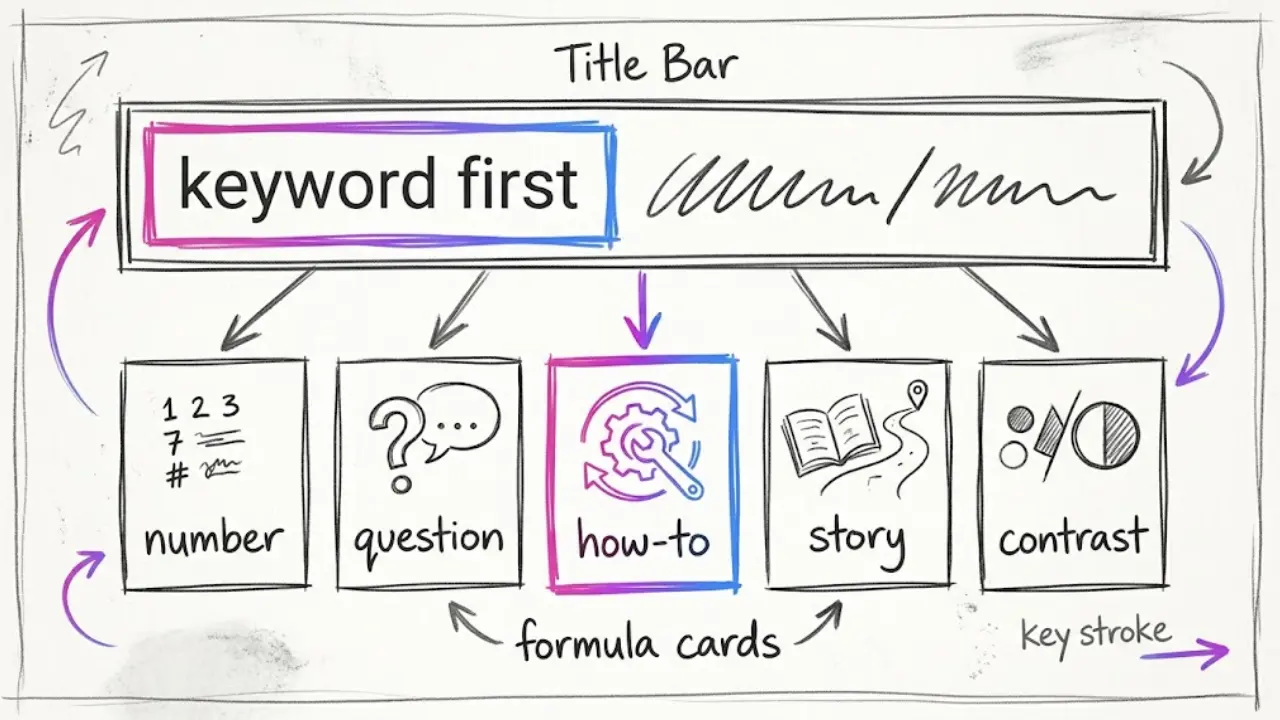
Put the main keyword first. If the video is about the Roman Empire, start with "Roman Empire" and not with a vague opener. Search results and feeds often cut long titles, so the front of the title carries the weight.
Promise one result. "3 Habits That Quietly Ruin Your Sleep" tells the viewer what they get and how much of it. A title that tries to promise five things promises nothing.
Stay under the limit. YouTube titles can be up to 100 characters, and the first part is what most people see in a feed, so keep the important words in roughly the first 50.
Use a few reliable formulas.
- The number: "5 Facts About the Deep Sea Nobody Tells You"
- The question: "Why Do Cats Purr? The Real Reason"
- The how-to: "How to Fall Asleep Faster in 10 Minutes"
- The story hook: "The Strange Story of the Lost City of Atlantis"
- The contrast: "What Looks Healthy but Isn't"
Match the title to the video. If the title promises a ranking and the video does not deliver one, viewers leave early and the platform notices. Write the title after the script is final, so you can promise exactly what the script delivers.
Keep a swipe file. Save the titles on your channel that earned the most watch time and reuse their shape for new topics. A channel with a recognizable title pattern feels like a series.
3. Write descriptions and captions people and search can use
The description on YouTube and the caption on Instagram, Facebook, LinkedIn and TikTok do slightly different jobs, so treat them as separate pieces of writing.
Lead with the point. On YouTube, the first lines of the description show before the "more" link, and on social posts the first line of the caption is what appears before the cut-off. Put the topic and the hook there.
Say the topic in plain words. Write one or two sentences that describe the video the way a person would search for it. This helps search and also helps the viewer who is deciding whether to watch.
Add one line of context. A source, a date, or why the video exists. For news, history and finance channels, this builds trust, and it keeps you honest.
End with one call to action. Ask for one thing: follow, comment with an answer, or watch the next part. Three calls to action in a row look like noise.
Adjust per platform.
- YouTube: a fuller description with the keyword near the top, plus a line pointing to the next video in the series.
- Instagram and Facebook: a short caption with a clear first line and a question that invites a comment.
- LinkedIn: one line of professional context, since the audience is there for insight and not entertainment.
- TikTok: a short, direct first line that matches what the video says in its opening seconds.
Do not paste the same text everywhere. Copying one caption across five platforms is fast, but each platform reads and shows text differently, so a ten-second adjustment per platform pays off.
4. Pick hashtags without overdoing it
Hashtags are labels. Their job is to tell a platform what the video is about, and a short, accurate set does that better than a long list.
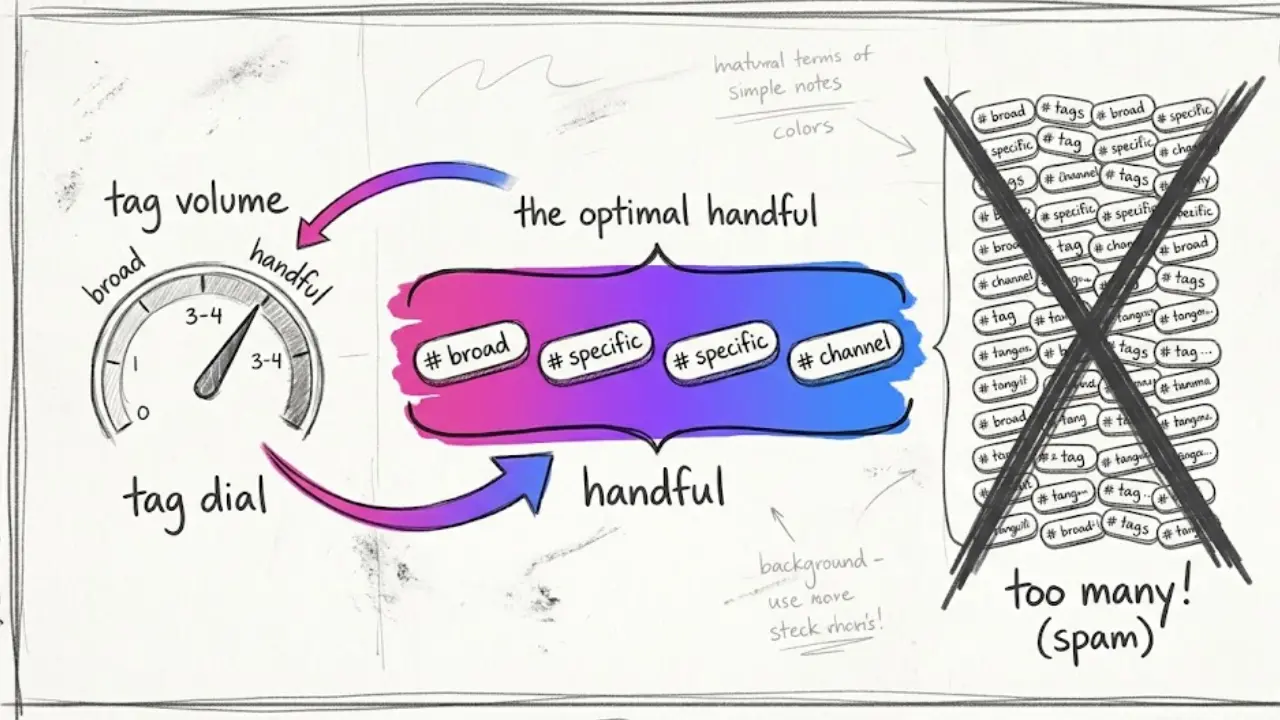
Aim for a handful. Three to five relevant hashtags is a sensible range for most posts. YouTube shows the first few hashtags from your description above the title, and it ignores the hashtags on a video if you add too many, so a long block can work against you.
Mix one broad tag with specific ones. A broad tag such as #facts or #history helps with category, and a specific one such as #romanempire helps the viewer who wants exactly that topic.
Use one tag that belongs to your channel. A branded or series hashtag lets people find your other videos, and it makes the channel feel organized.
Put them where the platform expects them. On YouTube, the description is the usual place. On Instagram, Facebook, LinkedIn and TikTok, they go in the caption.
Skip the irrelevant ones. A trending tag that has nothing to do with your video might get a few extra views from the wrong people, and those viewers leave quickly, which tells the platform your video is not a good match.
Check current rules. Platforms change their hashtag handling from time to time, so read the current help pages for each platform before you build a template.
5. How to set up titles and captions inside Faceless Lab
Faceless Lab produces the finished video, and the text around it takes a few minutes once you have a template. Here is the flow we use.
- Start from your topic. Type the idea into Faceless Lab and generate the script. The topic you type is also your keyword, so keep it specific.
- Finalize the script first. Edit the script until the video says exactly what you want. Titles are easier to write when you know what the video delivers.
- Pick a structure. Faceless Lab has 8 video structures. Using the same structure across a series makes your titles follow a pattern too, such as "5 Facts About..." or "The Story of...".
- Choose a voice and a visual style. There are over 200 ElevenLabs voices and 39 visual styles, powered by multiple models through Replicate. Keep one voice and one style per channel so it looks and sounds like one show.
- Generate the video. Faceless Lab assembles the script, voiceover, visuals, automatic captions and background music into a finished short.
- Write the title, caption and hashtags from your template. Use the formulas from section 2 and the checklist from section 3. Take a minute to review the text for each platform in the scheduling step before the post goes live.
- Schedule and publish. You can schedule and publish to YouTube, Instagram, Facebook and LinkedIn. TikTok is excluded from fully automatic auto-publish because it needs your explicit consent for each post.
💡 Ready to try it? Create a free account and make your first video, then write the title and caption with the routine in this article.
6. Where Faceless Lab is and isn't the right choice
We would rather you start with clear expectations.
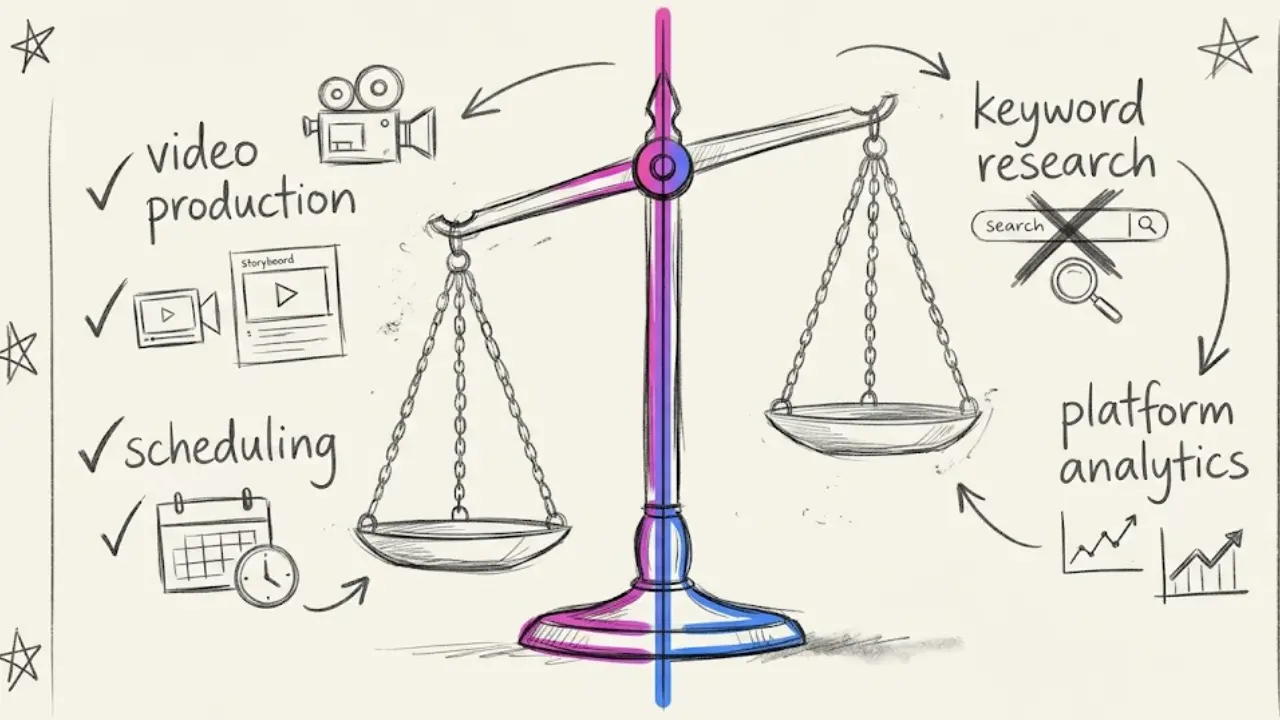
It is a strong fit if you want to publish faceless videos on a steady rhythm without editing each one by hand. You get the script, the voiceover, the visuals, the captions and the scheduling in one place, so you have time left for the packaging work in this article.
It is a weaker fit if you want a tool that writes and A/B tests titles for you, or a keyword research suite with search volumes. Faceless Lab builds and publishes the video. It does not do keyword research, and it does not promise views. You still own the title, the topic choice and the judgment about what your audience searches for.
Use other tools for research. Your platform's own search suggestions and analytics are free and show you what people type and which of your videos earned watch time. Use them alongside Faceless Lab.
A plain note on Autopilot. Autopilot is currently in beta and helps keep a channel fed with less manual work. If you use it, check the text that goes out with each post, because a title is a public promise made in your name.
7. Build a repeatable packaging routine
The goal is a routine you can run in a few minutes per video, so it survives busy weeks.
Create one template per platform. Keep a note with a title formula, a description layout and your hashtag set for each platform. Fill in the topic and publish.
Batch the writing. Write the titles and captions for a whole week in one sitting. Batching keeps your style consistent, and it pairs well with scheduling a week of videos at once.
Review monthly, not daily. Short-form views are noisy from day to day. Once a month, look at the five videos with the best watch time and the five with the worst, and compare their titles. The patterns you see go back into your swipe file.
Refresh older videos. If a video has a weak title and decent retention, rewrite the title. That is one of the quickest fixes available.
Keep it honest. A title that promises what the video delivers builds a channel that people trust. A misleading one might win one click, and it costs you the next ten.
If you want to try this routine on your next batch, start free and make a video today. If this helped, we would love to see you share your results, and if you create content about tools like this, ask us about the affiliate program.
Read more
Frequently asked questions
How do I write a good title for a faceless video?
Put the main keyword at the start, promise one clear result and keep the title within the platform limit, which is 100 characters on YouTube. Write it after the script is final so it matches what the video delivers. Reliable shapes include a number, a question, a how-to and a story hook. Save the titles that earned the most watch time and reuse their pattern, because a recognizable title style makes a faceless channel feel like a series.
How many hashtags should I use on a faceless video?
Three to five relevant hashtags is a sensible range for most posts. Mix one broad tag with one or two specific ones and add a tag that belongs to your channel or series. On YouTube, the first few description hashtags show above the title, and too many can lead YouTube to ignore them all. Platforms change their hashtag handling, so check the current help page for each one before you build a template.
Should I use the same caption on every platform?
It is faster, but a short adjustment per platform works better. YouTube rewards a fuller description with the keyword near the top. Instagram and Facebook suit a short caption with a question. LinkedIn suits one line of professional context, and TikTok suits a direct first line that matches your opening seconds. Ten seconds per platform is usually enough, and it keeps each post looking written for where it appears.
Where do I put hashtags, in the title or the description?
On YouTube, the description is the usual place, because it keeps the title free for keywords and the hook. On Instagram, Facebook, LinkedIn and TikTok, hashtags go in the caption. Whichever place you use, keep them relevant to the video and limit the number. A long block of unrelated tags can attract the wrong viewers, who leave quickly and signal that the video is not a good match.
Can Faceless Lab write my titles and hashtags?
Faceless Lab generates the script, voiceover, visuals, automatic captions and music, then schedules and publishes to YouTube, Instagram, Facebook and LinkedIn. TikTok needs your explicit consent for each post. The title, description and hashtags are yours to write and review in the scheduling step, and we suggest using the templates in this article. Faceless Lab does not do keyword research, so use your platform's search suggestions and analytics for that.
How long does packaging a faceless video take?
With a template per platform, a title, caption and hashtag set takes a few minutes per video, and less when you batch a whole week at once. Write the text in one sitting, schedule the posts across the week and review results once a month by comparing your best and worst titles. Rewriting a weak title on a video with decent retention is one of the quickest fixes available.
Related articles
Style a Dream Room Every Day With Faceless Interior Design Videos
Start a faceless interior design channel with AI rooms, a calm voiceover and captions. Batch a week of home decor videos in one afternoon and schedule them to post themselves.
A Daily Horoscope Channel Is the Easiest Faceless Series to Keep Alive
Horoscopes come with a built-in content calendar. Here is how to pick a lane, build one repeatable format and post daily or weekly astrology readings without ever showing your face.
You Can Build a Fitness Channel Without Filming a Single Workout
Start a faceless fitness channel with AI visuals, a clear voiceover and captions. Batch a month of workout Shorts now, schedule them, and be ready before January hits.