Brand a Faceless Channel So Viewers Recognize It Without a Face
No face means your brand has to do the remembering. Here are the five signals that make a faceless channel recognizable, and how to set them once and keep them steady across every video.

Stefano Ventrudo
CTO at Faceless Lab
A practical guide to faceless channel branding: the five signals viewers actually notice, how to set them once in Faceless Lab, and how to keep them consistent as you post more.
How do you brand a faceless channel when there is no face for people to remember? That is the real question behind faceless channel branding, and it matters more than most new creators expect. On a person's channel, the host is the brand. On yours, the name, the look, the voice and the little recurring details have to do that job. We run faceless channels ourselves, and the ones that grow are almost never the ones with the fanciest logo. They are the ones a viewer can spot in half a second.
Faceless channel branding is the set of recurring signals that make your videos recognizable without a presenter: a clear channel name and handle, one visual style, one voice, a logo or watermark, and a repeatable video structure. Viewers remember patterns, so the goal is to choose each signal once and then repeat it in every video, on every platform. You do not need a designer or a big budget. You need a few decisions made early, a tool that applies them automatically, and the discipline to leave them alone for at least a month so the pattern has time to stick.
Table of Contents
- Why branding matters more when there is no face
- The five brand signals viewers actually notice
- How to brand your videos inside Faceless Lab
- Name, handle and profile that match across platforms
- Keep the brand consistent as you scale
- Where Faceless Lab branding is and isn't the right choice
- Brand mistakes that cost you trust
1. Why branding matters more when there is no face
When a creator shows up on camera, viewers attach to a person. They recognize the face, the voice and the mannerisms, and they come back for that person even when the topic changes. A faceless channel does not get that shortcut, so the recognition has to come from somewhere else.
That is good news and a warning at the same time:
- The good news is that a brand is a system, and systems are repeatable. You can build one in an afternoon and apply it to every video forever. A style and a voice can be batched. A face cannot.
- The warning is that sameness works against you when it is accidental. Many faceless feeds look interchangeable because they use the same stock clips, the same default voice and the same trending sound. Viewers scroll past them because nothing says whose video it is.
- A recognizable channel earns the second video. The first view comes from the topic. The follow, the save and the return visit come from the feeling that this is a channel and not a one-off clip.
Branding also helps you behind the scenes. When your look and voice are decided, every new video is mostly a new idea and a new script. If you are still choosing the basics, our guide to starting a faceless YouTube channel from scratch covers the setup around this.
2. The five brand signals viewers actually notice
You do not need ten brand rules. Five are enough, and each one can be decided in a single sitting.
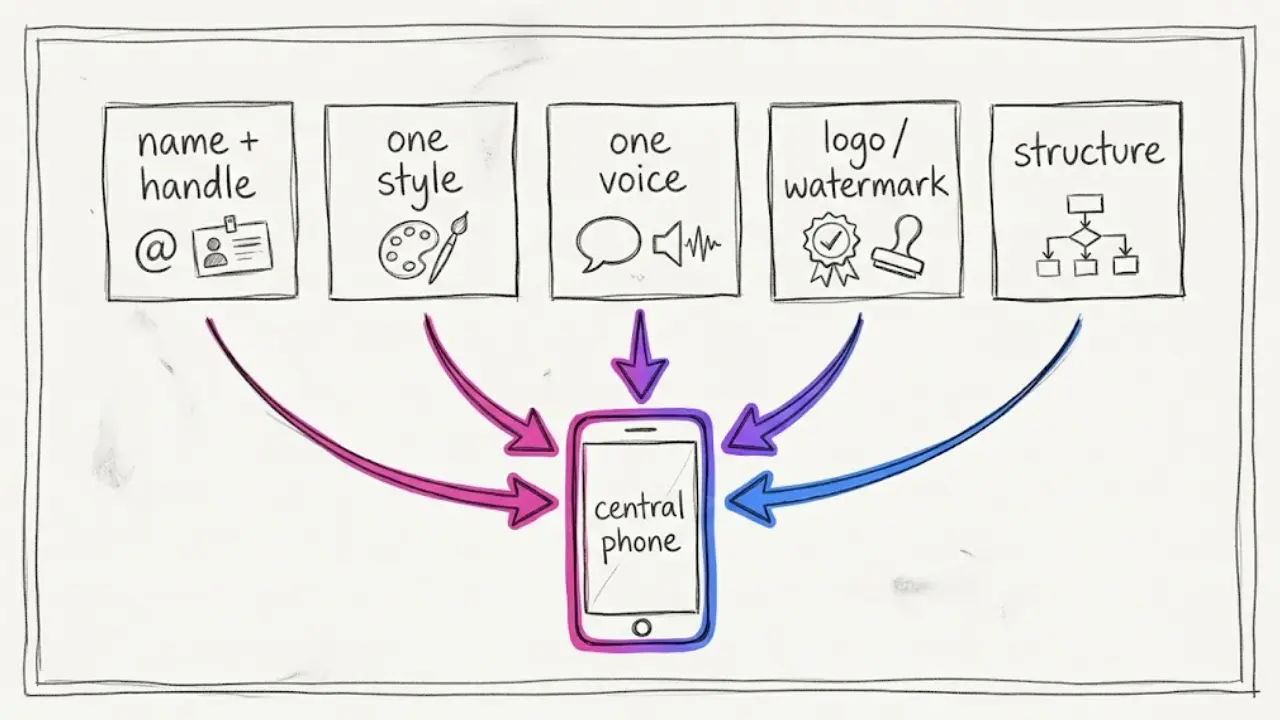
A name and handle that say what you do
"Calm Facts Daily" tells a viewer what they get. "XQ Studio 77" tells them nothing. Pick a name that hints at the topic or the feeling, keep it short enough to read on a small screen, and check that the same handle is free on the platforms you plan to use.
One visual style
This is the biggest signal. Faceless Lab has 39 visual styles, from 3D cartoon to realistic. Pick one and use it for a full batch before you even think about changing it. If your videos feature a recurring figure, our guide to keeping the same character in every faceless video shows how to hold it steady.
One voice
A voice is the closest thing a faceless channel has to a face. With 200+ ElevenLabs voices, the temptation is to rotate. Resist it. Choose one voice that fits your topic and keep it, because familiarity is what people remember. We compare options in our guide to picking an AI voice that fits your channel.
A logo or watermark
A small logo or watermark in the same corner of every video does two things. It tells viewers whose video they just watched, and it makes reposts and re-shares easier to trace back to you. Keep it simple and readable at phone size. A plain letter mark or a short name often beats a detailed illustration.
A repeatable structure
Viewers feel a channel's rhythm even when they cannot describe it: the hook, the pacing, the way every video ends. Faceless Lab offers 8 video structures, and sticking with one or two of them gives your channel a recognizable shape. Our breakdown of the 8 faceless video structures helps you choose.
3. How to brand your videos inside Faceless Lab
This is the setup we use when we start a new channel. You make the decisions once, and the tool applies them to every video after that.
- Describe the channel in Series. Series asks for the context of your channel or business: what it is, who it is for, your goal, the tone and the style. Faceless Lab then generates ideas, scripts and social captions in batches of up to 6, all shaped by that description, so your tone stays the same from video to video.
- Add your logo or watermark. Series includes a logo and watermark option, so your mark is applied to the videos automatically and you do not have to place it by hand each time.
- Choose one visual style. Pick from the 39 styles and keep it for the whole channel. If your channel uses a recurring character, turn on character consistency.
- Choose one voice. Listen to a few of the 200+ ElevenLabs voices on the same sample line and pick the one that sounds like your channel.
- Pick a structure. Leave it on Auto while you test, then settle on one of the 8 frameworks once you see which one your audience finishes.
- Style your captions and music. Subtitles are customizable, so choose one font treatment and keep it. For background music, pick tracks with a similar mood, and check the license information shown for each one. Our guide to subtitles that keep people watching covers readable caption choices.
- Review, then schedule. Check the first few videos side by side to make sure they feel like one channel. Then schedule and publish to YouTube, Instagram, Facebook and LinkedIn. TikTok needs your explicit consent, so it is left out of fully automatic publishing.
Once these settings are in place, a new video takes an idea and a few minutes. The brand is already built in.
💡 Ready to set up your channel look? Create your first video free.
4. Name, handle and profile that match across platforms
Branding does not stop at the video. A viewer who likes a Short will often tap your profile before deciding to follow, and a mismatch there costs you the follow.
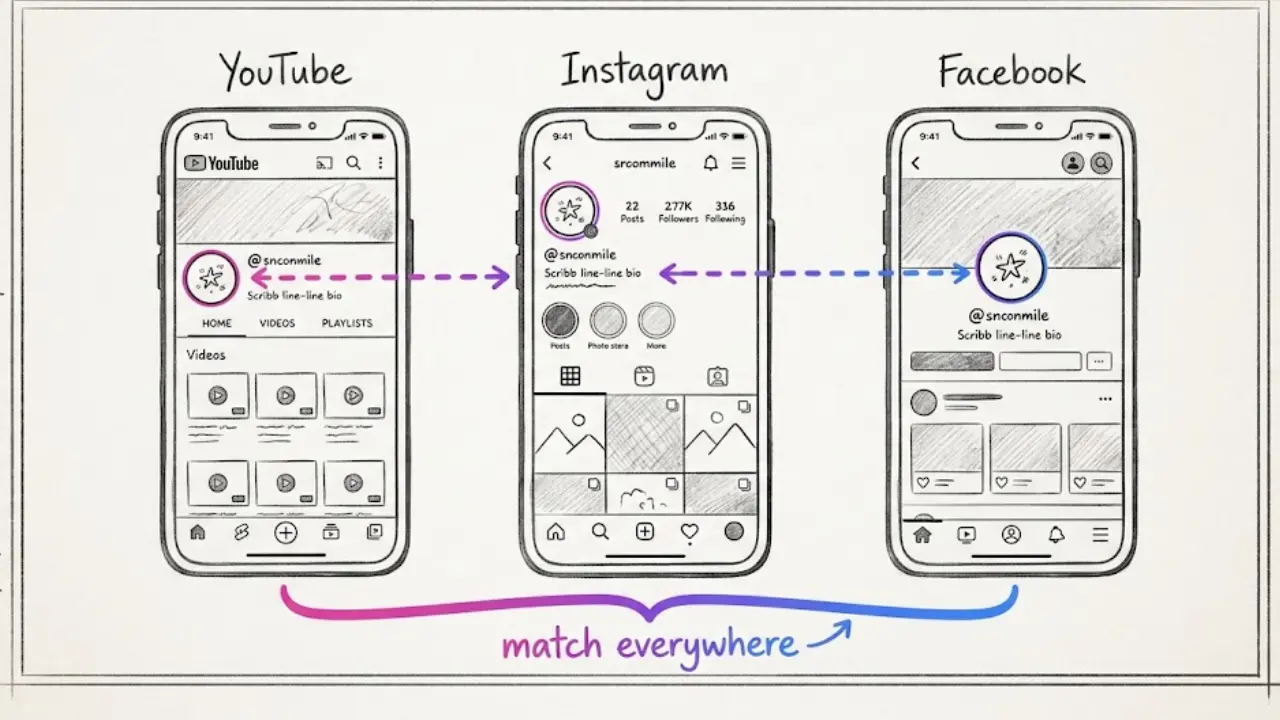
Use the same name and handle everywhere you can. If the exact handle is taken on one platform, add a short, consistent suffix on all of them instead of inventing a different name for each.
Write a one-line promise in your bio. "Daily 30-second space facts" beats "Welcome to my channel." It tells a new visitor what they will get and when.
Reuse your logo as the profile picture. The mark that appears in your videos should be the same one people see next to your name. That link is what turns a recognized video into a recognized channel.
On YouTube, use the channel customization tools. YouTube Studio lets you set a banner, a profile picture and a video watermark that appears on your videos for viewers. Check the current image requirements in YouTube Studio before you upload.
Match your titles and captions. A repeatable title pattern helps people recognize a series at a glance. Our guide to writing titles, captions and hashtags that get found shows how to keep that consistent without sounding robotic.
Make covers look like a family. If your platform supports thumbnails for Shorts, use the same layout, color and type treatment each time. We cover that in making your Shorts thumbnails earn the click.
5. Keep the brand consistent as you scale
Most brand problems do not appear in video one. They appear in video forty, when you are tired and tempted to try something new.
Write a one-page brand note. List your channel name, handle, style name, voice name, structure, caption font and logo position. When you or a teammate make a new video, you check the note and not your memory.
Change one thing at a time. If you want to test a new style or voice, do it for a short run of videos and compare results before you switch the whole channel. Changing five signals at once makes it impossible to learn what worked.
Batch so the brand stays identical. Videos made in the same sitting with the same settings look like siblings. Our guide to batching a month of faceless videos in one afternoon shows the routine.
Let Series carry the format. Because Series keeps your channel description, tone and style in one place, new batches start from the same brief. Autopilot (beta) can take ideas all the way to publishing on the platforms it supports, but you still own the brand decisions and should review what goes out.
Review every month. Look at your last ten videos in a row. If a stranger would think they came from one channel, the brand is working. If not, find the signal that drifted and fix it.
6. Where Faceless Lab branding is and isn't the right choice
Here is how the two of us see it.
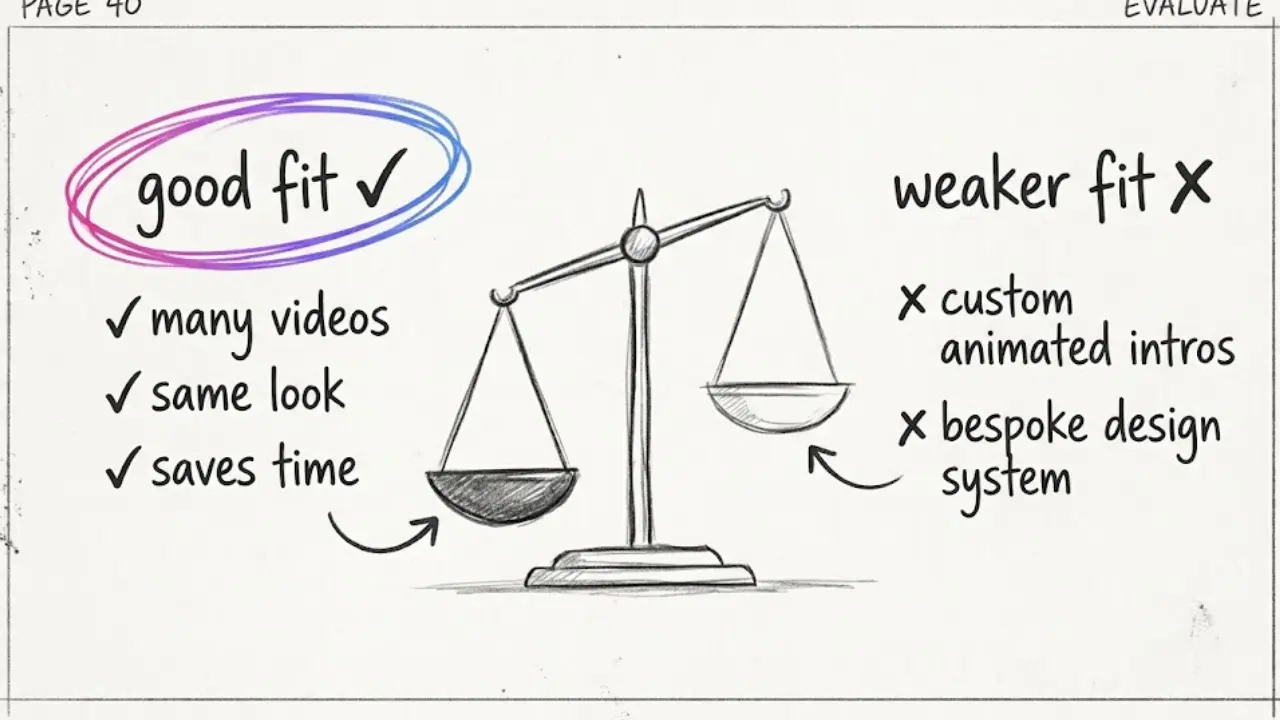
It is a strong choice if you want a channel that looks and sounds the same across dozens of videos without placing a logo, matching a voice and restyling captions by hand every time. It also suits you if you publish often, because the settings you choose once save the most time when the volume is high.
It is a weaker choice if you want a fully custom motion identity, such as an animated logo sting, a bespoke typeface system or hand-built intros designed frame by frame. In that case a traditional editor and a designer will give you more control. A logo or watermark is also only as good as the file you give it, so a blurry or crowded mark will still look blurry or crowded.
Faceless Lab has limits too. Automatic publishing covers YouTube, Instagram, Facebook and LinkedIn, and TikTok needs your explicit consent. Autopilot is still in beta, so treat it as a strong assistant and not as something you can stop checking. AI visuals can occasionally get small details wrong, so give each video a quick look before it goes out. If you want to try the workflow first, the free trial costs €0, and the paid plans are Starter at €19, Growth at €59 and Pro at €149.
7. Brand mistakes that cost you trust
A few habits quietly undo good branding. They are easy to avoid once you know them.
Rotating voices and styles to "keep it fresh." Freshness comes from new ideas. The container should stay familiar, because that is what makes a viewer say "oh, it's that channel."
Copying another channel's identity. Borrowing a look is tempting when something is working. Using another creator's name, logo or mascot, or hinting at a connection you do not have, can confuse viewers and put your channel at risk. Build your own mark.
Using logos or footage you do not have rights to. Generate your own visuals or use material you are allowed to use, and keep third-party brand marks out of your videos.
Overdesigning the watermark. If it covers captions or competes with the action, viewers learn to ignore it. Small, simple and in the same spot works best.
Promising what the channel does not deliver. A name like "Daily Money Secrets" sets expectations you must meet. Make the promise honest and keep it modest, and disclose sponsorships or affiliate links clearly where they apply.
Forgetting the original voice. A brand is a set of habits, but the ideas still have to be yours. Add your own opinion, your own examples and your own angle, because that is what separates a channel from a template.
Faceless channel branding is a handful of decisions you make once and keep repeating. Choose your name, style, voice, logo and structure, let the tool apply them, and give the pattern a month to settle. If one of your videos takes off, repost it on your other accounts and tag it so people can find you, and if you like the tool, our affiliate program pays you to send other creators our way.
Set your channel look once, start free and let every video carry your brand: https://facelesslab.video/
Read more
Frequently asked questions
What is faceless channel branding?
Faceless channel branding is the set of repeating signals that make your videos recognizable when no presenter appears on screen. It usually includes a clear channel name and handle, one visual style, one voice, a logo or watermark and a consistent video structure. Viewers remember patterns, so the goal is to pick each signal once and repeat it across every video and platform. Faceless Lab helps by applying your chosen style, voice, structure and watermark automatically, so each new video matches the last one.
How do I brand a YouTube channel without showing my face?
Start with a name that says what you cover, then lock one visual style, one voice and one video structure. Add a simple logo or watermark in the same corner of every video, and reuse the same mark as your profile picture. In YouTube Studio you can set a banner, a profile image and a video watermark. Write a one-line promise in your bio, keep titles in a repeatable pattern and give the look a full month before changing anything.
Can I add a logo or watermark to my AI videos in Faceless Lab?
Yes. Series in Faceless Lab includes a logo and watermark option, so your mark can be applied to your videos automatically instead of being placed by hand each time. Use a simple, high-contrast file that stays readable at phone size, and check the first few videos to make sure it does not cover captions. If you want a fully custom animated logo sting, you would still build that in a dedicated editor.
Should a faceless channel use the same AI voice in every video?
In most cases, yes. A voice is the closest thing a faceless channel has to a face, and hearing the same one each time builds familiarity. Faceless Lab offers 200+ ElevenLabs voices, so you can compare several on the same sample line and then commit to one. If you want to test a different voice, try it on a short run of videos and compare results before switching the entire channel, so you can tell what actually changed.
How many visual styles should I use on one channel?
Start with one. Faceless Lab offers 39 visual styles, which makes it tempting to switch often, but a single style repeated across a batch is what makes your videos look like they belong together. Once the channel has momentum, you can test a second style on a small set of videos, or give a recurring series its own look, while keeping your voice, watermark and structure the same so the brand still holds.
How much does it cost to set up a faceless brand with Faceless Lab?
You can start on the free trial at €0 to test your look, voice and workflow before paying. The paid plans are Starter at €19, Growth at €59 and Pro at €149, so you can move up when the channel needs more output or automation. Faceless Lab bundles script, voiceover, visuals, captions, music, scheduling and publishing, which means you do not have to pay for several separate tools just to keep your brand consistent.
Related articles
Make Faceless Gift Guide Videos Before the Holiday Shopping Rush Peaks
Gift guides are the easiest seasonal win for a faceless channel. Pick a format, script honest picks, add AI voice and visuals, and schedule the whole run before the rush.
Start a Faceless Beauty Channel With Skincare Tips People Save
You do not need to show your face to run a beauty channel. Here are the formats, the angle and the exact steps to make skincare and makeup tips with AI, plus where this approach falls short.
Tell Stories on Shorts and Reels Without Ever Showing Your Face
Storytelling is the format that makes faceless videos feel human. Pick a story type, build a hook and a turn, add an AI voice and visuals, then schedule a whole series.