Turn a Script You Already Wrote Into a Faceless Video in Minutes
You already have the words. Here is how to turn a finished script into a faceless video with voiceover, visuals, music and captions, and get it scheduled without opening a video editor.

Stefano Ventrudo
CTO at Faceless Lab
Faceless Lab turns an idea or a finished script into a publish-ready faceless video, with voiceover, visuals, music and captions in one place. This guide shows how to start from a script you already wrote.
How do you turn a script into a faceless video? You paste it into a video generator that splits it into scenes, reads it with an AI voice, adds visuals, music and captions, and renders a file you can post. If you already have scripts sitting in a notes app, a Google Doc or an old chat, you are most of the way there. The part left is production, and that is the part that eats the hours.
Executive Summary
To turn a script into a faceless video, prepare the script so each sentence is one scene, paste it into a tool like Faceless Lab, choose one of 8 structures and one of 39 visual styles, pick a voice from 200+ ElevenLabs options, review the scenes, captions and music, then render in 9:16, 16:9 or 1:1 and schedule it. A 30-second video needs roughly 75 words of script. Most videos finish generating in 2 to 5 minutes. Faceless Lab has a free trial at €0, then Starter €19, Growth €59 and Pro €149.
Table of Contents
- Why a finished script is the best place to start
- Prepare your script so it turns into good scenes
- How to turn a script into a video inside Faceless Lab, step by step
- Five things that go wrong with a pasted script, and the fix
- One script, three videos
- Where Faceless Lab is and isn't the right choice
1. Why a finished script is the best place to start
Most people who want to make faceless videos get stuck at one of two points. Either they have no idea what to say, or they know exactly what to say and then lose a whole afternoon making it look and sound like a video. If you are in the second group, a script-first workflow is the fastest way through.
Here is why starting from your own words works so well.
- The voice is yours. You wrote the hook, the examples and the ending. The AI does the voice, the pictures and the timing, and the message stays what you meant.
- You skip the blank page. Staring at an empty prompt box is slower than polishing a draft you already have.
- You can reuse what exists. A newsletter paragraph, a thread, a customer FAQ, a chapter outline or a script you drafted in another AI chat can all become a video.
- You control the facts. If your niche needs accuracy, such as finance, health basics or history, you check the script once and the video follows it.
We (Stefano and Roberto) use both routes. Some videos start from a one-line idea and a generated draft. Others start from a script one of us wrote by hand, because we wanted a specific joke or a specific number to land. Faceless Lab handles either.
2. Prepare your script so it turns into good scenes
A script written for reading is not the same as a script written for watching. Ten minutes of prep before you paste saves you most of the editing afterwards.
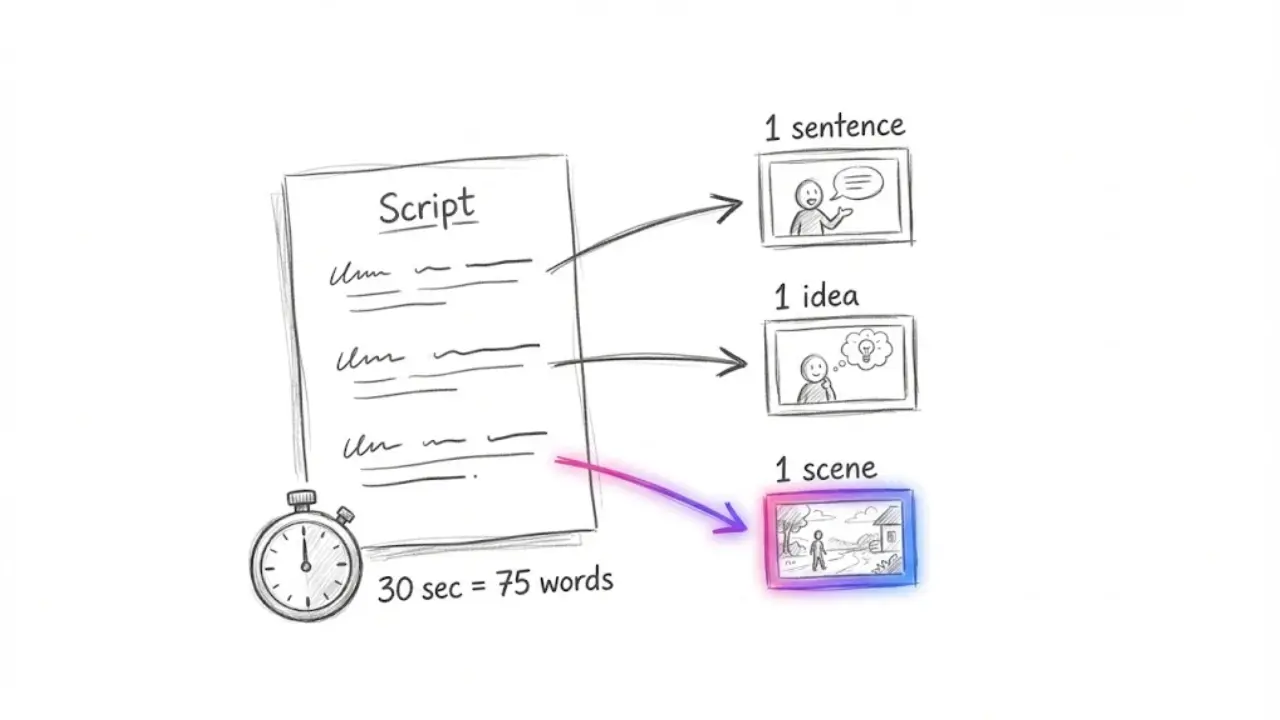
Match the length to the video you want
Spoken English runs at about 150 words a minute, which is roughly 2.5 words a second. That gives you a simple rule of thumb.
- 15 seconds: about 35 to 40 words
- 30 seconds: about 75 words
- 60 seconds: about 150 words
Short-form platforms reward videos people finish, so cut anything that does not earn its seconds. If you want to go deeper on this, we covered what faceless video length actually gets watched to the end.
Write one idea per sentence
Each sentence will usually become one scene with one visual. If a sentence holds three ideas, the picture has to pick one and the other two get lost. Short sentences give you clean cuts and make the captions easier to read.
Put the hook first
The first sentence is the whole pitch. Open with a question, a surprising number or a direct claim. Skip the greeting, the "in this video" line and the throat clearing.
Mark the visual where it matters
If a scene needs a specific thing on screen, such as a map, a product shape or a character doing something, write it in a short note next to the sentence. You can use it as a guide when you review the visuals later.
Read it out loud once
If you stumble on a sentence, the AI voice will sound odd on it too. Fix it in the script.
3. How to turn a script into a video inside Faceless Lab, step by step
This is the flow we follow. A first video takes a few minutes of your attention, and most of the time goes into review.
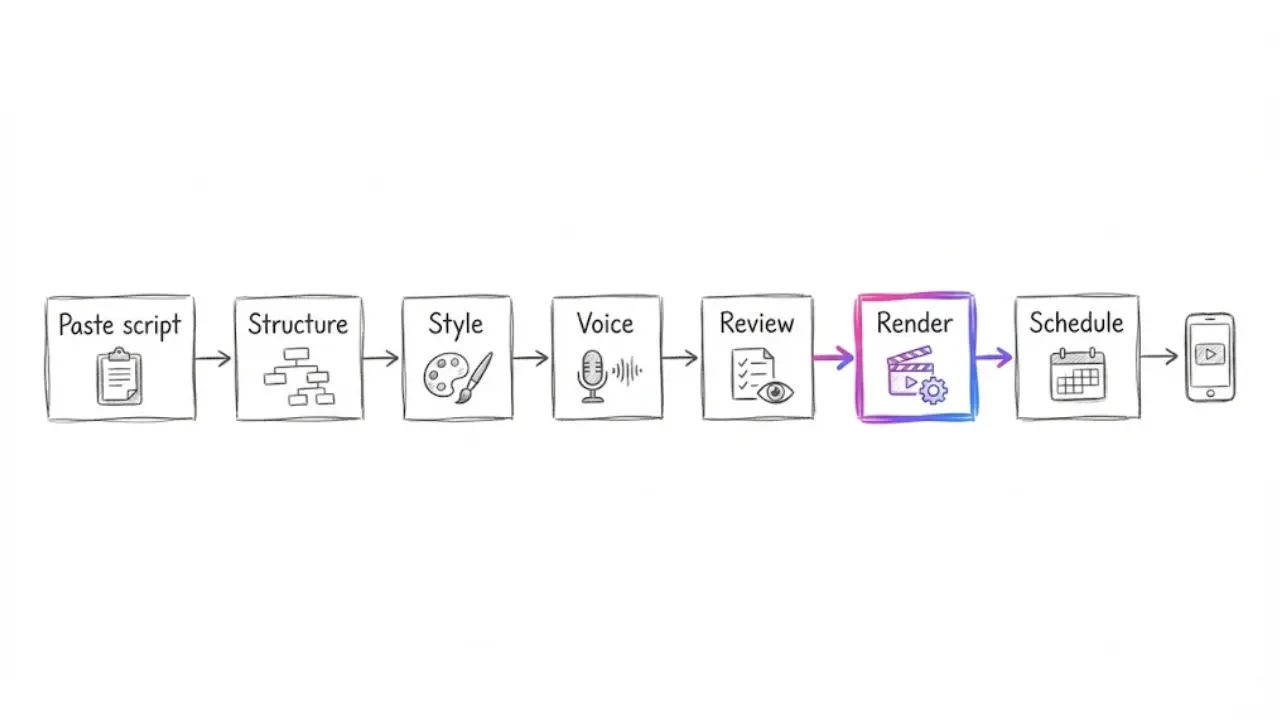
Step 1. Paste your script. Open Faceless Lab and start a new video with your script as the starting point. Faceless Lab builds the scenes around it, so you begin with a structured draft instead of a flat block of text.
Step 2. Choose a structure. Faceless Lab has 8 video structures. Pick the one that matches the shape of your script: a list, a story, a how-to, a countdown and so on. The structure decides the pacing and how the scenes are laid out.
Step 3. Choose one of the 39 visual styles. Pick a style and keep it for the whole channel. A consistent look makes your videos easy to recognize in a feed. Our guide on choosing one visual style for your faceless channel goes through how to decide.
Step 4. Pick the voice. Choose from 200+ ElevenLabs voices and adjust speed and pitch. A calm voice suits explainers and sleep content, while an energetic one suits lists and trivia. For a longer look at this choice, see how to add a natural AI voiceover to your faceless videos.
Step 5. Review every scene. Read the script one more time with the visuals next to it. Edit any line that sounds off, swap a visual that does not match, and check the captions and the background music. Faceless Lab generates visuals through multiple AI models via Replicate, so if one image misses the mark you can regenerate that scene.
Step 6. Choose the format. Render in 9:16 for TikTok, Instagram Reels and YouTube Shorts, in 16:9 for standard YouTube, or in 1:1 for square feeds.
Step 7. Render and schedule. Most videos finish in 2 to 5 minutes. Set the publish time and move on to the next script.
💡 Want to try it with a script you already have? Start free on Faceless Lab and run it through the steps above.
4. Five things that go wrong with a pasted script, and the fix
We have pasted a lot of scripts into Faceless Lab over the past months, our own and other people's. These five problems come up again and again.
The script is too long
A 300-word script cannot become a 30-second video. Either trim it to the right word count, or split it into a two-part series. Part one ends on the hook for part two, which tends to bring viewers back.
Every sentence sounds like a paragraph
Long sentences produce busy scenes and tiring voiceover. Break them in two. If you cannot say a sentence in one breath, the viewer will not follow it in one glance.
The visuals feel generic
This usually means the script is abstract. "Productivity matters" gives the AI nothing to draw. "A desk with one open notebook and a clock" does. Add a concrete noun to each scene and the pictures improve straight away.
The voice reads numbers and names badly
Spell out anything tricky the way you want it said. Write "twenty twenty-six" if the voice trips on a year, and check brand names and unusual words on the first listen. A small respelling in the script is quicker than fighting the voice later.
The ending just stops
Close with one clear line that tells people what to do next: follow for part two, comment their answer, or save the video. A video that ends on a call to action gets more of what you ask for than one that fades out.
5. One script, three videos
A good script rarely needs to live in only one place. Once you have a version that works, you can reuse it in three ways without rewriting from zero.
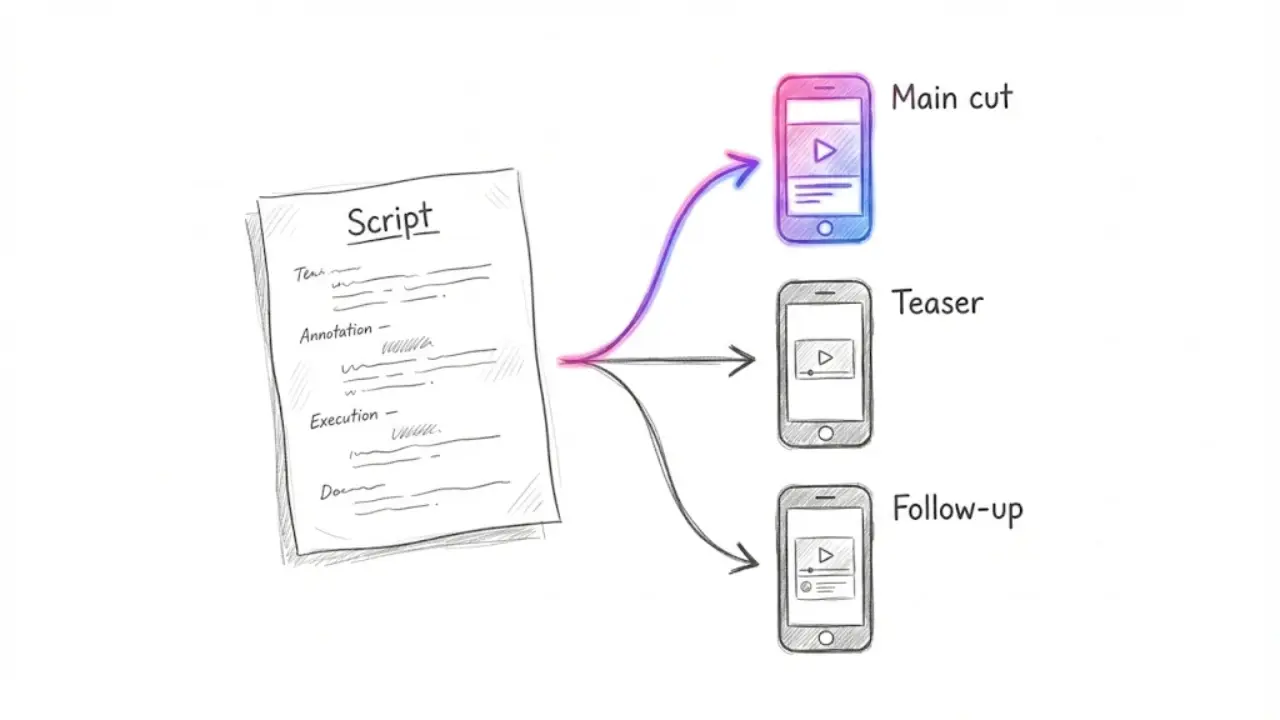
- The main cut. The full script in 9:16 for Shorts, Reels and TikTok.
- The short teaser. Keep the hook and the first two points, trim the rest and end on a question. Post it a day earlier to warm up the audience.
- The follow-up. Take the strongest sentence from the comments or from your analytics and turn it into the next script.
You can also change the visual style or the voice between versions, so each platform gets a version that feels native. If you plan this in a batch, ten scripts can be rendered in one sitting and scheduled across the next two weeks. Our guide on batching a month of faceless videos in one afternoon shows the full routine.
For channels that post on a fixed rhythm, Faceless Lab also has Series, which keeps a group of videos in the same style, and Autopilot, which is in beta and can publish automatically. TikTok is the exception, since it is excluded from fully automatic auto-publish and needs your explicit consent.
💡 Not sure what your scripts should be about? The Faceless Niche Method is our PDF guide with a Niche Scorecard, a gap-finder and a 30-day validation plan. It is on a launch price of €2.49 right now (normally €47), so check the page for the live price.
6. Where Faceless Lab is and isn't the right choice
We would rather you pick the right tool than the one we built, so here is the honest version.
Faceless Lab is a good fit if:
- you already write scripts, or you want to start from a draft and edit it;
- you want voice, visuals, music and captions in one place instead of five apps;
- you plan to post on a rhythm and want to schedule ahead;
- you like a free trial and simple pricing (Free trial €0, Starter €19, Growth €59, Pro €149) with human support from the people who built it.
It is probably not the right choice if:
- you need frame-by-frame control over a long film, where a traditional editor fits better;
- you want your own footage or a real person as the main visual;
- you want a fully automatic TikTok pipeline, since TikTok needs your explicit consent.
For short faceless videos built from a script you trust, we think it is the quickest way to go from words to a posted video.
Conclusion
If you already have the words, you already did the hardest part of a faceless video. Prepare the script with one idea per sentence and the right word count, paste it into Faceless Lab, pick a structure, a style and a voice, review the scenes, and schedule the result. Then reuse the same script as a teaser and a follow-up.
If you are still deciding what your channel should be about, our Faceless Niche Method guide is built for that decision.
If you make a video from your own script with Faceless Lab, post it on your channels and tell people how you made it. Organic reposts are how most small channels grow, and if you like sharing tools you trust, ask us about the affiliate program.
Ready to turn your script into a video? Try Faceless Lab free
Read more
Frequently asked questions
Can I turn a script into a video without showing my face?
Yes. A faceless video replaces the on-camera presenter with an AI voiceover, visuals, background music and captions. In Faceless Lab you paste your script, choose one of 8 structures and one of 39 visual styles, pick a voice from 200+ ElevenLabs options, review the scenes and render. Most videos finish generating in about 2 to 5 minutes. You can export in 9:16 for TikTok, Reels and Shorts, 16:9 for YouTube or 1:1 for square feeds, and you can schedule the post from the same place.
How long should my script be for a 30-second video?
Aim for roughly 75 words. Spoken English runs at about 150 words a minute, which is around 2.5 words a second, so 15 seconds needs about 35 to 40 words and 60 seconds needs about 150. Read the script out loud with a timer before you paste it. If it runs long, cut the weakest sentence first. Faceless Lab focuses on short-form videos of 15 to 60 seconds and also supports longer videos up to 5 minutes.
What is the best way to format a script for an AI video generator?
Write one idea per sentence, because each sentence usually becomes one scene with one visual. Put the hook in the first line, keep sentences short enough to say in one breath, and add a concrete noun to every scene so the visuals have something to draw. Spell out tricky numbers, names and years the way you want them spoken. End with one clear action, such as following for part two or commenting an answer.
Can I edit the video after the script is turned into scenes?
Yes. In Faceless Lab you can edit the script, choose a different voice, adjust the visual style, modify the captions and change the music before you render the final video. Visuals come from multiple AI models through Replicate, so if one scene does not match your line you can regenerate that scene instead of starting over. Reviewing every scene once before rendering is the habit that saves the most time later.
How much does it cost to make videos from scripts with Faceless Lab?
Faceless Lab has a free trial at €0, then three paid plans: Starter at €19, Growth at €59 and Pro at €149. You can test a full script-to-video run on the free trial before choosing a plan. Check the live pricing section on the site for what each plan includes, because limits can change. Human support comes from the co-founders, Stefano and Roberto, so you can ask us directly if you get stuck.
Can I schedule videos made from my scripts to post automatically?
Yes. You can schedule and publish from Faceless Lab, so a batch of videos goes out on your rhythm. Series keeps videos in the same style, and Autopilot, which is in beta, can publish automatically. TikTok is the exception. It is excluded from fully automatic auto-publish and needs your explicit consent, so for TikTok plan to confirm each post yourself and use automation for the other platforms.
Related articles
Make Faceless POV Videos That Put Viewers Inside the Scene
POV videos make viewers feel like they are inside the story. Learn five faceless POV formats, how to script them, and how to make and schedule them with AI, with no camera and no face on screen.
Teach a Language on Shorts and Reels Without Ever Showing Your Face
Language lessons are short, repeatable and built for replays and saves, which makes them a great fit for a faceless channel. Here are the formats, the script rules and a step by step build.
Faceless Shorts Can Have Thumbnails Now. Make Yours Earn the Click
YouTube just gave Partner Program creators custom thumbnails on Shorts. Here is how faceless creators, with no face to feature, build a frame that earns the click and lifts views.