Add Subtitles to Your Faceless Videos That Actually Keep People Watching
Around 85% of shorts play on mute, so your captions do the talking. Here is how to add subtitles to faceless videos that hold attention, and how to caption every clip automatically.

Roberto Pasqualini
CMO at Faceless Lab
The exact caption settings that hold attention on silent autoplay, plus the fastest way to subtitle every faceless video you publish.
How do you add subtitles to faceless videos so people actually keep watching instead of scrolling past? It is the question we get more than any other, and it matters more than most creators think. Around 85% of short videos play on mute by default, which means your captions are not a nice-to-have accessibility layer. They are the voice of your video for most of the people who see it. Get them right and your average view duration climbs. Get them wrong and viewers are gone before your hook lands.
I am Roberto, one of the two people behind Faceless Lab. Stefano and I run faceless channels every day, so we have tested captions the boring way: by posting, watching retention graphs, and changing one thing at a time. This guide is what we would tell a friend who asked us how to caption their shorts properly.
Executive Summary: For faceless videos, subtitles are the single highest-leverage edit you can make, because roughly 85% of social video is watched without sound and captioned videos hold viewers noticeably longer. The captions that work are burned-in (open) rather than platform toggles, big enough to read on a phone at arm's length, positioned in the safe zone above the UI, limited to one or two short lines, and animated word by word so the eye stays on screen. Inside Faceless Lab you get these captions generated automatically from your voiceover, timed to the audio, styled to match your video, and translated for other markets, so every clip you produce is already built for silent viewing without any manual timing work.
Table of Contents
- Why subtitles decide whether a faceless video survives the first seconds
- Open captions vs closed captions: what faceless creators actually need
- What a caption style that holds attention looks like
- How to add subtitles inside Faceless Lab, step by step
- Multilingual subtitles: more reach without reshooting a thing
- Subtitle mistakes that quietly kill retention
- Where Faceless Lab is and is not the right choice
1. Why subtitles decide whether a faceless video survives the first seconds
Open your own phone and watch how you scroll. Most feeds start playing on mute, and you decide in about two seconds whether a video is worth turning the sound on for. Your viewers do exactly the same thing to you. If your opening line only exists in the audio, most of the feed never hears it.

The numbers back this up. Studies consistently put silent viewing at around 85% of social video. Facebook's own research found that captions can lift view time by roughly 12%, and surveys report that about 80% of people are more likely to watch a video to the end when captions are available. For a faceless creator whose whole model depends on watch time and completion rate, that is not a rounding error. That is the difference between a video the algorithm pushes and one it buries.
There is a second reason that matters for faceless content specifically. You have no face, no gestures, and no eye contact to carry the emotion. The text on screen is doing the job a presenter's expression would normally do. Good captions give your video a rhythm and a personality even when the sound is off.
2. Open captions vs closed captions: what faceless creators actually need
There are two ways text can appear on a video, and the distinction is not academic. It changes how many people actually see your words.

Closed captions (the platform toggle)
Closed captions are the subtitles a viewer switches on through the platform, or the file you upload separately as an SRT. They are great for accessibility and searchability, but they have one fatal flaw for short-form: most people never turn them on. If your retention depends on the text and the text is hidden behind a menu, you have lost.
Open captions (burned into the video)
Open captions are baked directly into the video frames. Everyone sees them, on every platform, with zero action required from the viewer. For faceless shorts, open captions are the default you want. They travel with the file when you cross-post, they cannot be switched off, and they let you style the text as part of the visual design rather than leaving it to the platform's plain white default.
The honest rule of thumb: use open captions as your primary layer for every short, and add a closed caption or SRT file on top only where a platform rewards it for accessibility or search. Inside Faceless Lab the captions are burned in by default, so you are covered on the layer that matters most.
3. What a caption style that holds attention looks like
Most weak captions fail for the same handful of reasons. Here is what actually works, tested on real faceless channels.
- Size: Big. Assume someone is watching on a small phone with the video half the screen. If you would squint, it is too small. Captions should be one of the most legible elements in the frame.
- Position: Keep text in the middle-to-lower third but above the platform interface. TikTok, Shorts and Reels all stack buttons, usernames and descriptions along the bottom and right. Anything caught under that UI is wasted. The safe zone is roughly the central band of the frame.
- One or two short lines: Never dump a full sentence on screen. Break captions into short phrases that match how the line is spoken. One thought per card keeps the eye moving with the audio instead of reading ahead and tuning out.
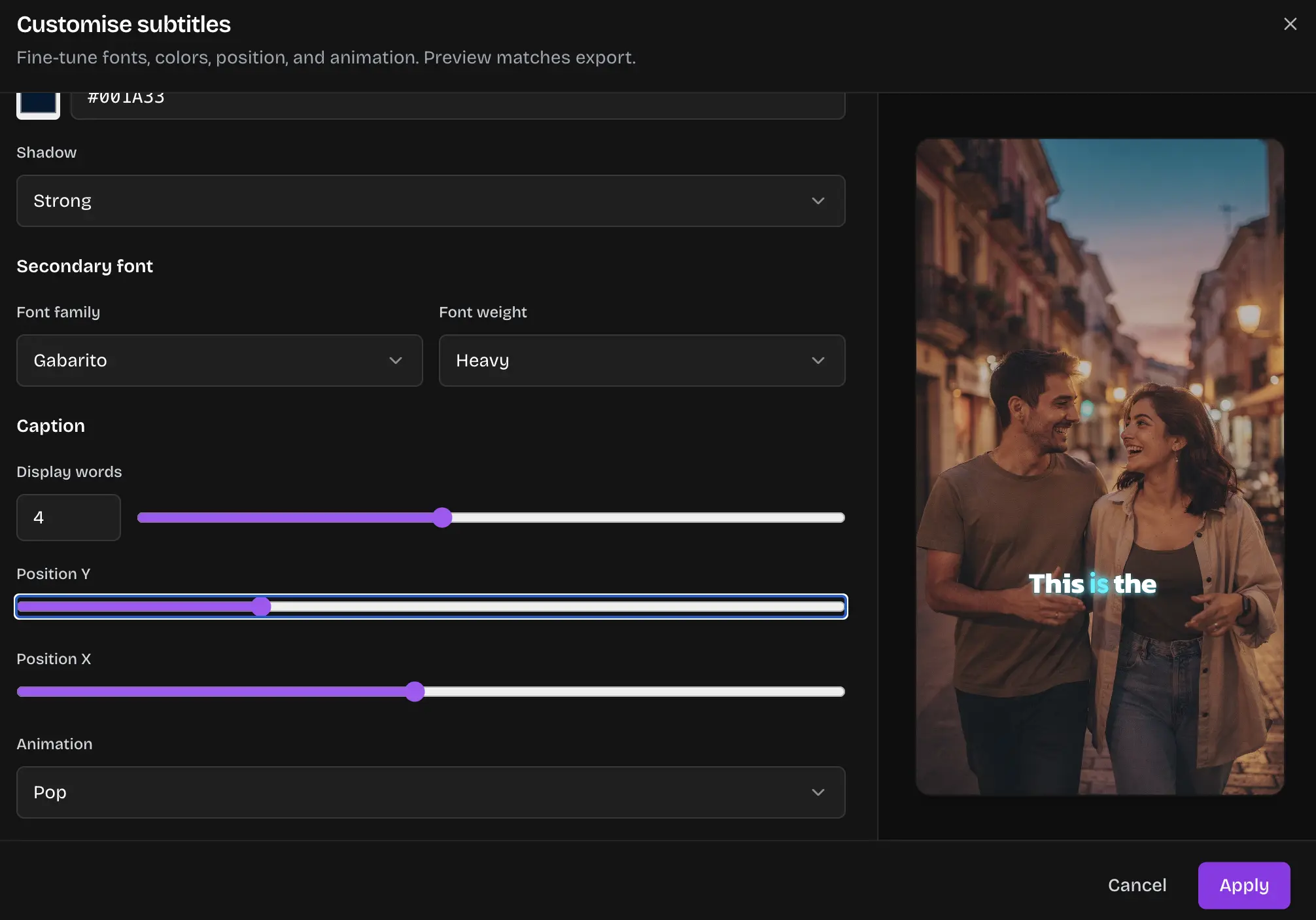
- Word-by-word highlighting: Animating captions so the current word pops or changes colour as it is spoken is the single biggest upgrade you can make. It creates a karaoke effect that pulls the eye along and mirrors the pace of the voiceover, which is exactly what holds attention on mute.
- Contrast: Use a bold weight with a stroke or subtle shadow so the text stays readable over any background, bright or busy. White text on a bright clip disappears.
- Timing: Captions have to land in sync with the voice, frame accurate. A caption that lags half a second behind the audio breaks the illusion instantly. This is the part that eats hours if you do it by hand.
4. How to add subtitles inside Faceless Lab, step by step
This is the part where the hours normally go: transcribing, timing each line, restyling, re-exporting. Faceless Lab does the timing and styling as part of generating the video, so captions are not a separate chore. Here is the flow.
- Start from your idea or script. Type a topic or paste a script. Faceless Lab writes or refines the script using one of its 8 story structures so the pacing already suits short-form.
- Pick a voice. Choose from 200+ ElevenLabs voices. The captions are generated from this voiceover, so the words on screen and the words you hear always match, with no manual transcription.
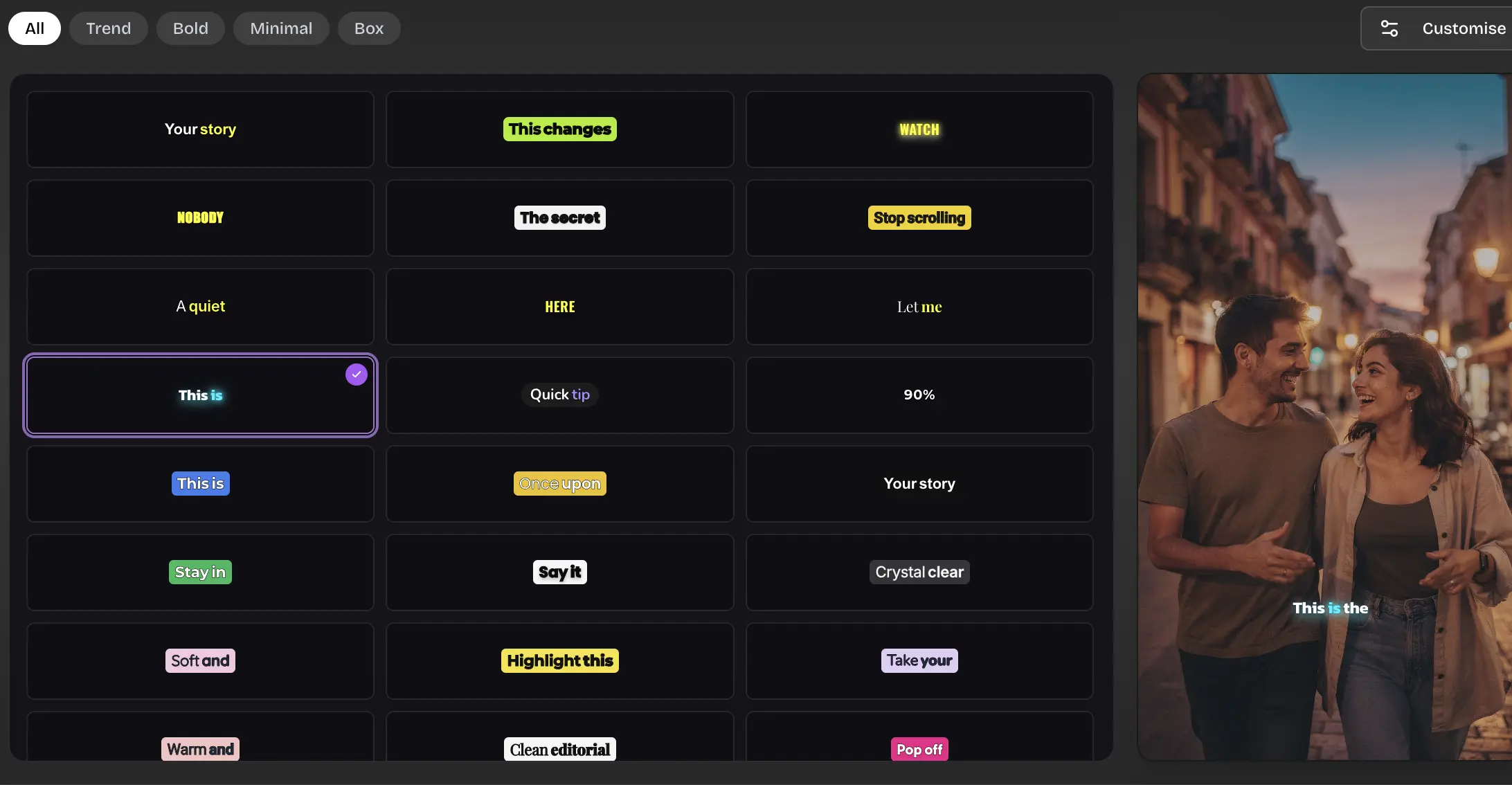
- Choose a visual style. Set the look from the 39 available styles. Your caption style sits on top of this, so text and visuals feel like one design rather than a subtitle pasted onto stock footage.
- Let the captions generate automatically. Faceless Lab transcribes the voiceover and times the captions to the audio for you. You get burned-in, word-timed subtitles without touching a timeline.
- Edit and restyle if you want. Adjust wording, tweak the caption look, and fine-tune anything before you render. You keep full control, the software just removes the tedious part.
- Publish or schedule. Send the finished video straight to YouTube, Instagram, Facebook or LinkedIn on the schedule you set. TikTok publishing needs your explicit consent rather than running fully hands-off, so you approve those before they go out.
That is the whole point of the tool. The caption work that used to cost 15 minutes of cleanup per video happens as a byproduct of making the video.
💡 Ready to try it on your own clip? Create your first captioned video free and see the timing quality before you commit to anything.
5. Multilingual subtitles: more reach without reshooting a thing
One of the quiet advantages of faceless content is that it translates cleanly. There is no lip-sync to break and no on-camera language to redub. A strong video in English can become a strong video in Italian or Spanish with a fresh voiceover and translated captions, and it reaches an audience your competitors are ignoring.

The practical play is to build your winner once, then spin out language variants. Keep the same structure and visuals, swap the voice, and translate the on-screen text so silent viewers in each market get the full message. Because Faceless Lab generates captions from the voiceover, producing a translated version is a matter of changing the language rather than re-timing everything by hand.
A word of honesty here: machine translation is good, not perfect. For your biggest markets it is worth a quick human read of the translated captions before publishing, especially for idioms and slang that do not carry over. Treat the automatic translation as a strong first draft that gets you 90% of the way.
6. Subtitle mistakes that quietly kill retention
Even creators who add captions often leave easy retention on the table. Watch for these.
- Text hidden behind the UI. Captions parked at the very bottom get covered by the platform's buttons and description. Keep them in the safe zone.
- Walls of text. A full sentence on screen makes viewers read ahead, finish early, and scroll. Short phrases synced to the voice keep them present.
- Captions that lag the audio. Even a small delay feels broken. Frame-accurate timing is non-negotiable, which is exactly why automating it beats eyeballing it.
- Tiny, low-contrast fonts. If the text is hard to read at a glance on a phone, it is not doing its job. Go bigger and bolder than feels comfortable on a desktop preview.
- Inconsistent style across a channel. Your caption look is part of your brand. Changing font and colour every video makes the channel feel random. Lock a style and keep it.
7. Where Faceless Lab is and is not the right choice
I would rather you pick the right tool than the wrong one and churn, so here is the straight version.
Faceless Lab is the right choice if you are producing short-form faceless videos on a schedule and you want script, voice, visuals, music and captions handled in one place, with subtitles generated and timed automatically so you are not living in a timeline. It fits creators, solo builders and small businesses who care about posting consistently more than about frame-by-frame manual editing. The plans are built for that rhythm: a Free trial at €0 to test it, Starter at €19, Growth at €59, and Pro at €149 as your output grows.
Faceless Lab is not the right choice if you need a full manual video editor for long-form, multi-track cinematic projects, or if your work is face-to-camera where captions sit under a talking presenter. Autopilot is still in beta, so if you want a completely untouched hands-off pipeline today, keep a human eye on the queue for now. And if your whole business is one heavily art-directed hero video a month, a dedicated editing suite will give you more low-level control than you need from us.
If your reality is more like "I need to publish good captioned shorts several times a week without burning a weekend," that is exactly what we built.
Conclusion
Subtitles are not the finishing touch on a faceless video. For the 85% of your audience watching on mute, they are the video. The formula is not complicated: burn them in, make them big, keep them in the safe zone, break them into short word-timed phrases, and keep the style consistent. The only hard part is doing that quickly on every clip, and that is the part worth automating.
Try it on one video and judge it by the retention graph, not by my word. Start free, caption your next short in minutes, and see whether people stay longer. If a video works, repost it across your platforms and let the reach compound, and if you know other creators fighting the same caption grind, our affiliate program pays you to send them our way.
Create your faceless videos and caption every one automatically.
Read more
Frequently asked questions
How do I add subtitles to a faceless video automatically?
The fastest way is to generate the captions from your voiceover instead of transcribing by hand. In Faceless Lab you enter a topic or script, pick a voice, and the software transcribes that voiceover and times burned-in captions to the audio for you. You get word-synced subtitles without opening a timeline, and you can still edit the wording or restyle the look before you render. That removes the 15 minutes of manual caption cleanup most creators spend per video and keeps the text perfectly matched to what is actually said.
Should I use open or closed captions for short-form?
For faceless shorts, use open captions as your default. Open captions are burned into the video frames, so everyone sees them on every platform with no action required, and they travel with the file when you cross-post. Closed captions are the toggle a viewer switches on, and most people never do, so relying on them for retention is risky. The best practice is open captions on every short, with a closed caption or SRT file added on top only where a platform rewards it for accessibility or search.
Do captions really improve watch time?
Yes, and the effect is well documented. Around 85% of social video is watched on mute, so for most viewers the captions carry the message. Facebook's research found captions can lift view time by roughly 12%, and surveys report about 80% of people are more likely to finish a video when captions are present. For faceless creators whose reach depends on completion rate and watch time, captions are one of the highest-leverage edits you can make, not just an accessibility feature.
Where should subtitles be positioned on a Short or Reel?
Keep them in the central-to-lower band of the frame but above the platform interface. TikTok, YouTube Shorts and Instagram Reels all stack buttons, usernames and captions along the bottom and right edges, so any text placed there gets covered and wasted. Aim for the safe zone in the middle of the screen where nothing overlaps. Also keep captions large and high contrast, because viewers are usually watching on a small phone screen and will scroll past anything they have to squint to read.
Can I make subtitles in other languages?
Yes, and faceless content is ideal for it because there is no lip-sync to break. You can take a video that works in one language, swap the voiceover, and translate the on-screen captions to reach a new market without reshooting. Inside Faceless Lab the captions are generated from the voiceover, so producing a translated version is a matter of changing the language rather than re-timing everything. Machine translation is a strong first draft, so for your biggest markets it is worth a quick human check of idioms before publishing.
How long does it take to caption a video this way?
Because the captions are generated and timed as part of making the video, there is effectively no separate captioning step. A short video is typically ready in a few minutes, including script, voiceover, visuals, music and burned-in subtitles. Compare that to doing it manually, where transcribing, timing each line, styling and re-exporting can add fifteen minutes or more per clip. Automating the timing is what makes it realistic to caption several videos a week without it turning into a second job.
Related articles
Teach a Language on Shorts and Reels Without Ever Showing Your Face
Language lessons are short, repeatable and built for replays and saves, which makes them a great fit for a faceless channel. Here are the formats, the script rules and a step by step build.
Faceless Shorts Can Have Thumbnails Now. Make Yours Earn the Click
YouTube just gave Partner Program creators custom thumbnails on Shorts. Here is how faceless creators, with no face to feature, build a frame that earns the click and lifts views.
Make Faceless Quiz Videos That Get People Answering in the Comments
Quiz and trivia shorts are some of the easiest faceless videos to grow with. Here is how the format works, the structures that hold attention, and how to make one in minutes.