The Faster Way to Make Faceless Videos Than Editing Each One in CapCut
You can make faceless videos in CapCut, but every short turns into hours of manual editing. Here is where CapCut fits, where it slows you down, and a faster all-in-one way to publish.

Roberto Pasqualini
CMO at Faceless Lab
A practical look at where CapCut fits a faceless workflow, where it quietly eats your time, and how an all-in-one generator turns a topic into a publish-ready short in minutes.
Can you make faceless videos in CapCut? Yes, and thousands of creators do it every day. CapCut is free to start, it runs on your phone, and it can cut, caption and export a vertical video. So if you are looking for a CapCut alternative for faceless videos, the honest first question is not whether CapCut works. It clearly does. The real question is how many hours it costs you to keep a channel posting, week after week, once the novelty wears off.
We are Stefano and Roberto, the two people behind Faceless Lab. Between us we run several faceless channels, and we spent a long time inside editors like CapCut before we built our own tool. This piece is our honest read on when CapCut is the right call and when it starts working against you.
Executive summary: CapCut is an excellent manual video editor and a fair starting point for faceless creators, with a free tier and a Pro plan at 19.99 dollars a month in 2026. The catch is that CapCut edits video, it does not create the whole thing for you. You still write the script, generate or source the voiceover, find the visuals, clean up the captions, pick the music and sync it all together, which realistically runs three or more hours per short. An all-in-one faceless generator like Faceless Lab collapses that into one flow: you give it a topic, it returns a finished short with script, voiceover, visuals, music and captions in minutes, then schedules and publishes it for you. CapCut wins when you want frame-level manual control. Faceless Lab wins when your bottleneck is volume and consistency.
Table of Contents
- Why faceless creators start with CapCut
- What CapCut does well
- Where the CapCut workflow slows a faceless channel down
- What an all-in-one faceless generator changes
- How to make a faceless video inside Faceless Lab
- What you actually pay, Faceless Lab and CapCut side by side
- Where Faceless Lab is and isn't the right choice
1. Why faceless creators start with CapCut
Almost everyone who tries faceless content lands in CapCut first, and for good reasons.
- It is free to open. You can install it and export your first vertical video without paying anything, which is exactly what a beginner wants before committing.
- It runs on your phone. No powerful laptop required. A lot of faceless creators edit their first fifty videos on a mobile screen during a commute.
- It handles the mechanical parts. Trimming, layering clips, adding a caption track, dropping in music. These are the tasks people picture when they think of editing, and CapCut does them cleanly.
The trouble is that "editing" is only the last stage of making a faceless short. By the time you open CapCut, most of the work is already behind you or still ahead of you, and none of it happens inside the editor.
2. What CapCut does well
We are not here to talk anyone out of a tool that works. Credit where it is due, CapCut is genuinely strong at a few things.
Manual, frame-level control. If you want to nudge a caption two pixels, hold a cut for an extra beat, or hand-place a sound effect, a timeline editor is the right instrument. Faceless Lab does not give you that kind of surgical control, and CapCut does.
A deep effects library. Transitions, text animations, trending templates and filters are all there. For creators whose whole style depends on a specific editing look, that library is valuable.
Watermark-free exports on a plain edit. As of 2026, a normal manual export from CapCut carries no watermark. A watermark only appears when you keep a Pro-locked template in the project or export certain AI-generated clips, in which case you need the paid plan to remove it.
A clear paid path. CapCut Standard is 9.99 dollars a month and Pro is 19.99 dollars a month, or 179.99 dollars a year, which unlocks 4K and HDR export, the full AI toolkit and commercial usage coverage for client work.
If your goal is a small number of highly polished videos where every frame matters, CapCut is a reasonable home. The math changes the moment your goal becomes volume.
3. Where the CapCut workflow slows a faceless channel down
Here is the part nobody mentions when they recommend CapCut. The editor is fast. The workflow around it is not.
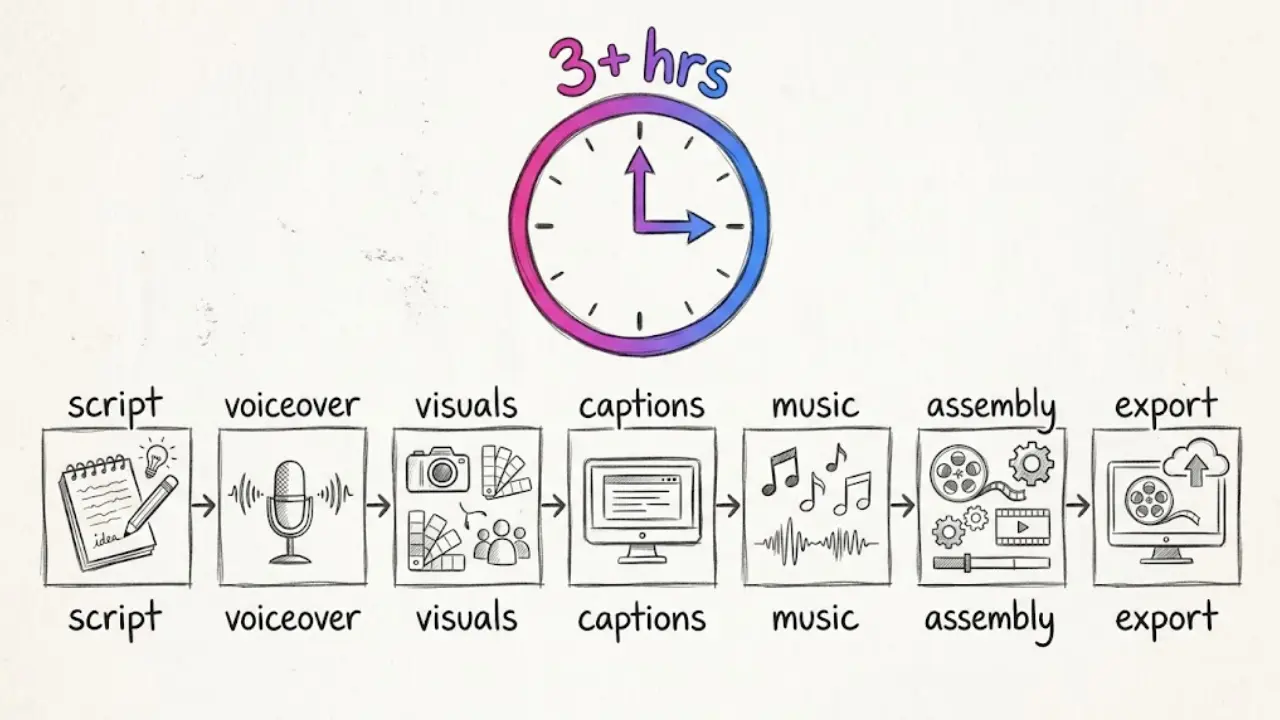
To ship one faceless short manually, you typically move through this chain:
- Script. Around 30 minutes prompting an AI or writing it yourself, then refining the hook so it survives the first three seconds.
- Voiceover. Roughly 20 minutes generating a voice, listening back, and regenerating the lines that sound flat.
- Visuals. About an hour sourcing stock, generating images, or cutting b-roll that actually matches the script.
- Captions. Around 15 minutes fixing the auto-captions, because AI transcription still trips on names and numbers.
- Music. Another 15 minutes hunting for a track that fits the mood and is safe to use.
- Assembly. An hour syncing audio, visuals and captions on the timeline so everything lands on beat.
- Export. Around 20 minutes rendering and getting a clean publish-ready file.
That is more than three hours for a single short, and CapCut only covers the assembly and export at the end. Multiply it by three posts a week and you have taken on a part-time job. This is the exact wall we kept hitting on our own channels, and it is why so many faceless projects go quiet after a month. The problem was never talent or ideas. It was the grind between the idea and the upload.
The hidden cost is consistency. Short-form platforms reward creators who post on a steady rhythm. A three-hour-per-video workflow makes that rhythm almost impossible to hold once real life gets busy, and an empty week resets the momentum you spent all month building.
4. What an all-in-one faceless generator changes
An editor waits for you to bring it finished ingredients. A generator makes the ingredients and assembles the meal. That is the core difference between CapCut and Faceless Lab.
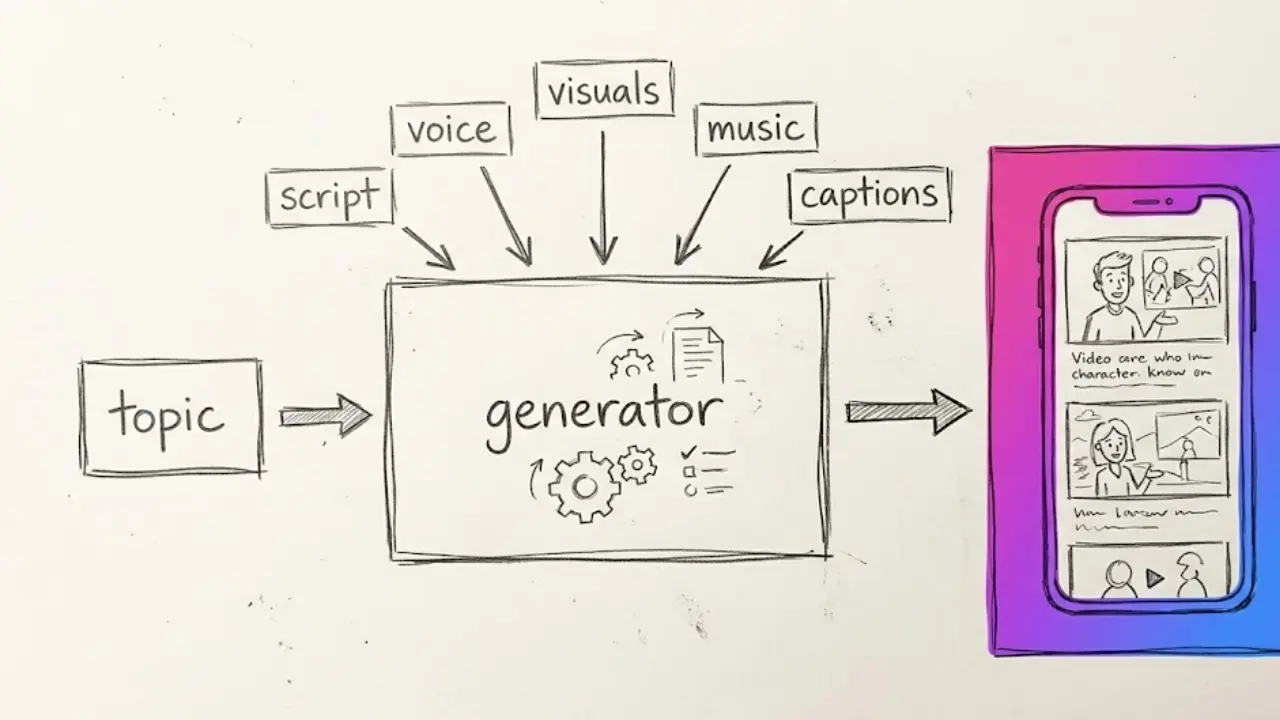
With Faceless Lab, you start from a topic or a script, and the app produces the whole short in one flow:
- Script written for short-form, structured around a hook, using one of our 8 proven video structures.
- Voiceover from a library of more than 200 natural ElevenLabs voices, so it does not sound robotic.
- Visuals generated through multiple models on Replicate, matched to the script, in any of 39 styles.
- Music selected to fit the mood, with copyright-safe tracks marked clearly.
- Captions burned in and synced, in the 9:16, 16:9 or 1:1 ratio the platform needs.
Then it keeps going where an editor stops. Faceless Lab can schedule and auto-publish your finished videos to YouTube, Instagram, Facebook and LinkedIn, so a batch you make on Monday goes out one per day all week. TikTok is deliberately excluded from fully automatic publishing and requires your explicit consent each time, because we would rather respect the platform's rules than risk your account. For creators who want to step back even further, Autopilot (currently in beta) and Series turn one idea into a recurring stream of videos that keeps posting on a schedule.
Most videos generate in two to five minutes. That is the difference between editing a video and creating one.
5. How to make a faceless video inside Faceless Lab
Here is the full flow, start to finish, so you can see how few steps it takes.
- Create a free account. No credit card, so you can test the whole thing before deciding anything.
- Enter your topic or paste a script. A single line like "three space facts that sound fake but are true" is enough to start.
- Pick a structure and a style. Choose one of the 8 video structures and one of the 39 visual styles so the look matches your channel.
- Choose a voice. Browse the 200 plus voices, preview a few, and lock the one that fits your brand and language.
- Generate. The app writes the script, records the voiceover, creates the visuals, adds music and burns in the captions. This takes a couple of minutes.
- Review and tweak. Edit the script wording, swap a voice, adjust visuals or captions before the final render. You keep control of the important choices without touching a timeline.
- Schedule or publish. Send it straight to YouTube, Instagram, Facebook or LinkedIn on a schedule, or export the file. For TikTok, you confirm each post yourself.
That is the entire pipeline from section 3, done for you in one place, in minutes instead of hours.
💡 Ready to try it on your own topic? Create your first faceless video free and see how fast the flow really is.
6. What you actually pay, Faceless Lab and CapCut side by side
Price only means something next to what you get for it, so here are the real numbers for both, as of 2026.
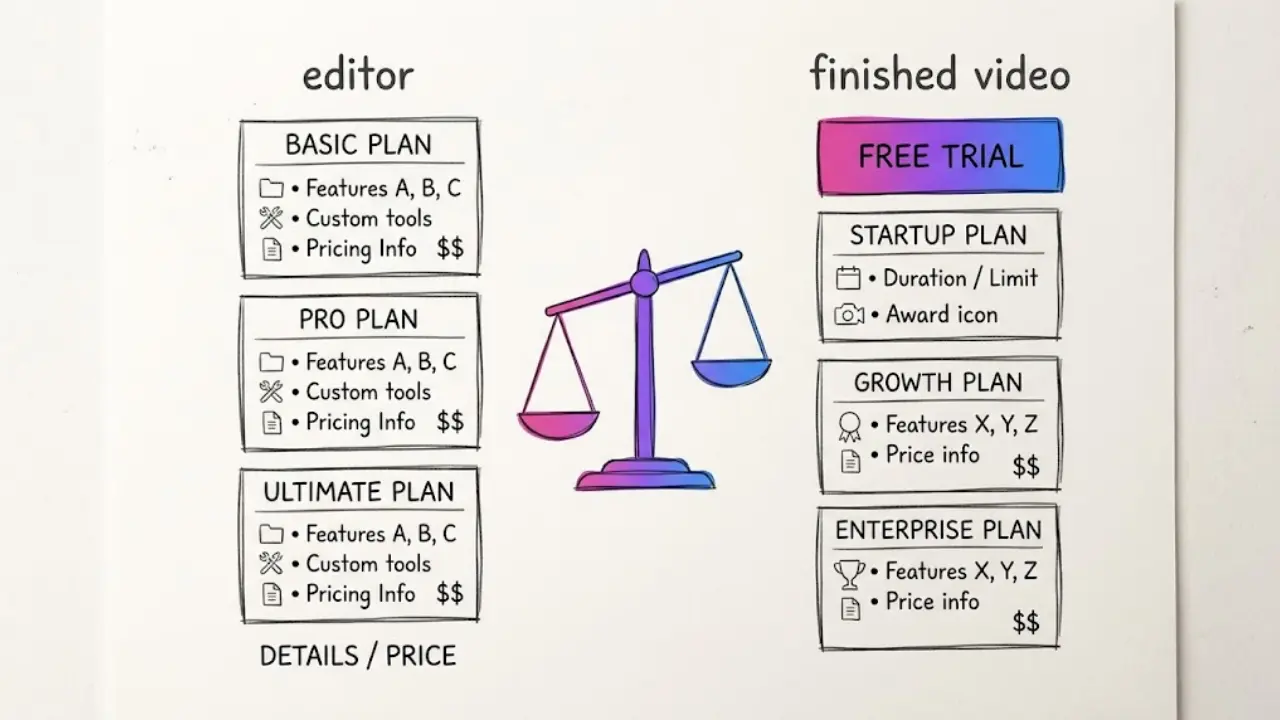
CapCut
- Free: manual editing, watermark-free on plain exports.
- Standard: 9.99 dollars a month, aimed at mobile users, removes template watermarks.
- Pro: 19.99 dollars a month or 179.99 dollars a year, adds 4K and HDR export, the full AI toolkit and commercial usage coverage.
What you are paying CapCut for is a better editor. You still supply the script, voice, visuals, music and hours of assembly yourself.
Faceless Lab
- Free trial: 0 euros, so you can generate real videos before paying.
- Starter: 19 euros a month.
- Growth: 59 euros a month.
- Pro: 149 euros a month.
What you are paying Faceless Lab for is the whole video, generated and ready to publish, plus scheduling and auto-publishing. The comparison is not really plan against plan. It is a better editor against a finished output. If your time is worth anything per hour, the three-plus hours per video you save is the number that actually matters.
7. Where Faceless Lab is and isn't the right choice
We would rather tell you the truth than oversell, so here is where each tool genuinely fits.
Faceless Lab is the right choice when:
- You want volume and consistency, several posts a week without burning your evenings.
- You care more about ideas and hooks than about hand-editing every frame.
- You want scheduling and auto-publishing built in, not bolted on with extra tools.
- You are running multiple channels or a series and need to batch.
CapCut is the better choice when:
- You need frame-level manual control and a deep effects and template library.
- You are making a small number of highly polished videos where every transition matters.
- You already have your own footage and just need a strong timeline editor to cut it.
- Your style depends on a specific CapCut editing look you cannot reproduce elsewhere.
Honest limitations of Faceless Lab. We do not give you a full manual timeline, so if your identity is built on hand-crafted edits, you will feel boxed in. Autopilot is still in beta, so treat it as powerful but young. And TikTok auto-publishing is not fully hands-off by design, because that platform needs your explicit consent per post. We think those are fair trade-offs for getting hours of your week back, but they are trade-offs, and you should know them going in.
The verdict is simple. If editing is your craft, stay in CapCut. If publishing consistently is your goal and the editing is just the tax you pay to get there, an all-in-one generator removes the tax. Faceless Lab has a real free trial, no credit card required, so the cheapest way to decide is to make one video in each and compare the hour it took you. If Faceless Lab saves you time, do us a favor and repost the video that performs best, and if you want to earn from sharing the tool, our affiliate program pays you for it.
Try Faceless Lab free and make your first faceless video in minutes.
Read more
Frequently asked questions
Can you make faceless videos in CapCut?
Yes. CapCut is a capable manual video editor that can trim clips, layer visuals, add caption tracks and export vertical video, so plenty of faceless creators use it. The limitation is that CapCut only handles the editing stage. You still have to write the script, generate the voiceover, source or create the visuals, fix the captions and choose the music yourself before you ever open the timeline. For a single polished video that is fine. For a channel that needs several posts a week, the manual steps around the editor are what eat your time, which is why many creators eventually look for an all-in-one generator instead.
What is the best CapCut alternative for faceless videos?
It depends on your goal. If you want the whole video created for you rather than assembled by hand, an all-in-one faceless generator like Faceless Lab is the closest fit, because it turns a topic into a finished short with script, voiceover, visuals, music and captions in minutes, then schedules and publishes it. If you only want a different manual editor, tools like DaVinci Resolve or InShot are closer replacements for CapCut. The honest test is whether your bottleneck is editing control or publishing volume. Editors solve the first, generators solve the second.
Is CapCut free, and does it add a watermark?
CapCut has a free tier, and as of 2026 a plain manual export carries no watermark. A watermark only appears when you keep a Pro-locked template in your project or export certain AI-generated clips, and removing it means upgrading. Paid plans are Standard at 9.99 dollars a month and Pro at 19.99 dollars a month, or 179.99 dollars a year, which adds 4K and HDR export, the full AI toolkit and commercial usage coverage. So the free version is genuinely usable, but the features many creators want sit behind the paid tiers.
How long does it take to make a faceless video manually versus with a generator?
Made manually, a single faceless short realistically takes three or more hours once you add up scripting, voiceover, sourcing visuals, cleaning captions, choosing music, syncing everything on a timeline and exporting. An editor like CapCut only covers the last two steps. With an all-in-one generator like Faceless Lab, you enter a topic and the app produces the finished video, usually in two to five minutes, then lets you schedule and publish it. The difference is not a small speed boost. It is the gap between editing a video and having one created for you.
Does Faceless Lab publish videos automatically?
Yes, with one deliberate exception. Faceless Lab can schedule and auto-publish your finished videos to YouTube, Instagram, Facebook and LinkedIn, so a batch you make on Monday can go out one per day through the week. TikTok is excluded from fully automatic publishing and requires your explicit consent for each post, because we would rather follow the platform's rules than put your account at risk. For a more hands-off setup, Autopilot, currently in beta, and Series can turn a single idea into a recurring stream of videos that keeps posting on a schedule without you starting each one manually.
How much does Faceless Lab cost?
Faceless Lab starts with a free trial at 0 euros and no credit card, so you can generate real videos before paying. Paid plans are Starter at 19 euros a month, Growth at 59 euros a month and Pro at 149 euros a month, with limits that reset monthly and the option to cancel anytime. The way to think about the price is not plan against plan with an editor. You are paying for the whole video generated and ready to publish, plus scheduling and auto-publishing, which replaces the three-plus hours of manual work each short would otherwise take.
Related articles
A Free Faceless Video Generator You Can Actually Publish With
Most free faceless video tools stop at a watermarked preview. Here is what a free plan should really include, and how far Faceless Lab gets you before you pay a cent.
Dog and Cat Tips Make a Faceless Channel That Owners Come Back To
Pet owners search for tips every day, and each answer fits one short. Learn how to pick an audience, write safe tips, and publish a faceless dog and cat channel without ever filming.
Faceless What If Videos Are the Easiest Way to Turn Curiosity Into Views
Curiosity sells, and you never have to show your face. Here is how to make faceless what if videos with AI, which formats hold attention, and how to turn one idea into a daily series.