Turn Study and Productivity Tips Into Faceless Shorts People Save for Later
Exam season and New Year planning send people searching for study and productivity tips. Learn how to pick a promise, write useful shorts and schedule a faceless productivity channel without filming.
Roberto Pasqualini
CMO at Faceless Lab
How to start a faceless productivity and study tips channel, from choosing a promise to writing useful shorts and scheduling them while exam and New Year planning season is on.
How do you make faceless productivity videos when you do not want to appear on camera? You pick one clear promise, turn each tip into a 30 to 45 second script, and let an AI voice and AI visuals carry the screen. Late autumn is when many students and workers start searching for study routines, focus tricks and year-end planning ideas, which makes it a good moment to begin. We are Stefano and Roberto, the co-founders of Faceless Lab, and this is how we would set up a faceless productivity channel today.
Executive Summary
A faceless productivity channel publishes short videos with study methods, focus routines, planning templates and habit tips, narrated by an AI voice over AI visuals instead of a presenter. It works because productivity advice is useful on its own: viewers save a good tip to use later, and one tip fits a 30 to 45 second short. The channels that grow choose a narrow audience (students, remote workers, parents, freelancers), open each video with a problem, give one concrete action, and keep their advice accurate and original. With Faceless Lab you can turn each tip into a scripted, voiced and captioned video, batch a month of episodes, keep a consistent look with a Series, and schedule publishing to YouTube, Instagram, Facebook and LinkedIn, starting on a free trial.
Table of Contents
- Why productivity tips suit faceless video
- Pick an audience and a promise
- Script formats that get tips saved
- Keep your advice accurate and original
- How to make a productivity short inside Faceless Lab
- Where Faceless Lab is (and is not) the right choice
- Conclusion
1. Why productivity tips suit faceless video
Productivity and study content has a built-in advantage for faceless creators. The value sits in the idea, so nobody needs to see who is saying it.
The tips are small and complete
- One tip is one episode. "Study in 25-minute blocks with a 5-minute break" is a full short with a hook, a method and a reason.
- Viewers act on it. A good tip gets saved and tried tomorrow morning, and saves are a strong signal on short-form platforms.
- The topic never runs dry. Focus, planning, sleep, note-taking, memory, procrastination and habits give you hundreds of episode ideas.
The visuals are easy to produce
You do not need a desk setup or a presenter. A clean illustrated desk, a calendar, a notebook, a timer, a brain-and-lightbulb scene or a simple diagram explains most tips better than a talking head would.
Timing helps this niche
Exam periods, the end of the year and New Year goal-setting all raise interest in routines and planning. Videos published in the weeks before those moments have time to be found and saved. If you publish only when the peak arrives, you compete with everyone who had the same idea.
2. Pick an audience and a promise
"Productivity tips" is too wide to stand out. A new viewer should know in two seconds who the channel is for and what they get.
Audiences with room to grow
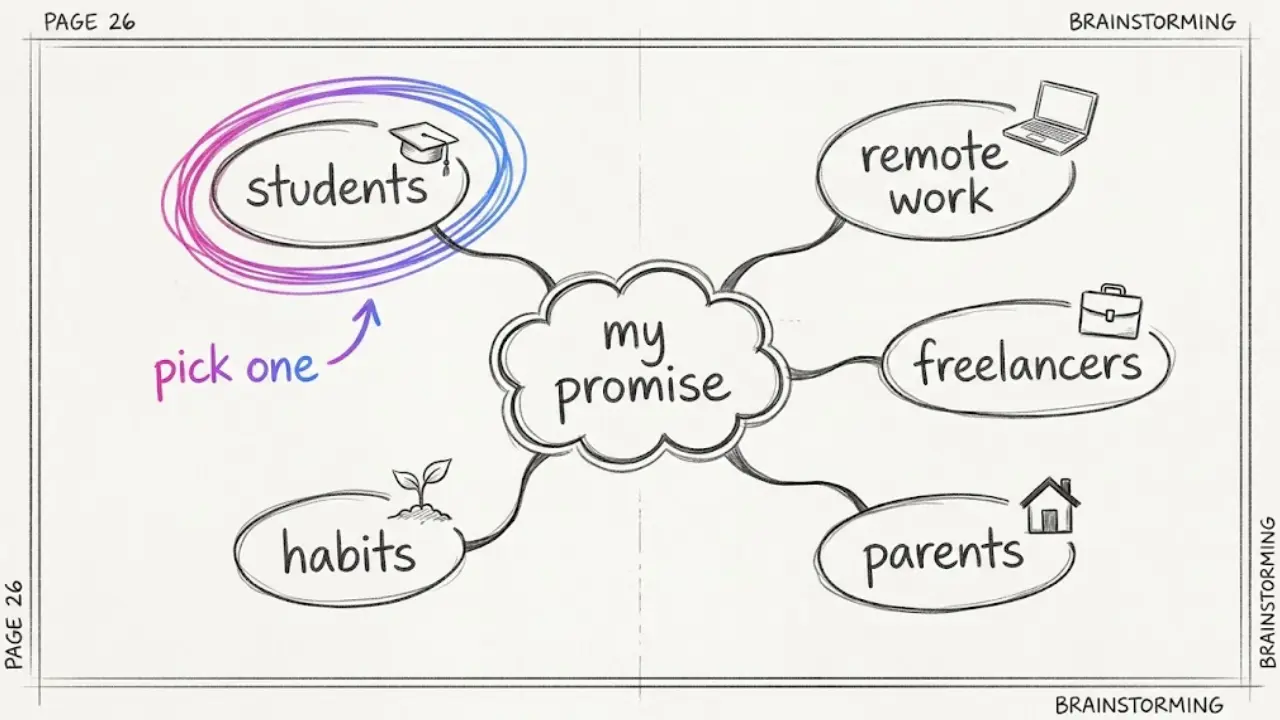
- Students. Study methods, exam planning, note-taking and memory techniques.
- Remote workers. Focus blocks, meeting hygiene, inbox habits and a calm workday.
- Freelancers and side-project builders. Planning a week, pricing your time and staying consistent.
- Parents. Simple routines, mornings and evenings that run on little time.
- Beginners to habit building. Small habits, tracking and getting restarted after a bad week.
Choose with a simple test
Pick the audience you could write 15 episode ideas for in ten minutes. If you run dry at five, it is too narrow. If every idea could sit on any self-help channel, it is too broad.
Make one promise and repeat it
A promise sounds like "one study method every day" or "a calmer workday in 30 seconds". Put it in your channel name, your first line and your descriptions. Then keep the same narrator voice and the same visual style on every episode so your shorts are recognizable in a busy feed.
3. Script formats that get tips saved
Viewers decide quickly whether a tip is for them. Open with the problem, not a greeting.
A script structure that works
- Hook (first line). Name the problem. "If you reread your notes and still forget everything, try this."
- The method. Say what to do in one plain sentence.
- The steps. Give two or three actions the viewer can follow right away.
- The reason. One line on why it helps, in everyday words.
- Loop or question. End with a question ("What do you struggle with most?") or a line that flows back into the hook.
Formats that repeat well
- One tip in 30 seconds. A single method, explained with an example.
- Myth versus better habit. Name a common belief and replace it with a practical alternative.
- A routine in order. "My 20-minute morning reset" as a numbered list.
- Ranked lists. Three study methods ranked by how easy they are to start.
- A mini challenge. "Try this for three days," which invites comments and returns.
Write for the ear
- Keep each sentence short enough to say in one breath.
- Speak to "you" and describe what changes for the viewer.
- At 30 seconds, aim for roughly 75 to 90 spoken words. Cut anything that does not help the viewer act.
4. Keep your advice accurate and original
Productivity content earns trust slowly and loses it fast. A viewer who tries your tip and sees no benefit moves on.
Build an accuracy habit
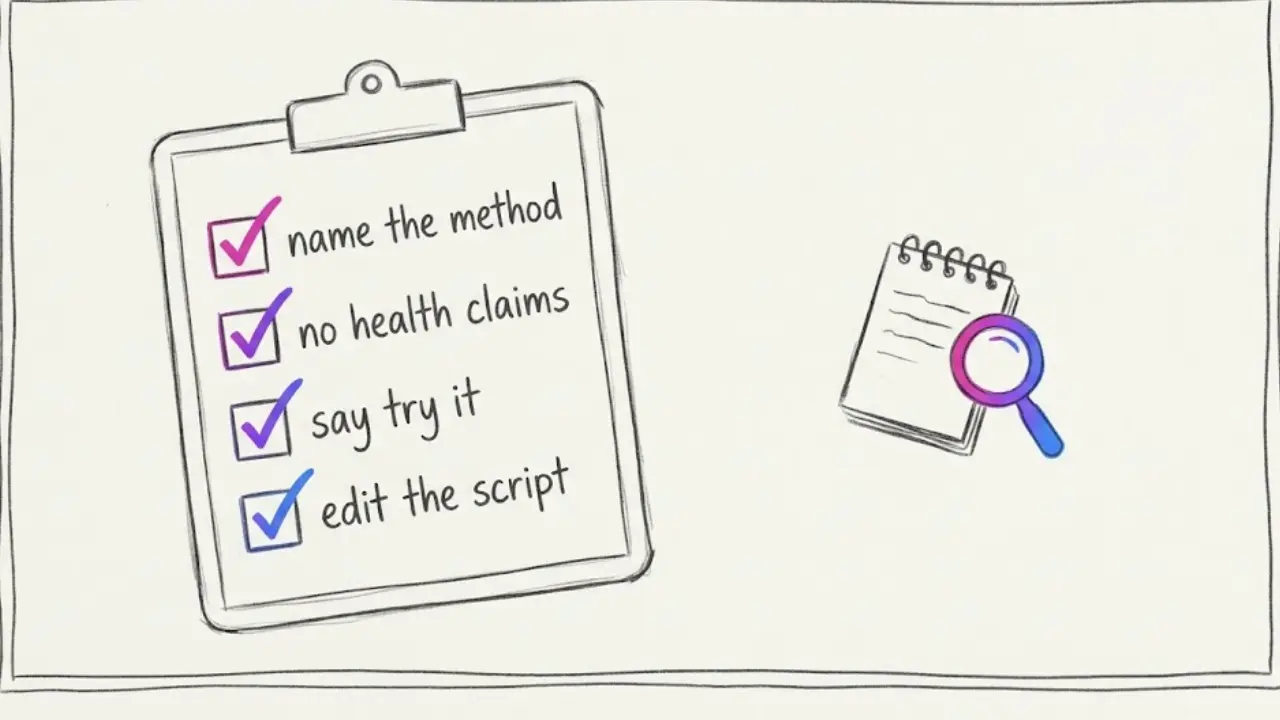
- Name the method correctly. The Pomodoro technique uses 25-minute work blocks with short breaks, so describe it that way. If you adapt it, say that you adapted it.
- Avoid medical and income claims. Sleep, focus and anxiety tips should stay general and suggest a professional for health concerns. Never promise exam grades or income.
- Say "try it" instead of "this always works". People differ, and honest framing sounds more credible.
- Edit the AI script. An AI draft is a starting point. Read it, check every claim and cut what you cannot stand behind.
Keep it original
Faceless channels are allowed on the major platforms. What tends to cause trouble is a pile of near-identical videos with only a few words swapped, or re-uploaded clips from other creators. Vary your formats, give each episode a specific audience and a real example, and your channel will feel like a show rather than a feed of recycled quotes.
Respect other people's work
Do not copy another creator's script or reuse their footage. Use your own words, AI visuals or properly licensed material, and mention books or methods by name only to credit them.
5. How to make a productivity short inside Faceless Lab
This is the workflow we use, from blank page to scheduled video. Once your channel settings are in place, each short takes only a few minutes.
Step 1: Start with one tip or one question
Open the dashboard and type the idea, for example "a 25-minute study block method for exam week". If you already wrote a script, paste it in and Faceless Lab uses your text as the script.
Step 2: Choose a structure
Pick one of the 8 video structures. A ranked list suits "three study methods ranked", a problem, solution and call to action structure suits "stop rereading your notes", and a step-by-step structure suits "my 20-minute morning reset".
Step 3: Review and edit the script
Read the draft, check each claim and adjust the wording so it sounds like you. This is where your channel earns its credibility, so do not skip it.
Step 4: Pick a voice
Choose from more than 200 ElevenLabs voices. A calm, clear voice suits study and focus topics. Use the same one on every episode so people recognize it.
Step 5: Lock your visual style
Choose one of the 39 visual styles and stay with it. You can also choose which AI image model generates the scenes, since Faceless Lab runs several models through Replicate, which helps when one model draws desks, notebooks or diagrams better than another.
Step 6: Captions and music
Captions are generated automatically and you can adjust them. Add background music from the library, where licensing is clearly indicated. Quiet, steady tracks suit this niche.
Step 7: Batch it, Series it, schedule it
Make five to ten episodes in one sitting, save the setup as a Series so every episode keeps the same voice, style and structure, and schedule them to publish automatically on YouTube, Instagram, Facebook and LinkedIn. TikTok publishing needs your explicit consent each time, so it is not fully hands-off there. Autopilot (currently in beta) can keep a Series running on a rhythm you set.
💡 Ready to try it on your first tip? Create your free Faceless Lab account and make one today.
6. Where Faceless Lab is (and is not) the right choice
We want you on the tool that fits your channel, so here is our honest take.
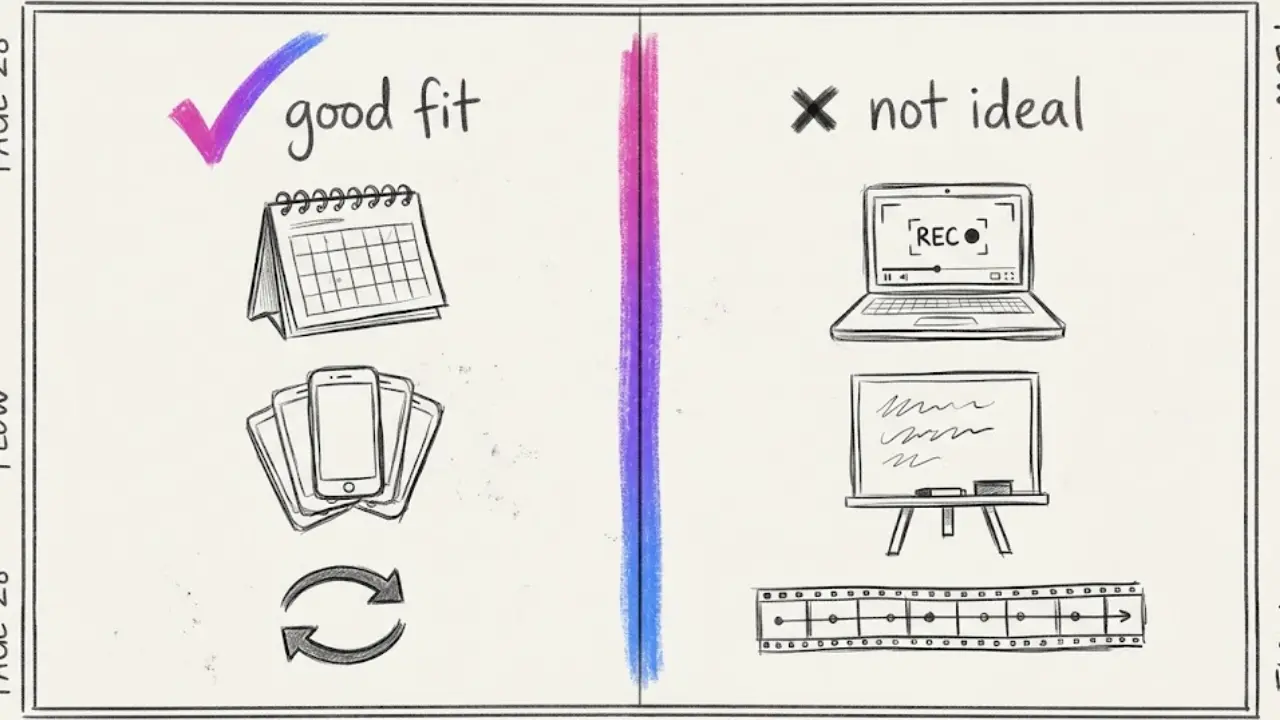
Faceless Lab is a good fit if
- You want to batch a month of tips in one sitting and schedule them ahead.
- You like the idea of a Series that keeps your voice and style consistent.
- You want scheduling and auto-publishing in the same place you create.
- You want to start free and pay only when the channel proves itself. Plans are Free trial €0, Starter €19, Growth €59 and Pro €149 per month.
It is probably not the right choice if
- You want screen recordings of apps. Faceless Lab generates AI visuals, or you can bring your own content. If your videos depend on a live demo of a planner or note-taking app, a screen recorder and a regular editor are a better home for those clips.
- You make long courses. We focus on short-form and support videos up to 5 minutes.
- You want hand-drawn whiteboard animation. Our visuals are AI generated scenes, so a dedicated whiteboard tool suits that look better.
- You want frame-by-frame timeline control. A full video editor will give you more manual control.
7. Conclusion
Productivity and study tips fit faceless video well. The tips are small, the visuals are simple, and viewers save what helps them. The channels that grow choose a clear audience, open with the viewer's problem, give one action per video and keep their advice honest.
Our verdict: if you enjoy sharing practical ideas, a productivity channel is a low-risk place to start, and the season is on your side. Make a batch this week, see which tips get saved, and keep the best formats for your New Year content.
You can make your first tip video on the free trial before paying anything. If this guide helped, share it with a friend who keeps saying they will start a channel, and if you already love Faceless Lab, ask us about our affiliate program.
Try Faceless Lab free and make your first productivity short
Read more
Frequently asked questions
Can I run a productivity channel without showing my face?
Yes. Productivity and study content is valued for the idea, not the presenter, so a narrator voice over AI visuals works well. A calm AI voice reads the script, illustrated scenes show desks, calendars, notebooks or simple diagrams, and captions carry the message for viewers watching on mute. The main requirement is usefulness. Pick one audience, give one concrete action per video, and keep your advice accurate. Viewers return to channels that save them time, whether or not the creator ever appears on screen.
What kind of productivity videos work best as shorts?
Single-tip videos work best because one method fits a hook, a few steps and a reason in about 30 to 45 seconds. Myth versus better habit, a short routine in order, ranked study methods and three-day challenges also repeat well. Open with the viewer's problem, such as forgetting what you just read, and end with a question or a line that loops back to the start. Pick one audience, keep the same voice and style, and watch which episodes get saved and shared.
How often should I post a faceless productivity channel?
Consistency matters more than volume. A rhythm you can keep for months beats a burst of daily posts that stops after two weeks. Many creators start with three to five shorts a week, then adjust based on what they can sustain and what the analytics show. Batching helps: write and generate several episodes in one sitting, then schedule them across the week. A Series in Faceless Lab keeps the voice and style identical, so a batch stays consistent without extra work.
Can I give study or health advice in faceless videos?
Study methods and planning tips are fine when you describe them accurately and credit well-known techniques properly. Health topics need more care. Keep sleep, focus and stress tips general, avoid diagnosing or promising results, and suggest viewers talk to a qualified professional for medical concerns. Never guarantee grades, income or outcomes. We are not medical or legal advisors, so check the guidelines of each platform and the rules that apply where you live before publishing sensitive advice.
Can a faceless productivity channel be monetized on YouTube?
It can, as long as it follows YouTube Partner Program rules. AI visuals and voices are allowed, but mass-produced, near-identical uploads and re-uploaded clips can cause problems. Write original scripts, vary your formats, give each video a specific audience and a real example, and avoid copying other creators. Entry requirements for new applicants change over time, so check YouTube's official Partner Program page for the current thresholds before planning your timeline.
How much does it cost to make productivity videos with Faceless Lab?
You can start on the Free trial at €0 and make your first videos before paying. When you want to publish more often, the paid plans are Starter at €19, Growth at €59 and Pro at €149 per month, with usage limits that reset monthly and the option to cancel anytime. Yearly billing saves about 20%. Scripts, voiceover, AI visuals, captions, music, scheduling and auto-publishing live in one workflow, so you do not need separate tools to get a finished short out.
Related articles
Dog and Cat Tips Make a Faceless Channel That Owners Come Back To
Pet owners search for tips every day, and each answer fits one short. Learn how to pick an audience, write safe tips, and publish a faceless dog and cat channel without ever filming.
Faceless What If Videos Are the Easiest Way to Turn Curiosity Into Views
Curiosity sells, and you never have to show your face. Here is how to make faceless what if videos with AI, which formats hold attention, and how to turn one idea into a daily series.
Keep the Same Character in Every Faceless Video Without Redrawing Anything
AI characters tend to change face, outfit and style from one video to the next. Here is how to keep one recurring character across a whole faceless channel, step by step.